Social Media Agency Workflow From Client Request to Monthly Report
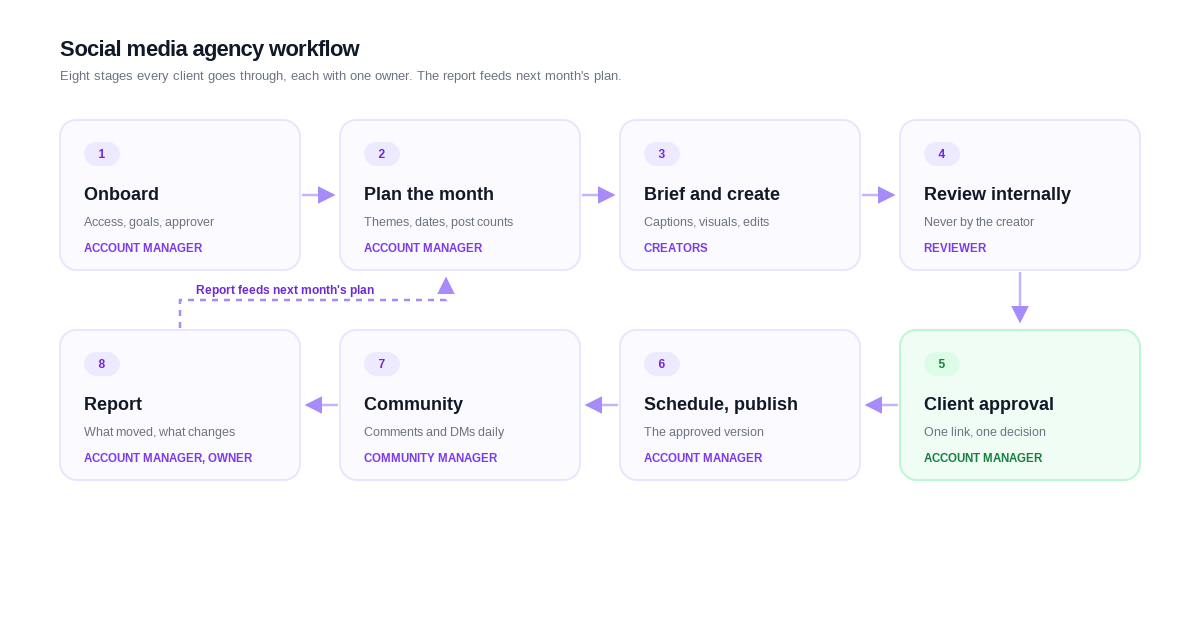
A social media agency workflow is the repeatable path every client's work follows: onboarding, planning, creation, review, client approval, publishing, community management and reporting, with a named owner and a deadline at each stage. Most agencies run one from memory until they pass five or six clients, and then it starts living in one tired person's head. This guide sets out the eight stages, who owns each one in a small team, a weekly and monthly rhythm that holds up past ten clients, and a template you can copy.

Why Agency Workflows Break as You Add Clients
What works for three clients rarely survives ten
The Workflow Lives in One Person's Head
01The founder or a senior account manager knows that client A approves on Thursdays and client B hates emojis. When that person is sick, on holiday or leaves, the next post goes out wrong. A workflow that is not written down is a person, not a process.
Every Client Runs on a Different Rhythm
02One client gets content planned a month ahead, another a week ahead, a third on the day. The team context-switches all week, and the calendar for whichever client shouts loudest is always the most complete.
Approvals Stall the Whole Chain
03Creation finishes on time, then the post waits days for a client reply, and publishing slips. Clients answer by email anywhere from an hour to three days later, as our client approval time benchmarks show, so the workflow has to plan for the wait.
Reporting Is Built at the Last Minute
04At month end someone exports numbers from six platforms into a slide deck the night before the client call. The report describes what happened instead of what to do next, because there was no time to think.
Who Owns What in a Small Social Media Agency
Roles, not job titles: in a five-person agency one person often holds two of these
Agency Owner
Owns the client relationship at the top, pricing, scope and escalations, starting with the social media management proposal. Reviews the monthly report before it goes out for any client that is at risk, and steps in when a client disputes something.
- Scope and pricing
- Escalations
- At-risk clients
- Final say on disputes
Account Manager
Owns the workflow for a set of clients: the plan, the deadlines, sending work for approval, chasing it and the monthly call. The account manager is the person the client talks to.
- Monthly plan
- Deadlines
- Client approvals
- Monthly call
Content Creator
Writes captions and scripts, and often plans the content mix. Works from briefs and the client's brand notes, and fixes requested changes quickly.
- Captions and scripts
- Content ideas
- Brand voice
- Revisions
Designer or Video Editor
Produces the visuals and edits, sized for each platform. Hands over final exports, not working files, so nothing unfinished reaches review.
- Visuals and edits
- Platform sizes
- Final exports
- Brand assets
Community Manager
Owns comments and DMs for their clients: daily triage, replies, and passing leads and complaints to the right person. In small agencies this is often the account manager in the morning.
- Daily triage
- Replies in brand voice
- Leads to the client
- Complaints escalated
Reviewer
Checks work before the client sees it. Not a separate hire: any team member who did not create the piece. The rule is simply that nobody approves their own work.
- Copy and visuals
- Links and tags
- Timing
- Nobody approves own work
The Social Media Agency Workflow in 8 Stages
Every client goes through the same stages; only the rules inside each stage change
Onboard the Client
With the contract signed, collect account access, brand assets, goals, competitors, who approves and how fast they answer, before the first post. A structured client onboarding questionnaire covers the questions that otherwise surface as problems in month two.
Plan the Month
Turn goals into a monthly plan: themes, key dates and festivals, campaigns and the number of posts per platform. Put it on the client's content calendar so the team works from one plan instead of a spreadsheet and a chat thread.
Review Internally
Someone other than the creator checks copy, visuals, links, tags and timing before the client sees anything. This one step removes most of the small mistakes that otherwise cost a round of client feedback.
Get Client Approval
Send the client one review link they can open on a phone without logging in, by email or pasted into the chat they already use. Collect one decision per round from one named approver. The full method is in our social media approval process guide.
Schedule and Publish
Schedule the exact version the client approved, at the times that work for that audience. Check failed posts every morning: a post that silently failed is worse than a late one. Social media scheduling that takes the approved post directly removes the copy-paste step where versions get mixed up.
Manage the Community
Comments and DMs are part of the job, not an afterthought. Sort messages into questions, leads, complaints and noise every working day, reply in the brand's voice and pass anything sensitive to the client the same day. A unified inbox keeps each client's messages in one queue.
Report and Plan Again
Report on what moved the client's goals, explain why, and say what changes next month. The report is the input to stage two, so the workflow becomes a loop rather than a monthly scramble. See how agency reporting can run on a schedule.
Three Workflow Setups by Agency Size
Illustrative setups; the stages stay the same, the hand-offs change
Freelancer or Two-Person Studio
Three to six clients, one person creating and managingEverything runs from memory and a notes app. Approvals happen in WhatsApp, and Sunday evenings go on catching up.
One fixed weekly rhythm for all clients, briefs written even when you are the one creating, and approvals on a review link so the record is not a chat thread.
Agency of Three to Ten People
Eight to twenty-five clients split across two or three account managersEach account manager runs their clients their own way. When one is off, nobody else knows where their clients stand.
Every client follows the same eight stages with written client rules. Any team member can open any client and see the plan, the approvals and the messages. Workload is checked weekly so one designer is not carrying half the agency.
Agency with Separate Teams
Twenty-five clients and more, with creative, community and account teamsWork crosses three teams and gets stuck at each hand-off. Reporting takes the last three days of every month.
Clear hand-off points between stages, reporting on a schedule instead of built by hand, and a weekly look at which clients are at risk. Running many brands at once is covered in our guide to multi-client social media management.
A Weekly and Monthly Rhythm That Holds Up Past Ten Clients
The stages say what happens. The rhythm says when. Running every client on the same weekly rhythm is what lets a small team carry fifteen clients without anyone keeping the whole picture in their head. Adjust the days to your week; in the UAE and Saudi Arabia the working week runs to Friday or Thursday, so shift it accordingly.
The Week
- Day 1: clear the weekend's comments and DMs, check for failed posts, confirm this week's posts are approved and scheduled.
- Day 2 and 3: create next week's content from the briefs; internal review the same day it is finished.
- Day 3: send next week's batch to clients for approval, so there are two working days for an answer and one round of changes.
- Day 4: make requested changes, chase anything unanswered once, update the calendar.
- Day 5: schedule everything approved, check workload for next week, note anything at risk for the agency owner.
The Month
- Week 1: send last month's reports and hold short client calls.
- Week 2 and 3: production as above.
- Week 3: draft next month's plan from what the report showed, and share it with the client for a yes on themes and key dates.
- Week 4: lock next month's plan, brief the first two weeks of content, and check which clients look at risk before the month closes.
Write each client's exceptions next to their name rather than changing the rhythm for them: their approver, their usual response time, their posting days, the topics they never want touched. Keeping those notes in your agency client management system, not a personal notebook, is most of what makes covering for a colleague possible.
Handovers, Holidays and the Agency Workflow Process
The real test of an agency workflow process is the week someone is away. If a colleague cannot open a client and answer three questions in five minutes (what is going out this week, what is waiting for approval, and what did the client last ask for), the workflow still depends on a person.
Three habits make handovers painless. Keep briefs, feedback and approvals attached to the work, not in someone's inbox. Keep the client's rules in one shared place. And end each week with the calendar showing the truth: approved posts scheduled, pending ones marked, and anything stuck flagged to the agency owner.
Workflow Notes for Gulf and WhatsApp-First Clients
- Approvals happen on WhatsApp. Paste the review link into the chat the client already uses instead of expecting them to open an email. In WhatsApp-first markets clients often answer within hours.
- Plan Ramadan and Eid a month early. Dates move with the moon sighting, client teams work shorter hours, and posting times shift later into the evening. Lock the Ramadan plan before it starts.
- Bilingual captions need their own review. An Arabic caption should be checked by a native speaker, not translated and approved alongside the English one in a hurry.
- Weekend messages still arrive. Decide who checks DMs on Friday and Saturday, or Saturday and Sunday, and how fast a complaint must be answered.
A Social Media Agency Workflow Template You Can Copy
Fill in the top once per client, then use the stage list for every month. Deadlines are counted back from the publish date.
Client: [name]
- Account manager: [name] · Backup: [name]
- Client approver: [name, channel: email or WhatsApp] · Review window: [e.g. 2 working days]
- Platforms and posting days: [e.g. Instagram Mon/Wed/Fri, LinkedIn Tue/Thu]
- Brand notes: [tone, words to avoid, topics to avoid, languages]
- Reporting: [monthly, sent by day X, call on day Y]
Each month
- Plan (account manager): next month's plan shared with the client by week 3.
- Brief (account manager): briefs for weeks 1 and 2 by the end of the month.
- Create (creator, designer): content ready 5 working days before publish.
- Review (anyone but the creator): same day as creation.
- Client approval (account manager): sent 4 days before publish, decision due 2 days before.
- Schedule (account manager): approved content scheduled 1 day before.
- Community (community manager): comments and DMs cleared every working day.
- Report (account manager, owner reviews at-risk clients): sent in week 1 of the next month.
Running the Workflow in CampaignSwift
The workflow above works in any set of tools if the team is disciplined. CampaignSwift puts the stages in one place, with each client's work kept separate. Each client has its own calendar, media library, approvals and inbox, and anyone on your team can open any client to cover for a colleague, which is how multi-client management works in the app.
- Plan and create: plan the month on the client's calendar, brief work as tasks with owners, and keep assets in the client's media library.
- Approve: clients review on a link with no login, approve or request changes with a comment, and get reminder emails after 24 and 48 hours. The social media approval software keeps every round on record.
- Publish: approved posts go out on schedule to Facebook, Instagram, X, LinkedIn, YouTube, TikTok, Pinterest.
- Community: each client's messages land in one inbox. With the Inbox Triage agent switched on, Facebook, Instagram and X DMs are sorted and get drafted replies that wait for a person to approve and send.
- Report: weekly or monthly PDF reports go out on a schedule, and the Reporting & Retention agent scores each client's churn risk every week, so drifting clients show up early.
If you are comparing tools for the whole workflow rather than one stage, our page on agency project management software covers what to look for, and the AI agents page explains which parts of the workflow can run on their own. Client approvals and the unified inbox start on the Professional plan, and pricing includes a 30-day free trial, no credit card required.
Social Media Agency Workflow FAQs
Common questions about running client work at an agency
It is the repeatable set of stages every client's work goes through, from onboarding to the monthly report, with an owner and a deadline at each stage. A good one makes the work predictable enough that anyone on the team can see where a client stands without asking.
Eight stages cover most agencies: onboard the client, plan the month, brief and create, review internally, get client approval, schedule and publish, manage the community, then report and feed the results into next month's plan.
The workflow is the sequence of stages and hand-offs. A process is the detailed method inside one stage, such as how approvals are requested and recorded. You need both: the workflow tells people what happens next, the process tells them how to do it.
Give each stage one named owner per client, even if one person owns several stages. The account manager usually owns planning, deadlines and approvals; creators and designers own production; whoever handles messages owns community management; the agency owner owns escalations and at-risk clients. The one fixed rule is that nobody reviews their own work.
Most agencies plan a month ahead and create one to two weeks ahead, which leaves time for client approval and a round of changes. Plan further ahead for launches and seasonal peaks such as Ramadan, Eid or year-end sales, when clients' own teams slow down.
Agree at onboarding who approves, how long they have and what happens if they do not answer. Then send one review link per post or batch, collect one consolidated decision per round, and keep the record. Approval is the stage that most often delays everything after it, so it needs its own written rules.
For each stage: the owner, the deadline relative to the publish date, the inputs it needs, the output it hands on and the client-specific rules that apply. Add the client's approver, review window, brand notes and posting times at the top so they travel with every piece of work.
Monthly is the norm, with a short weekly update for clients in active campaigns. What matters more than frequency is that each report ends with what changes next month, so it feeds straight back into planning.
At minimum: a content calendar per client, a way to track tasks and owners, a client approval method that records decisions, a scheduler, an inbox for comments and DMs, and reporting. Agencies often start with five separate tools and move to one platform when hand-offs between them become the bottleneck.
Still have questions?
Our team is here to help. Book a 15-minute call to get all your questions answered.
Ready to put the busywork on agents?
Start with one client. Connect accounts, send your first approval link, and let the agents take the follow-ups. Plans start at $29/mo.
30-day free trial · No credit card · Cancel anytime
Questions? Book a 15-min demo call
Schedule Demo