Creative Agency Project Management Software From Brief to Published Post
CampaignSwift is creative agency project management software for studios that make social content for clients. Plan the work as tasks, send finished pieces for client approval without asking anyone to log in, and publish the approved version through social media scheduling in the same workspace.
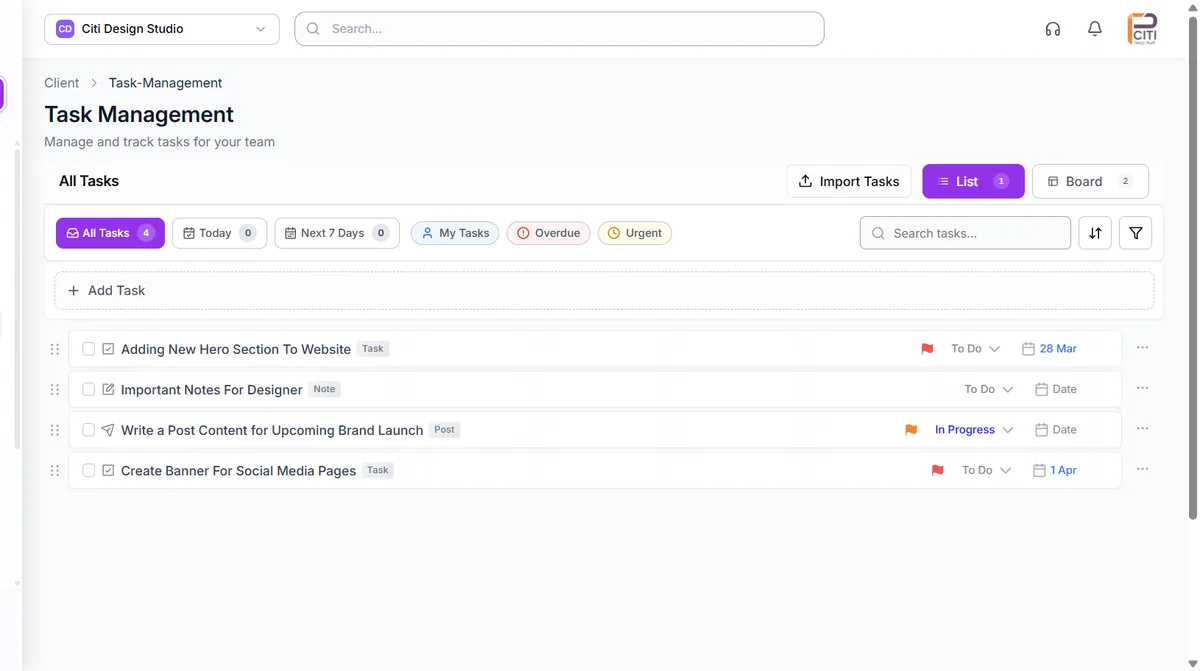
One client's tasks, notes and post drafts in a single list, with priority flags, due dates and a board view one click away.
Where creative agency workflows break down
Most studios we talk to don't have a talent problem. They have a handoff problem.
Feedback lives in five places
01The client replies to the email, the account manager forwards a screenshot, and the designer finds a third version of the comment in Slack. Every revision round takes days because nobody is sure which note is the latest.
Nobody knows who has room
02New briefs land on whoever answered first. Your senior designer is booked solid while someone else waits for work, and you only find out when a deadline slips.
The approved file isn't the one that goes live
03The client signs off on version four, but version three is still sitting in the scheduler. Re-uploading finals by hand is how the wrong caption or crop ends up on a client's feed.
Designers turn into coordinators
04Chasing approvals, updating status sheets and answering "where is this at?" eat the hours your best people should spend designing. That admin load is a big part of why good creatives burn out.
Creative agency project management software built around the review cycle
Six things a creative agency project management tool has to handle every week, inside one workspace per client.
Tasks, subtasks and a board view
Break each project into folders, tasks and subtasks with owners, due dates and priority flags. Work in a list or drag cards across a board, and filter to today, the next seven days, overdue or urgent. Our task management keeps notes and post drafts next to the work they belong to.
Client approval without a login
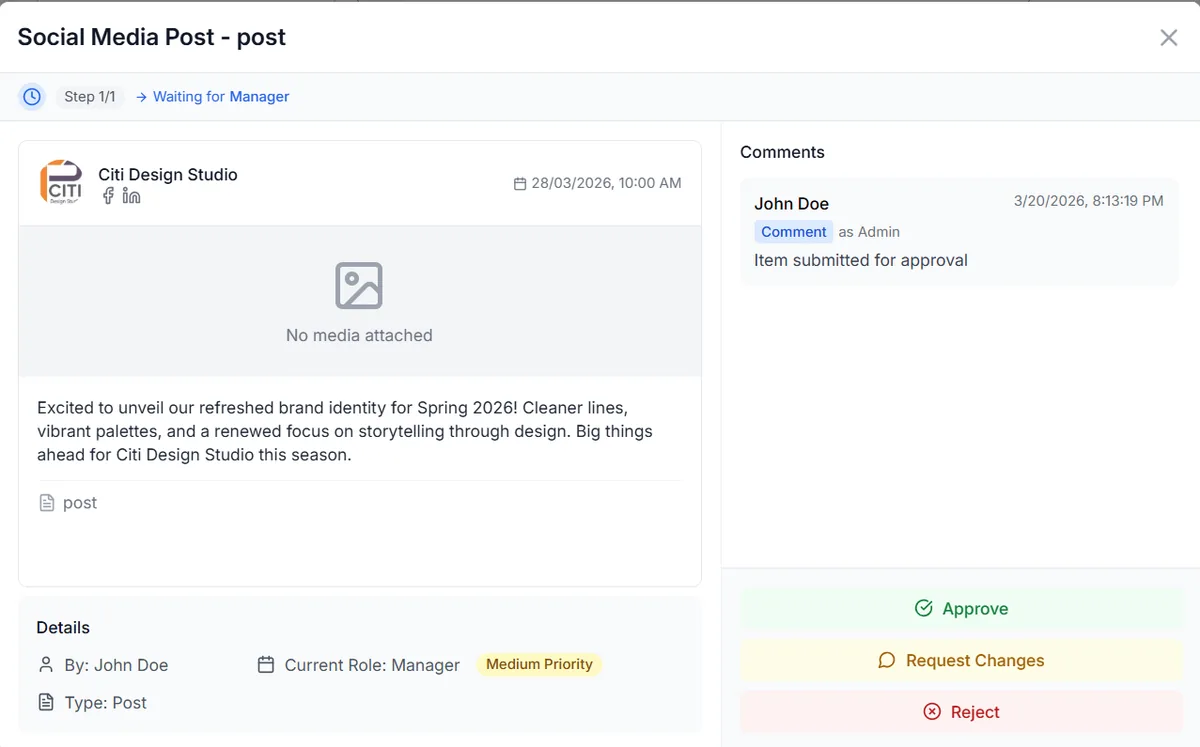
Send finished work as a link the client opens in any browser. They approve it or request changes, comments stay attached to the item, and every round is saved in the revision history. Reminders and an optional auto-approve deadline come with the social media approval workflow.
Internal review before the client sees it
A designer submits work on the task, and a lead approves it, rejects it or sends it back for revision. The reviewer and the time of the decision are recorded, so clients only see work your team has already checked.
Time logs on each task
Log hours against the task itself, correct an entry later, and see the running total. After a few projects you know how long a brand refresh or a month of social content really takes, which makes the next quote easier to price.
Workload before you assign
Open the Team View in task management to see who has room this week. Each teammate shows as Available, Moderate Load, Busy, At Capacity or Overloaded, based on their open and overdue tasks, and you decide who takes the work.
An asset library for every client
Each client gets a media library with folders for campaign assets, approval documents, post media and task attachments. Pull designs in from Canva, Google Drive or Dropbox.
Creative agency workflow software for social content
Most creative agencies we speak with now deliver social content inside their retainers, and that is where most creative agency workflow management software stops. It can record that a post is "done", but someone still copies the caption into a scheduler, downloads the final asset and rebuilds the post for each network.
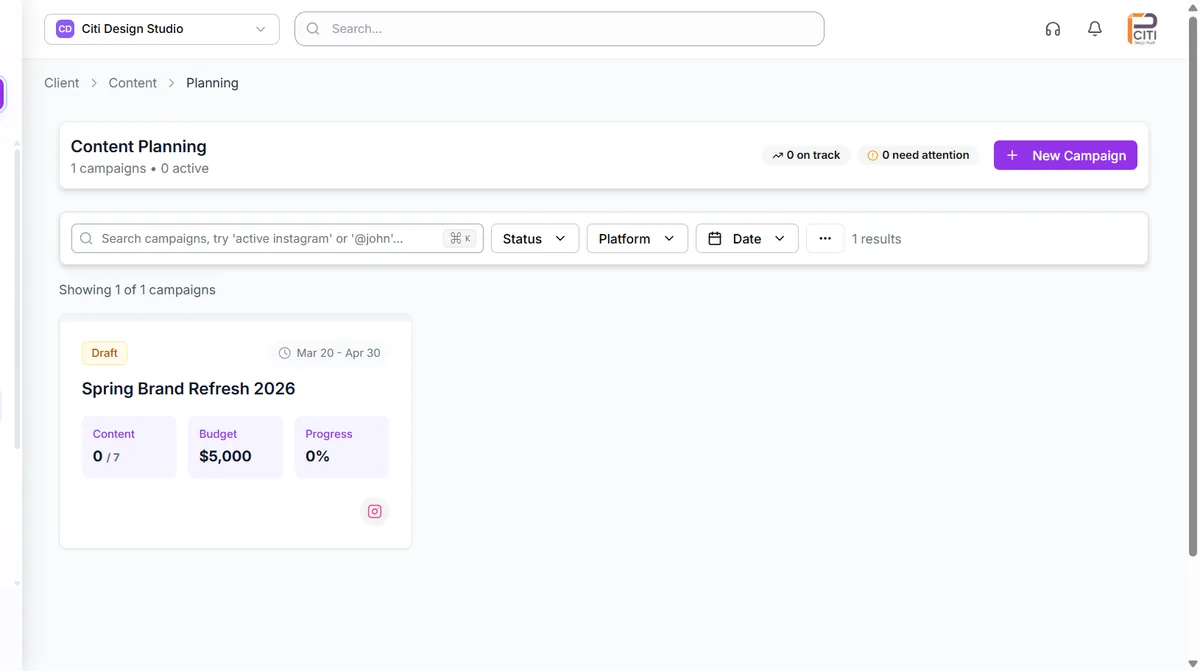
In CampaignSwift the same item moves from brief to post. Plan a client's campaign with its dates, budget and progress in content planning, draft the posts in the editorial calendar, and get a first draft of captions from the AI content generator if you want one.
When a post is ready it goes through the same approval steps as any other deliverable. On the Professional plan and above, the Approval Shepherd agent follows up when a client goes quiet. Once approved, the post publishes to Facebook, Instagram, X, LinkedIn, YouTube, TikTok, Pinterest, and the client's results feed into agency reporting.
The approved version is the one that ships
Clients see the post or deliverable they are approving, leave their changes on it, and sign off in the same place. Because the approved item is the one that goes into the publishing queue, nobody has to hunt for the final file or retype a caption after sign-off.
Finals live in the client's media library next to the approval documents and task attachments, so the next campaign starts from the assets the client already approved. Our guide to managing creative assets from task to post covers the file side in detail.
Setting up creative agency project management software in four steps
You set up each client once, and after that the review cycle repeats on its own schedule. The workspace setup guide walks through it.
Add clients and your team
Create a workspace for each client and invite teammates with the access level they need, grouped by department such as design or content.
Bring in the work
Import your existing task list, or create folders, tasks and subtasks with owners, due dates and priority.
Connect channels and files
Connect the client's social accounts, then link Canva, Google Drive or Dropbox so assets are one click away.
Run the review cycle
Submit work for internal review, send it to the client by link, and publish the version they approved.
How creative agencies use CampaignSwift
Illustrative scenarios based on how studios typically work, not customer case studies.
Brand design studio
Feedback arrived by email, phone and Slack. Designers spent part of every week rebuilding the comment history before they could start a revision.
Clients review each concept by link and request changes on the item itself. The revision history shows exactly what was asked for in each round.
Content production studio
Briefs went to whoever replied first, so the same three people were always overloaded while others waited for work.
Before assigning, the lead checks the Team View to see whose open and overdue tasks leave the most room. Time logs show where each client's hours actually go.
Digital creative agency
Approved finals were downloaded and re-uploaded into a separate scheduler, and more than once the wrong version went live.
Approved posts move straight into publishing for each client's channels, and the assets stay in that client's library.
Choosing the best project management software for creative agencies
Creative agencies live and die by the review cycle. A logo concept might pass in one round or need eight, depending on client taste, internal politics or a late change in brand direction. Most creative agency project management systems look alike in a demo. So when you compare creative agency project management software, judge it on the five questions below rather than on the length of its feature list.
Can clients review without friction?
Every extra login is another reason sign-off stalls. Look for review by link, comments attached to the work and a record of who approved what. Dedicated creative approval software does this well for files, so check that whatever you choose also covers the posts you publish. And the reports that follow approval should look like your studio's, not your software vendor's: on the Scale plan, white-label client reports carry your branding.
Will it show you who is overloaded?
Capacity problems show up as missed deadlines long before anyone admits they are stretched. You want each person's open and overdue work visible before you assign the next brief, without turning agency resource management into surveillance.
Does it track time without getting in the way?
Many creative projects are priced per deliverable, so knowing how long a brand identity really took decides whether the next one makes money. Time tracking has to sit on the task itself, or designers stop doing it after the first week.
Does it fit the tools your designers already use?
Check the file integrations before you buy. CampaignSwift connects to Canva, Google Drive and Dropbox and keeps finals in a brand asset library for each client. It does not integrate with Figma or Adobe Creative Cloud today, so studios working in those apps export finals to Drive or Dropbox first.
What CampaignSwift is not
It is not an invoicing or retainer-billing system, and it won't replace your accounting software. If you mainly need business management software for creative agencies, with budgets, invoicing and quote-to-cash, a dedicated agency ERP will suit you better. But if your studio produces social content for clients, design agency project management software that ends at "approved" leaves the last and most error-prone step to copy and paste. That step is what CampaignSwift was built for. For the operations layer across every client, see our agency project management software.
Creative agency management software: common questions
What studios ask us before they switch.
Ready to put the busywork on agents?
Start with one client. Connect accounts, send your first approval link, and let the agents take the follow-ups. Plans start at $29/mo.
30-day free trial · No credit card · Cancel anytime
Questions? Book a 15-min demo call
Schedule Demo