Marketing Agency Project Management Software From Campaign Plan to Client Report
CampaignSwift is marketing agency project management software for teams running campaigns, content and reporting for many clients at once. Plan each client's campaigns with budgets and progress, get content approved through a review link with no client logins, publish to 7 social platforms and send scheduled client reports from the same workspace.
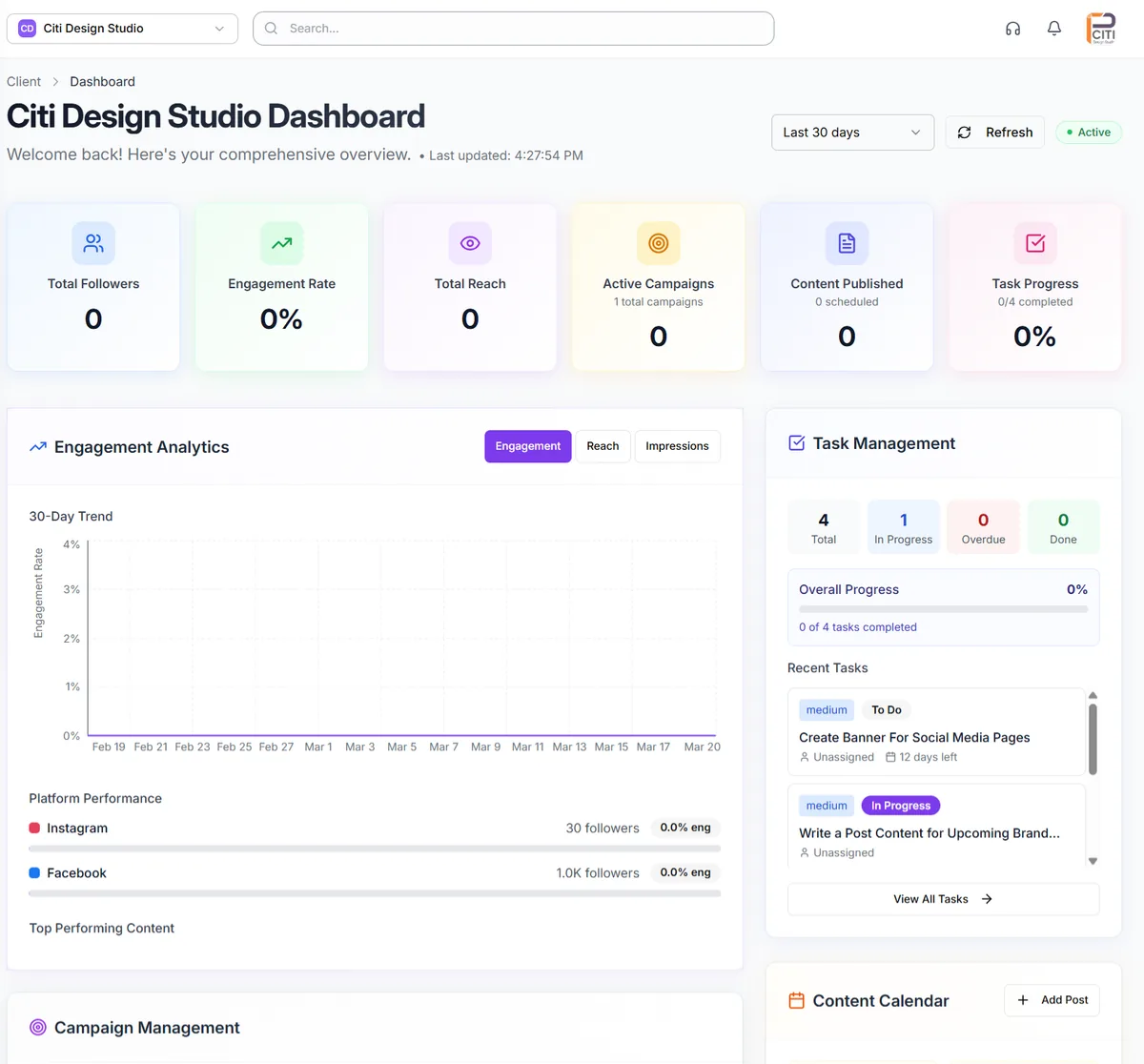
One client's dashboard: social performance, active campaigns, published content and task progress side by side.
Where marketing agency client management breaks down
None of these are talent problems. They are what happens when agency marketing software doesn't know who the client is, which is the gap agency client management software closes.
Campaigns scattered across tabs
01Social in one tool, ads in another, analytics in a third. Nobody has a single picture of what is running for which client, so every morning starts with twenty minutes of getting oriented.
Reporting week eats the calendar
02The end of the month means pulling numbers from five platforms, pasting them into slides and writing commentary by hand. By the time the report goes out, the data is already a week old.
Approvals live in inboxes
03Content goes out for review by email, feedback comes back in Slack, and the final asset sits in someone's Drive. Every client conversation turns into a search through three channels.
Nobody knows who is on what
04Which campaigns need attention today, and who has room to take the next brief? Without that view, tasks slip and you hear about it from the client rather than from your team.
Marketing agency project management software built for campaign work
Six things a marketing agency relies on every week, inside one workspace per client.
Campaigns with budgets and progress
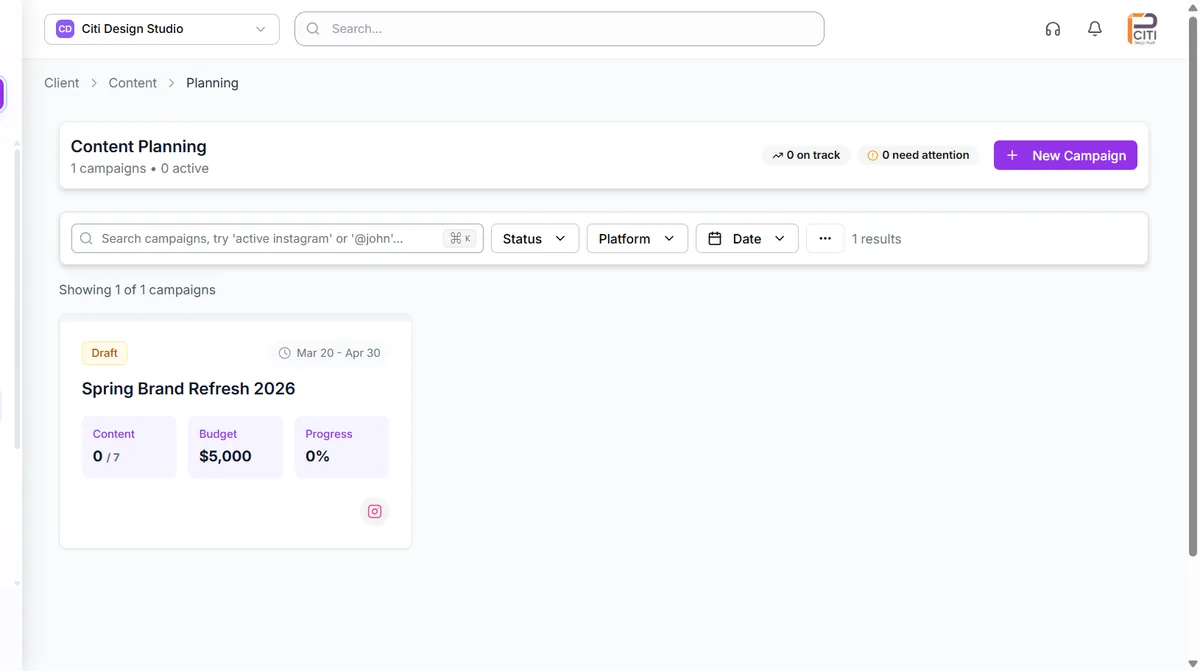
Plan each client campaign with its dates, budget and progress, and link the tasks and posts behind it. The agency dashboard shows which campaigns are running across every client. For campaign planning in depth, see our marketing campaign software.
Scheduled client reports
Build a report for each client, such as an executive summary or social media performance, and schedule it weekly or monthly on the day and time you choose. Agency reporting emails each one to the client's recipients as a PDF with a share link, and white-label reports carry your branding on the Scale plan.
Social and web data in one place
Each client's Facebook, Instagram, LinkedIn and YouTube results sync daily, and reports and the client's Outcomes page set them next to Google Analytics 4 and Search Console. Social media analytics for agencies covers what you can measure on each network.
Content approval by link
Work goes through internal review first, then to the client as a link they open without an account. Comments and revisions stay on the item, and on the Professional plan and above the Approval Shepherd agent chases slow sign-offs through the social media approval workflow.
Tasks and workload
Break campaigns into tasks and subtasks with owners, due dates and priority in a list or on a board, using task management. Before you assign, check its Team View, which shows each teammate's load from their open and overdue tasks.
Calendar, templates and publishing
Plan posts in the editorial calendar by month, week or list, reuse caption, hashtag and post templates per client, and publish approved content to Facebook, Instagram, X, LinkedIn, YouTube, TikTok, Pinterest through social media scheduling.
Marketing agency workflow software, from plan to report
Most marketing project management software stops when a task is ticked off. The post still has to be scheduled somewhere else, and the results still have to be pulled into a report by hand at the end of the month.
In CampaignSwift the loop stays in one place. A campaign holds its budget, dates and progress in content planning, its posts are drafted and approved against it, and once approved they publish to Facebook, Instagram, X, LinkedIn, YouTube, TikTok, Pinterest. That is the job marketing agency operations software should do: carry the work from brief to live post without a copy-and-paste step in the middle.
Reports that go out on their own
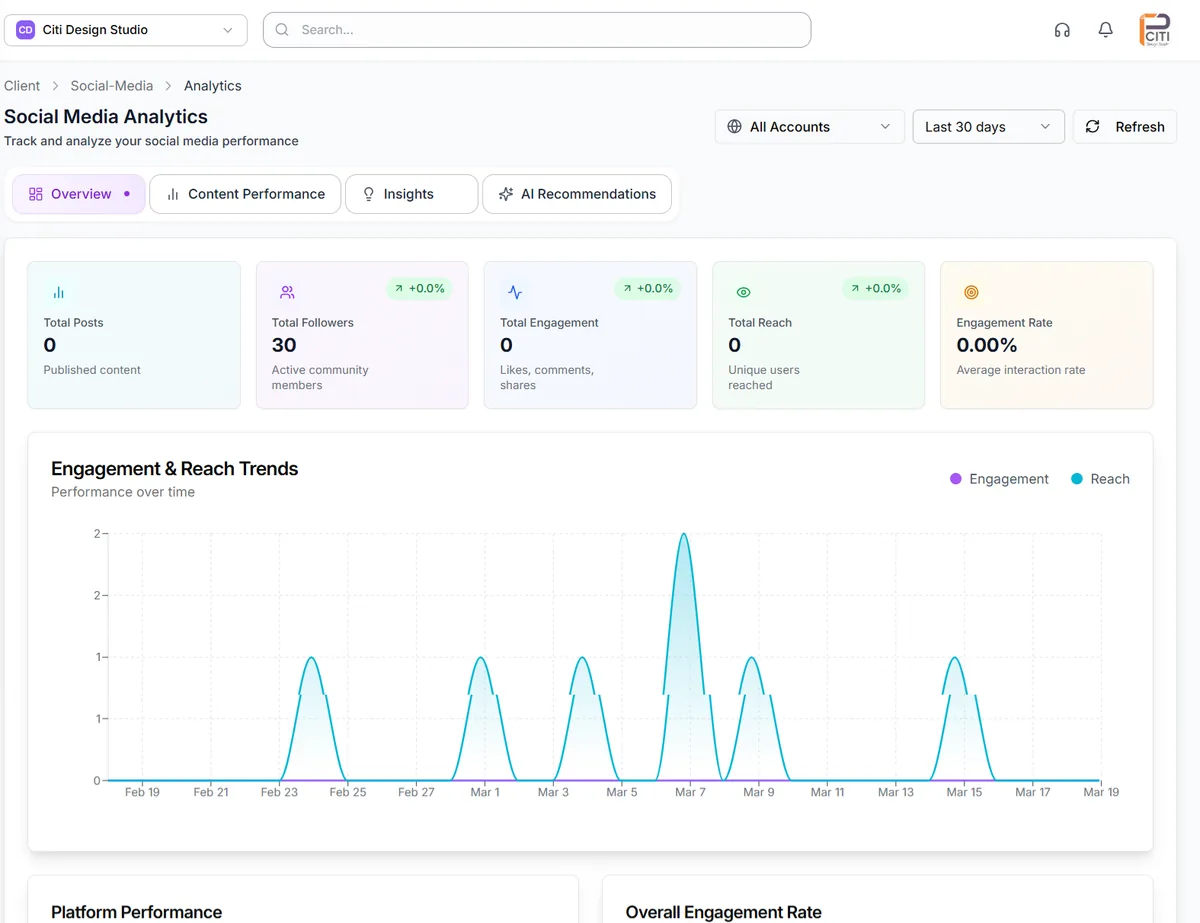
Results come from the same data the team works in. Social performance, Google Analytics 4 and Search Console sync daily, ads data joins on the Agency plan, and each client's report goes out on the schedule you set. The analytics view adds content performance, insights and AI recommendations when you want to dig into why a month went the way it did.
Reporting week stops being a week. It becomes reading what went out and adding the commentary only a person can write.
AI that handles the follow-up, with you in control
Every agent proposes a change and waits for a person to confirm it, and real decisions go back to your team. The Owner Digest sends one brief of approvals needing attention and at-risk clients, only when something needs you.
Reporting & Retention agent
Reporting & Retention scores each client's churn risk every week and writes outcome narratives tied to revenue, conversions and organic growth, so you know which clients are slipping before the renewal conversation.
Approval Shepherd agent
On the Professional plan and above, Approval Shepherd routes posts to the right approver, follows up when sign-off stalls, applies minor requested fixes and hands real decisions back to your team.
Content planning agents
Content Suggestion and the Monthly Planner propose on-brand post ideas and a month of drafts for each client, so campaign content starts from a draft rather than a blank page. Like every agent, they propose and a person on your team confirms before anything changes.
Setting up marketing agency project management software in four steps
Setup happens once per client. The workspace setup guide walks through each step.
Create client workspaces
Add a workspace for each client. The Onboarding agent proposes goals, KPIs and a setup checklist, which you review before anything goes live.
Connect the data
Connect each client's social accounts, Google Analytics 4 and Search Console, and their ad accounts on the Agency plan.
Plan the campaigns
Set up campaigns with budgets and dates, create the tasks and posts behind them, and choose the approval steps each client needs.
Schedule the reports
Pick a report type for each client, set the schedule and recipients, and let the weekly cycle of plan, approve and publish run.
How marketing agencies use CampaignSwift
Illustrative scenarios based on common agency setups, not customer case studies.
Performance marketing agency
Ad data was exported from each platform by hand every month, and reports took most of a week to assemble.
Ads data syncs daily on the Agency plan, and a paid-ads report goes to each client on a monthly schedule without anyone rebuilding it.
Content marketing agency
Approvals ran through long email chains, and writers lost days waiting on drafts that sat in client inboxes.
Drafts get an internal review, then go to the client by link. The Approval Shepherd agent follows up when a client goes quiet.
Full-service agency
There was no single view of client work, so priorities were set by whoever shouted loudest that week.
The agency dashboard shows active campaigns, scheduled posts and accounts that need attention, and each client dashboard shows performance next to task progress.
Choosing the best project management software for marketing agencies
Most marketing agency software looks alike in a demo. The difference shows up in a real month: forty pieces of content, three campaigns launching and a report due for every client on the first. Project management software for marketing agencies earns its place by how it handles that month, so judge it on the five questions below.
Is approval built into the workflow?
If sign-off happens in email, the plan is always out of date. Look for internal review and client approval as steps on the work itself, with the decision recorded. Our guide to agency approval workflows covers how to structure them.
Can it report without a spreadsheet?
Reporting is where marketing agency management quietly loses a week a month. The tool should pull social, web and ads data on its own and send each client a report on a schedule. If you run a digital marketing agency, digital marketing agency project management software has to cover paid, social and SEO numbers in the same report rather than three exports. If your agency also runs web builds and SEO projects next to the marketing work, see our project management software for digital agencies. Our roundup of agency reporting tools compares the options.
Will clients see what they need, and nothing else?
Clients want to approve their work and see their results. They don't need logins to your internal tool or a view of other accounts. Review links and scheduled reports give them exactly that.
Does it show budget and workload before you overcommit?
Campaign budgets should sit next to the work, and you should be able to see who has open and overdue tasks before you hand out the next brief. CampaignSwift does both through campaign budgets and the Team View in task management, which shows each teammate's load. It does not forecast capacity weeks ahead, so plan larger hiring decisions with your leads.
What CampaignSwift is not
It is not a CRM and not an invoicing tool. Keep your CRM for the sales pipeline and your accounting software for billing. CampaignSwift covers delivery, the work between a signed client and a sent report, as part of our wider agency project management software.
Marketing agency management software: common questions
What marketing agencies ask us before they switch.
Ready to put the busywork on agents?
Start with one client. Connect accounts, send your first approval link, and let the agents take the follow-ups. Plans start at $29/mo.
30-day free trial · No credit card · Cancel anytime
Questions? Book a 15-min demo call
Schedule Demo