Social Media Approval Software Built for Agency Workflows
CampaignSwift is social media approval software built for agencies. Route posts through an agency approval workflow, collect no-login sign-off, keep feedback and revisions attached to the content, then move approved work directly into social media scheduling. If you need a social media tool with an approval workflow—not another disconnected proofing app—this is the complete path from draft to publish.
Built for Digital Marketing Agencies
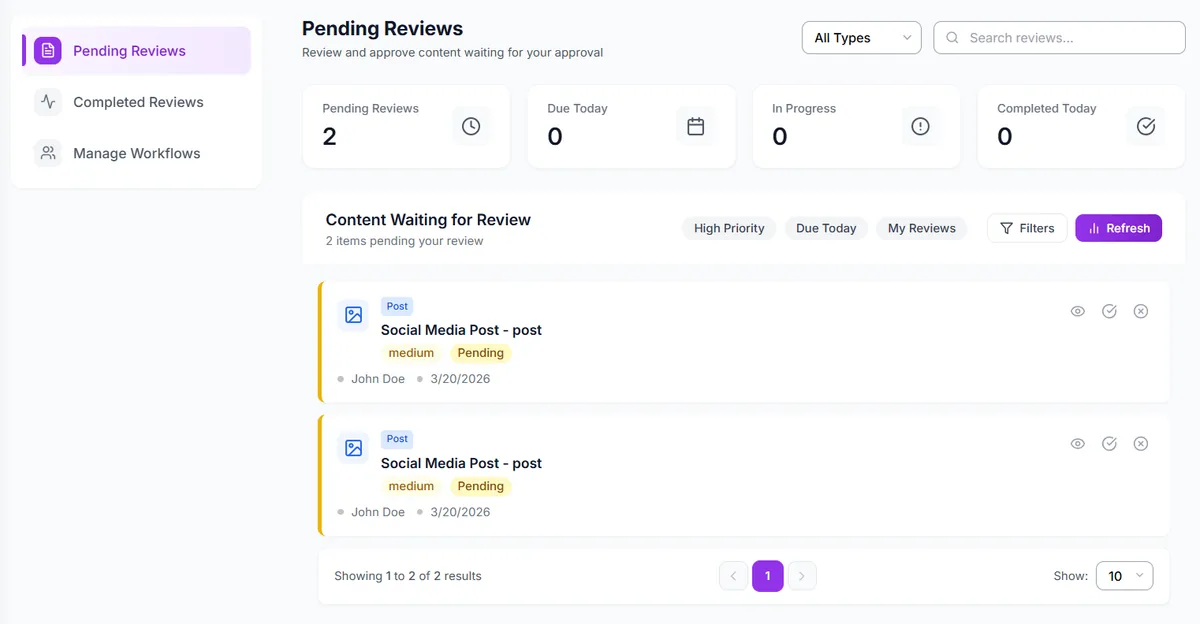
See every pending, in-progress and completed review in one approval queue.
What social media approval software should actually do
A useful social media approval tool removes friction for the client. A no-login client portal makes review simple without giving up control, context or a reliable record for the agency.
No-login client review
Share a secure review link. Clients approve or request changes in their browser without creating an account.
Custom approval stages
Route content through the review steps each client requires, from internal QA to final client sign-off.
Decision and revision history
Keep feedback, versions and approval decisions attached to the post instead of scattered across inboxes.
Approval-to-publish handoff
Approved content stays connected to the social calendar and publishing queue—no copy-paste handoff.
A social media content approval tool that stays connected to the work
Combine multi-client social media management with the right review path, capture the decision and keep the approved post moving toward publication.
Client-specific approval workflows
Give each client the review path that matches their team. A routine post can use a simple internal-to-client flow, while sensitive content can add more required reviewers.
No-login social media content approval
Send a shareable link by email. The reviewer sees the post, leaves feedback, approves it or requests changes without joining your workspace.
Feedback attached to the post
Comments and change requests stay with the content under review. Your team can see what was requested without reconstructing an email or Slack thread.
Revision history and approval record
Track versions, changes and decisions so the team can answer who approved a post, when they approved it and what they reviewed.
Reminders and optional deadlines
Use reminder windows for pending approvals. For routine content, you can configure an auto-approve deadline; sensitive posts can wait for explicit sign-off.
Approval Shepherd follow-through
The Approval Shepherd agent routes posts, follows up when sign-off stalls, applies minor requested fixes and escalates real direction changes to the account manager. It does not approve on a client's behalf.
How CampaignSwift’s social media approval workflow software works
CampaignSwift keeps social media content planning with client approvals inside one operational workflow.
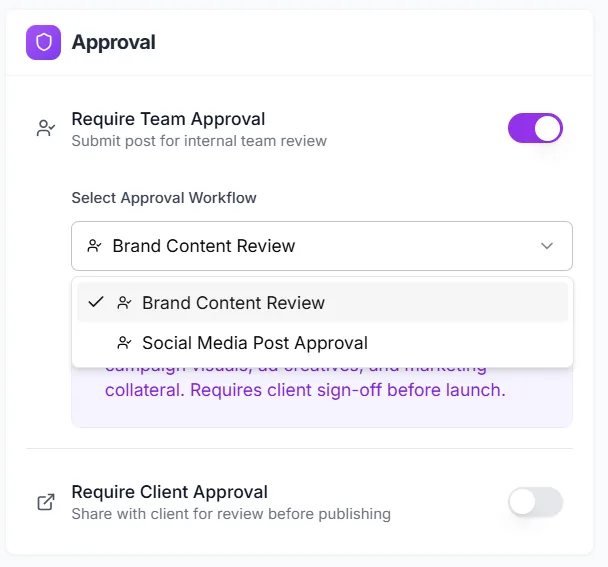
Choose the review path
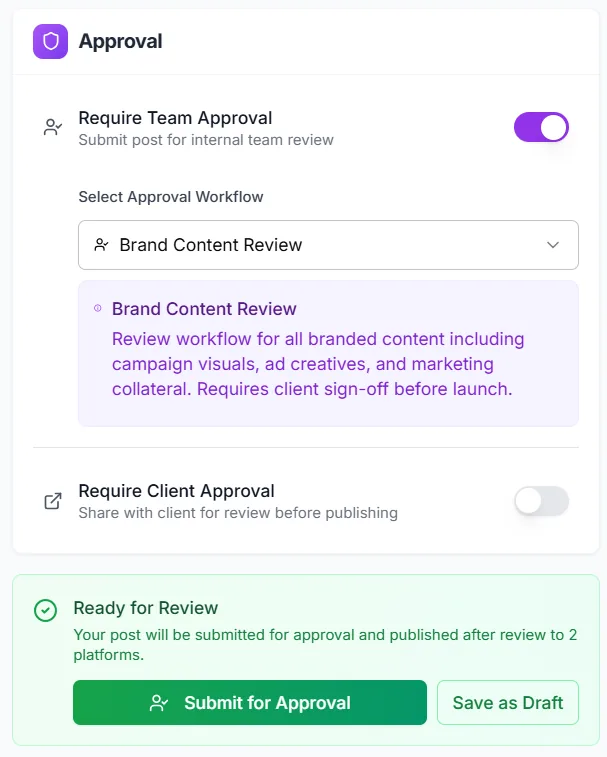
Turn on team approval, client approval or both, then select the workflow that applies to the post.
Custom approval workflows begin on the Professional plan. Each client workspace can follow its own review path.
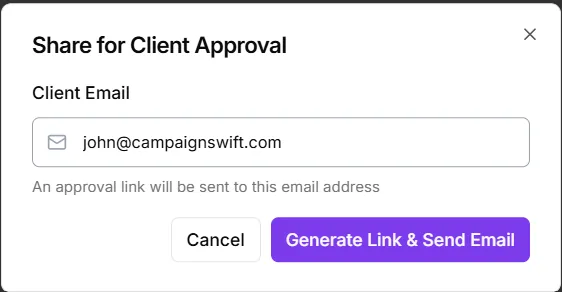
Send the client review link
Generate a review link and email it to the client. They do not need a CampaignSwift account.
The link is designed for outside reviewers: no seat, password or app installation is required.
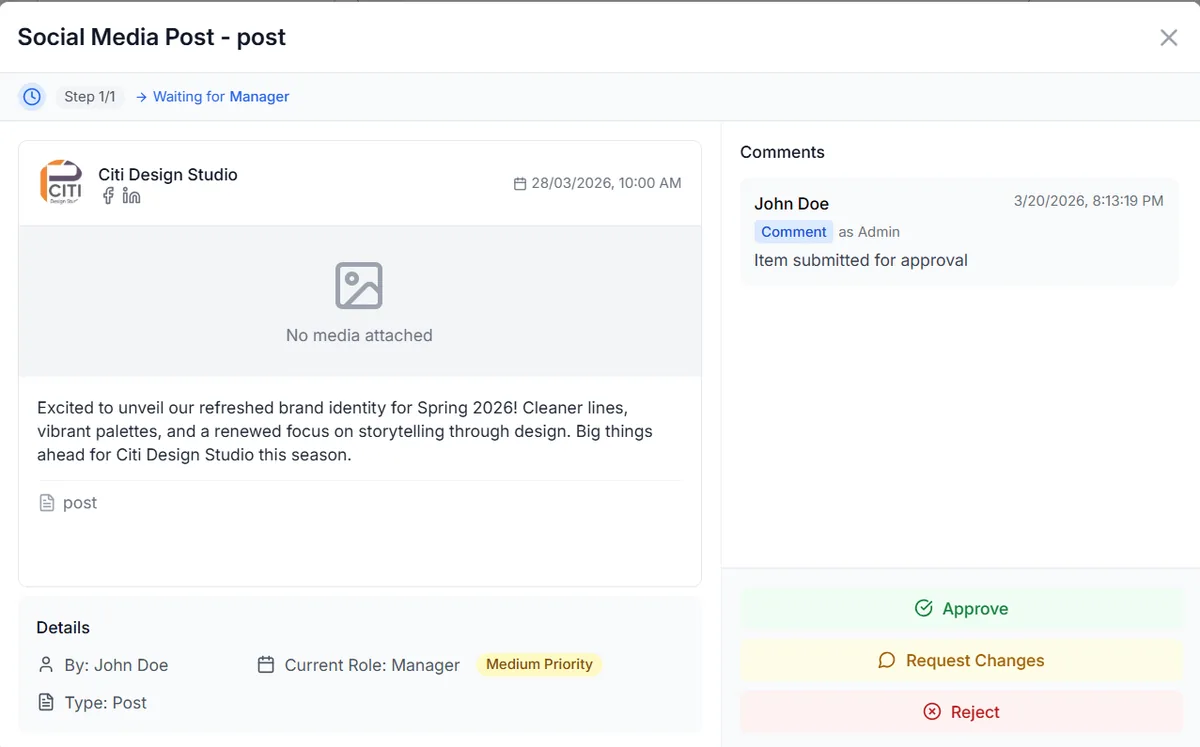
Collect approval or changes
The reviewer sees the post and its context, then approves, requests changes or rejects it. Comments stay with the item.
The review screen keeps the post, feedback and decision together so your team does not have to reconcile separate threads.
Move approved content to publishing
Once the required sign-offs are complete, the post remains connected to its scheduled date and target social platforms.
CampaignSwift supports publishing to Facebook, Instagram, X, LinkedIn, YouTube, TikTok, Pinterest.
Why a built-in approval workflow beats a disconnected review process
Email and generic project tools can record a “yes.” Agency-grade approval software connects that decision to the exact social post and what happens next.
| What agencies need | Email or chat | Generic project tool | CampaignSwift |
|---|---|---|---|
| Client access | No account, but feedback is scattered | Usually requires a guest account | No-login review link with the post attached |
| Social post preview | Screenshots or attachments | Generic file or task preview | Post and publishing context in the review screen |
| Approval stages | Managed manually | Generic task statuses | Custom team and client approval workflows |
| Revision and decision record | Split across threads | Comments separated from publishing | Versions, feedback and decisions stay with the post |
| Publishing handoff | Copy or re-enter content | Move to a separate scheduler | Approved content stays in the scheduling workflow |
| Stalled approvals | Account manager follows up | Rule-based reminders | Reminders plus Approval Shepherd follow-through |
An AI content approval platform with human guardrails
A traditional workflow waits for someone on your team to notice a stalled review. Approval Shepherd follows the configured path, sends polite follow-ups and surfaces what is blocked.
When feedback asks for a small mechanical change, such as a caption adjustment or hashtag swap, the agent can apply it. A change in strategy, creative direction or client commitment goes to the account manager.
See how AI approval workflows workWhat the agent can do
- Route content to the configured reviewer
- Follow up when approval stalls
- Apply minor requested fixes
- Escalate decisions with context
What remains human-controlled
- Client approval and rejection
- Substantive content direction
- Strategic or sensitive messaging
- Publishing decisions outside your rules
Run a real client approval cycle before you commit
Client approval links, custom workflows and Approval Shepherd are available from the Professional plan at $97/month. Start a 30-day trial without a credit card, add a client workspace and test the complete review-to-publish flow.
How to choose social media approval software for an agency
The best tool is not the one with the longest feature list. It is the one that makes review easier for clients, preserves the agency’s control and keeps the approved version connected to publishing.
Start with the client experience
Every extra login creates another reason for sign-off to stall. Look for social media post approval software that shows the content clearly and lets the client approve or request changes from a browser link. The reviewer should not need a paid seat, access to your internal workspace or training on a full project-management system.
CampaignSwift’s no-login review link is deliberately narrow. It gives the reviewer the post and the decision they need to make, while your team retains the full workspace, scheduling and client-management context.
Match review stages to the risk of the post
Not every post needs the same route. Routine organic content may need internal QA followed by client sign-off. Regulated, paid or reputation-sensitive content may need additional reviewers. A social media tool with approval workflow stages and custom permissions should let the agency model those differences without forcing every client into one universal process.
Keep explicit approval for content where silence cannot reasonably mean consent. Optional auto-approve deadlines are better reserved for routine work and should be agreed with the client before activation.
Keep proof of the decision attached to the version
An approval is only useful if everyone can identify what was approved. A strong social media content approval process preserves comments, revisions, timestamps and the final decision alongside the post. That record helps the team resolve disputes and understand how the published version changed during review.
For formal compliance obligations, evaluate retention, access, export and security requirements directly. An audit trail supports governance, but it does not by itself make any product compliant with every regulation or industry policy.
Check the scheduling handoff before buying
Some content approval tools end at “approved.” The account manager still has to copy the final caption, download the asset and recreate the post in a scheduler. That gap is where version mistakes return. CampaignSwift combines a social media calendar, approval software and publishing, so the signed-off item remains the item that enters the queue.
- Agencies: isolate each client’s content, reviewers and approval status in its own workspace.
- Multi-brand teams: use different review paths when stakeholders and risk levels vary by brand.
- Sales and marketing teams: add the right subject-matter reviewer without opening the entire social workspace.
- Enterprise teams: validate permissions, decision history and required governance controls during the trial.
Run one real batch from draft to client feedback to approved and scheduled. Count the logins, handoffs and places your team has to check. The right approval workflow makes the process obvious without a training call.
Social media approval software questions
Clear answers about client access, review stages, revisions, scheduling, AI guardrails and plan availability.
Ready to put the busywork on agents?
Start with one client. Connect accounts, send your first approval link, and let the agents take the follow-ups. Plans start at $29/mo.
30-day free trial · No credit card · Cancel anytime
Questions? Book a 15-min demo call
Schedule Demo