Multi-Client Management Built for Scale
Scale from 5 clients to 50+ without the chaos. CampaignSwift gives you isolated client workspaces, organized hierarchy, and a unified dashboard, so growth doesn't mean more complexity.
Built for Digital Marketing Agencies
The multi-client chaos holding you back
The multi-client chaos that's holding your agency back.
Spreadsheet Chaos
01Tracking clients across spreadsheets, shared folders, and sticky notes. Nothing is in one place.
Constant Switching
02Logging in and out of different accounts, tools, and platforms for each client all day.
Can't Scale
03Adding more clients means more chaos. Growth feels impossible with current systems.
Zero Visibility
04No unified view of all clients. You can't see what's happening across your entire agency.
Agency-grade client management
Everything you need to manage every client from one platform.
Client Workspaces That Scale
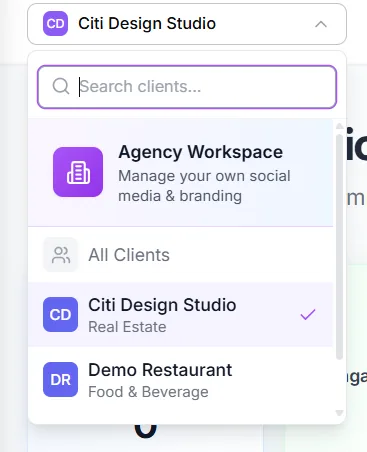
Create separate, organized workspaces for each client. No per-client fees: 25 workspaces on Agency, unlimited on Scale.
Client Hierarchy & Organization
Group clients by team, industry, or account manager. Create folders, tags, and custom views that match how your agency works.
Unified Command Dashboard
See all clients at a glance. One dashboard shows pending approvals, scheduled posts, engagement alerts, and deadlines across every account.
Per-Client Team Permissions
Control exactly who sees what. Assign team members to specific clients with role-based access that keeps data separate and secure.
Bulk Operations
Apply changes across multiple clients at once. Update templates, adjust schedules, or export reports for 10 clients in seconds.
Client-Specific Branding
Store brand guidelines, colors, fonts, and approved assets per client. Never accidentally post the wrong brand's content again.
From onboarding to daily operations
From onboarding to daily operations, all streamlined.
Create Workspace
Add a new client in seconds. Set up their workspace with brand assets and team access.
Organize & Tag
Add to folders, apply tags, and assign to team members. Your structure, your rules.
Work & Monitor
Manage all client work from one dashboard. Switch contexts in one click.
Scale & Grow
Add more clients without adding complexity. Your systems scale with you.
How agencies use multi-client management
Illustrative scenarios based on common agency workflows.
Growing Agency
Each new client meant more chaos, more spreadsheets, more confusion
New clients onboard in minutes with templated workspaces
Multi-Team Agency
Teams stepping on each other's toes, no clear ownership
Each team has their own filtered view with assigned clients
White-Label Agency
Complicated access controls, security concerns
Complete workspace isolation with custom branding per client
Streamlined client onboarding
Get new clients set up and organized in minutes, not hours.
Multi-Step Onboarding Wizard
Guided 4-step wizard: Brand Info, Contact Details, Address, and Additional Details. Never miss critical client information during setup.
Logo Upload & Industry Tags
Upload client logos and categorize by industry for organized filtering. Visual identification makes switching between clients instant.
Client Communication Hub
Centralized communication with each client. Store notes, track conversations, and keep all client correspondence in one place.
Social Handles Management
Store and manage all client social media handles in one place. Quick access to any account across all platforms for each client.
Timezone & Language Config
Set timezone and language preferences per client. Scheduling, reporting, and communication respect each client's local settings.
Bulk Import & Client Assets
Import multiple clients at once via CSV. Manage brand assets per client: logos, fonts, color palettes, and approved media all organized and accessible.
The 30-Client Wall (And How Agencies Hit It)
Agencies fail at 30 clients, not 100
We have watched the same pattern play out repeatedly. A 25-client agency makes a clean sale of three new accounts, hits 28 active clients, and within six months the team is missing deadlines, the founder is back in the weeds, and at least one client is openly considering leaving. The problem is almost never the work itself. It is that the operational system that worked at 15 clients quietly broke somewhere between client 22 and client 28.
The exact range where ad-hoc client management quietly breaks. Most agencies don't notice until 6 months later when retention numbers slip.
What multi-client management software actually changes
Real multi-client software solves the 30-client wall by giving every account its own structured environment:
- Separate calendars per client so cross-account confusion stops being possible
- Isolated client management spaces with per-client permissions, so nobody accidentally posts to the wrong account
- A branded client portal for every account, so clients stop demanding status updates because they can see for themselves
- Per-client social media post approval software, so every brand can use the reviewers, stages, and sign-off rules its content requires
The operational and emotional shift
You move from "what's happening with Client X again?" mode to "every client's status is one click away." Most agencies that get past 30 clients without burning out have done this. The ones that didn't are usually the ones still running everything in spreadsheets. We wrote about how growing agencies actually structure multi-client management as a follow-up.
The Multi-Client Scaling Playbook
Growth is supposed to be exciting, but for most agencies it triggers a stretch of growing pains where everything feels harder than it should. After watching hundreds of agencies navigate this, we have noticed a consistent pattern. There are three distinct phases, and the agencies that scale smoothly are the ones that recognize which phase they are in and build for the next one before they need it.
Founder Memory Breaks
At this stage, the founder or a senior team member holds most of the client context in their head. That works until you take a vacation, get sick, or simply forget a detail from a conversation three weeks ago. The fix is straightforward: create documented workspaces for each client where brand assets, notes, and history live in one place. The most common mistake here is thinking "I'll just remember it." You will not, and the cost shows up as a missed detail that erodes client trust.
Team Handoffs Break
Once multiple people touch the same accounts, information needs to flow between them cleanly. The fix is per-client permissions and role-based views so each team member sees exactly what they need without the noise of accounts that are not theirs. The mistake we see most often at this stage is giving everyone access to everything. It feels democratic, but it creates cognitive overload and makes it too easy for someone to accidentally touch the wrong client's content. For a deeper look at this phase, our guide on scaling without burnout covers the operational side of what changes.
Operational Visibility Breaks
At thirty-plus clients, no single person can have a pulse on everything. You need a unified command dashboard that surfaces what needs attention without requiring you to check each account individually. The mistake here is adding more team leads or account directors to compensate for a lack of tooling. People cannot outscale a systems problem. Agency management software becomes less of a nice-to-have and more of a requirement at this stage.
The difference between agencies that grow through these phases and those that get stuck is rarely talent or client quality. It is whether the systems were ready before the growth arrived. Building for the next phase while you are still comfortable in the current one is the single most underrated move in agency operations.
Frequently asked questions
How multi-client management works in practice.
Ready to put the busywork on agents?
Start with one client. Connect accounts, send your first approval link, and let the agents take the follow-ups. Plans start at $29/mo.
30-day free trial · No credit card · Cancel anytime
Questions? Book a 15-min demo call
Schedule Demo