Agency Client Management Software One Workspace per Client
CampaignSwift is agency client management software for teams that run social, content and paid work for many clients at once. Every client gets a record and a workspace of their own, clients sign off through approval links without creating an account, and the Reporting & Retention agent flags which clients are drifting before they leave.
Why client management breaks as an agency grows
Five clients fit in one person's head. Fifteen don't.
Every client lives in five places
01The contact is in someone's inbox, the brand files are in a shared drive, approvals are in an email thread and last month's report is a slide deck. Answering "what is going on with this client?" means opening all of them.
Context leaves with people
02When the person who runs an account is off for a week, the client notices. Nobody else knows which posts are waiting, what the client signed off on or where the latest logo is.
Clients chase you for updates
03Where is the report? Did the post go out? Is the campaign live? Every one of those emails is a sign the client can't see the work, and every reply is an hour nobody bills.
Churn arrives as an email
04Most agencies find out a client is unhappy when the cancellation lands. The signals were there for weeks (slower approvals, quieter replies, weaker results) but nothing was watching for them.
Client management software for agencies, client by client
Six things that keep every client relationship in order.
One record per client
Each client has a record with the company, industry, website, logo, primary contact (name, role, email and phone), address, timezone, language, social handles and a status of active, pending or inactive. Bring a whole client list in at once from a CSV or the Excel template.
A workspace for every client
Social accounts, posts, campaigns, tasks, files and reports sit inside each client's workspace, and the client switcher moves you between them in one click. The agency dashboard counts scheduled posts, tasks and items waiting on client approval across your whole roster. See how the client workspaces and switcher work.
Client sign-off without a login
Clients review posts, campaigns and tasks through a link that opens in any browser, with no account to create, on the Professional plan and above. Reminders go out when they go quiet, and you can set an auto-approve deadline per link. The client approval guide covers each setting.
Reports that reach the client
Schedule each client's report weekly or monthly and it is emailed with the PDF attached, or send any report as a share link. Reports export as PDF, and white-label branding is on Scale. More on agency reporting.
Brand files in one library
Logos, brand guides and approved creative live in each client's media library, and files come straight in from Google Drive and Dropbox, so nobody digs through a shared drive for the final version.
Churn risk before the cancellation
Every week the Reporting & Retention agent scores each client's churn risk and writes a plain-English account of what your work did for them, so the conversation about value happens before the renewal does.
What is agency client management software?
Agency client management software keeps everything an agency knows and does for each client in one place: the client's details, the work in progress, what is waiting for sign-off, the brand files and the reports. It centralizes client data that otherwise sits in an inbox, a shared drive and last month's slide deck. Some teams call it account management software for agencies; the job is the same. It answers the question every account lead gets asked: what is going on with this client right now?
It sits between two other tools. A CRM wins the client, and a project or PSA tool tracks hours and invoices. Client management covers the part in between that the client actually sees. Digital agency client management software has to cover social, search and paid work for the same client, so the record and the workspace matter far more than a pipeline. Our agency project management software guide covers the delivery side, and our guide to agency client retention strategies covers the habits that keep clients longer.
Every client at a glance
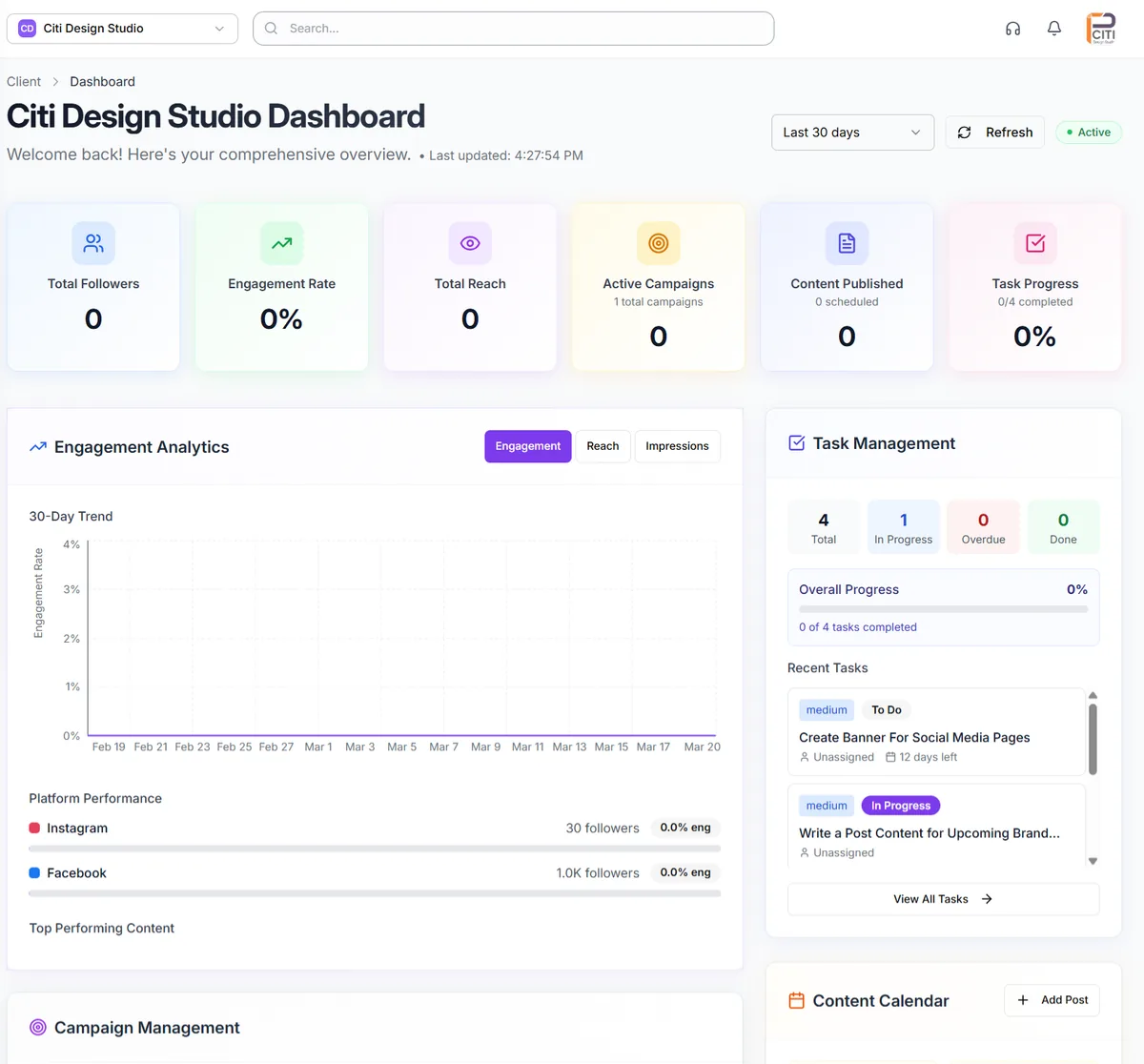
Open a client and the overview puts their active campaigns, active projects, approvals waiting and engagement rate above the contact and company details. Each client also has a dashboard with engagement, reach, content published and task progress.
The agency dashboard does the same across every client, so the owner can see which accounts need attention without opening each one.
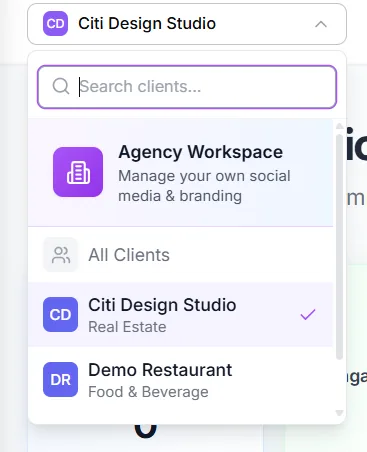
Switch clients, not tools
The client switcher lists every client workspace, plus your agency's own. Pick a client and everything on screen belongs to them: their calendar, campaigns, tasks, files and social media inbox. Nothing from one client shows up in another's workspace, which matters on the day someone schedules a post in a hurry.
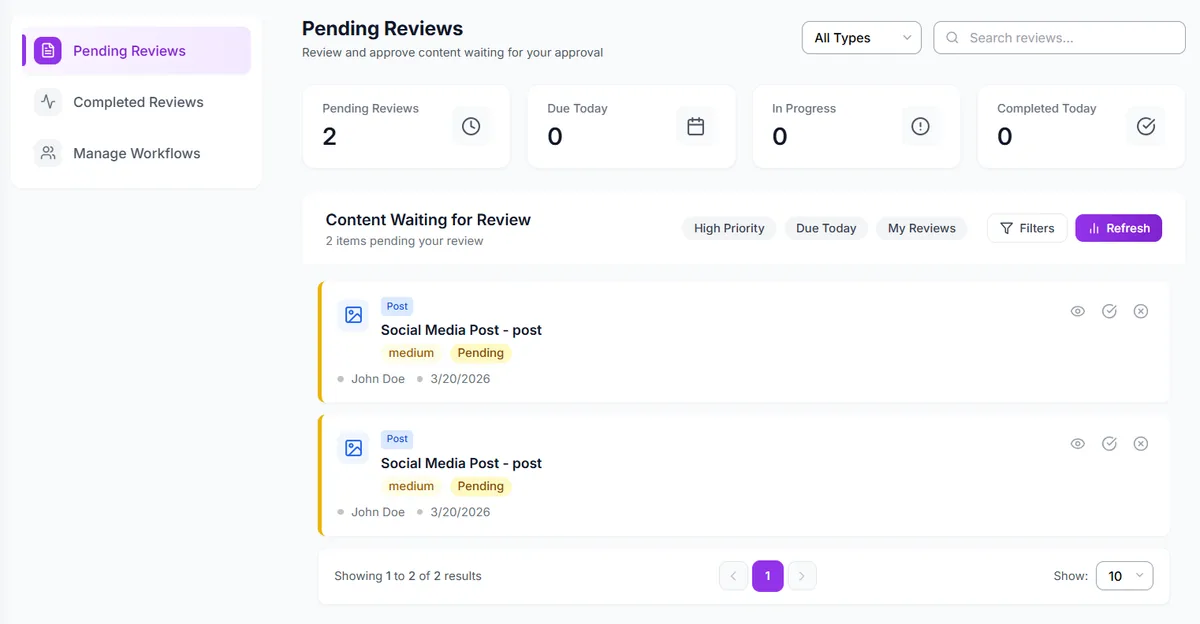
Everything waiting on a review, in one queue
Posts waiting for an internal review sit in one queue with their priority, who submitted them and when, and filters narrow it to what is due today or assigned to you. Once your team approves, the client gets their link and signs off in the browser.
Agency client management software vs a CRM
The two get confused because both have a record for each client. They do different jobs. A CRM is built for the months before the contract; client management is built for the years after it.
| The job | A CRM (HubSpot, Pipedrive) | CampaignSwift |
|---|---|---|
| Pipeline, deals and forecasts | Yes, the core job | No |
| Sales emails and call logs | Yes | No |
| A workspace per client for posts, campaigns, tasks and files | No | Yes |
| Client sign-off on content | No | No-login approval links |
| Reports sent to the client | Not the core job | Scheduled reports and share links |
| Warning that a client is drifting | Not the core job | Weekly churn-risk score |
Most agencies end up running both. CampaignSwift doesn't connect to a CRM today; every connection it does support is on the integrations page.
AI that watches every client relationship
The agents do the reading and the drafting across every account. Anything that affects a client waits for someone on your team, and alerts go to the agency owner.
Onboarding agent
For every new client, the Onboarding agent drafts a goals and KPI agreement plus a setup checklist. Nothing takes effect until you review it and agree it with the client.
Reporting & Retention agent
It reads the same Analytics and Search Console data as your reports, scores churn risk weekly, and explains results in terms of revenue, conversions and organic growth rather than likes.
Owner Digest
One brief for the agency owner with approvals that need attention and clients at risk, sent only on days when something needs you. The Owner Digest guide explains what goes into it.
Setting up agency client management in four steps
Most of this happens once per client, and the workspace setup guide walks through each step.
Import your clients
Upload your client list from a CSV or the Excel template, or add clients one at a time with their contact and company details.
Connect each client
Connect each client's social accounts, Google Analytics 4 and Search Console, plus Meta and Google Ads on the Agency plan.
Agree the goals
The Onboarding agent drafts goals, KPIs and a setup checklist for each new client, which you review and agree with them.
Set up client access
Choose who signs off by approval link, and schedule the reports each client should get and when.
How agencies manage clients with CampaignSwift
Three common setups, written as examples rather than customer case studies.
Retainer social agency
The owner found out a client was unhappy when the cancellation email arrived. Nobody had time to read the signals across 20 accounts.
Reporting & Retention scores every client weekly, and the Owner Digest puts the clients at risk in front of the owner before the renewal call.
Agency adding clients monthly
Every new client was set up differently. Brand files arrived in pieces, goals were agreed on a call and forgotten, and the first report showed it.
Each client starts with a full record, connected accounts and a goals agreement drafted by the Onboarding agent, so the first month is measured against something agreed.
Owner-led boutique agency
Clients emailed to ask whether posts were approved, whether the campaign was live and where the report was. The owner answered most of them.
Clients approve posts by link, reports go out on a schedule, and share links answer the rest, so the questions mostly stopped.
Choosing client management software for agencies
Most agencies start looking when the owner has become the place where client knowledge lives. Four questions narrow the options quickly, and a fifth tells you where any tool, including ours, stops.
Do you need a CRM, a PSA or a delivery platform?
A CRM wins clients. A PSA tool such as Productive or Scoro tracks hours, budgets and invoices. A delivery platform runs the work the client sees: content, approvals, publishing and reports. If your pain is the sales pipeline, buy a CRM. If it is unbilled hours, buy a PSA. If it is clients who can't see the work, that is client management, and many agencies end up with two of the three.
Can clients take part without another login?
A client who needs a password to approve a post will leave it until Friday. A link that opens in the browser usually gets an answer the same day. Our guide to agency approval workflows covers how many review steps to use and who should own each one.
Will it tell you a client is drifting?
Slower approvals, fewer replies and flat results usually show up weeks before a cancellation. Look for a tool that reads those signals for you. In CampaignSwift, the Reporting & Retention agent scores each client every week and the Owner Digest puts the ones at risk in front of you.
How does the price grow with your client list?
Per-seat pricing grows every time you hire. CampaignSwift is priced per plan, and the plan sets the number of clients, from 1 on Starter to unlimited on Scale. The details are on our pricing page.
Where CampaignSwift stops
It is not a CRM: there is no pipeline, no deal tracking, no email sync and no call logging. Clients don't get logins. There is no time tracking for billing or invoicing, and no shared notes feed on the client record yet. If you are looking for client communication software for agencies in the sense of email and chat, this is not it; client communication here means approvals, reports and share links. If your agency runs SEO, PPC and social together, see our digital agency project management software page, and for campaign-led teams, our marketing agency project management software page.
Client management questions agencies ask us
What agency owners ask before they move their client list over.
Ready to put the busywork on agents?
Start with one client. Connect accounts, send your first approval link, and let the agents take the follow-ups. Plans start at $29/mo.
30-day free trial · No credit card · Cancel anytime
Questions? Book a 15-min demo call
Schedule Demo