Run your agency from Claude, ChatGPT or your own AI agents
CampaignSwift runs a social media MCP server, so the AI app your agency already pays for can work on your clients. Connect it in about a minute: it reads your clients, posts and results, writes drafts, and proposes the next step. Nothing it proposes goes live until your team confirms it, and any built-in agents you've switched on keep running alongside.
Works on every plan · Uses your own AI subscription · Nothing publishes without your team
Works with the AI apps your team already uses
MCP is the open standard for connecting AI apps to tools. Any app that can add a remote MCP server with sign-in, or send an access token, can connect.
Claude
WorksPaste the server link, then sign in to CampaignSwift
Claude Code
WorksOne command, then sign in
Your own agents and scripts
WorksThe server link plus an access token
ChatGPT
Coming soonAdd the link as a connector, then sign in
Cursor
Coming soonAdd the link, then sign in
The rest of what CampaignSwift connects to, from social networks to Canva, is on the integrations page.
Connected in three steps
Copy the server link
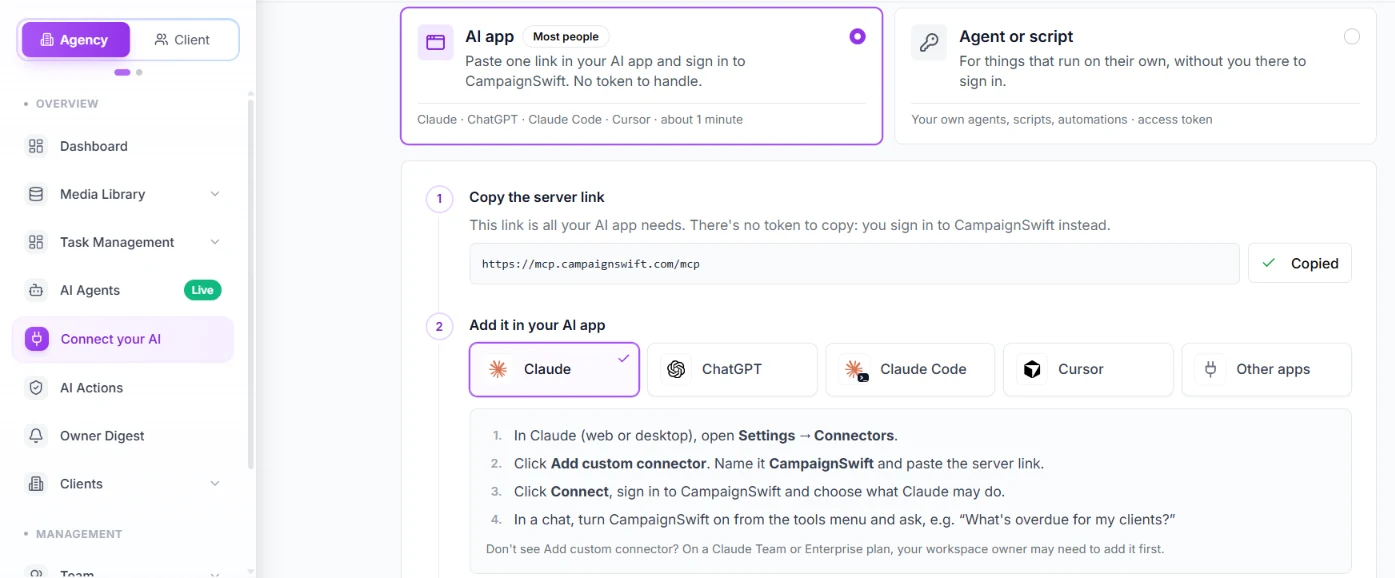
It's https://mcp.campaignswift.com/mcp, and it's also shown in CampaignSwift under Connect your AI.
Add it in your AI app
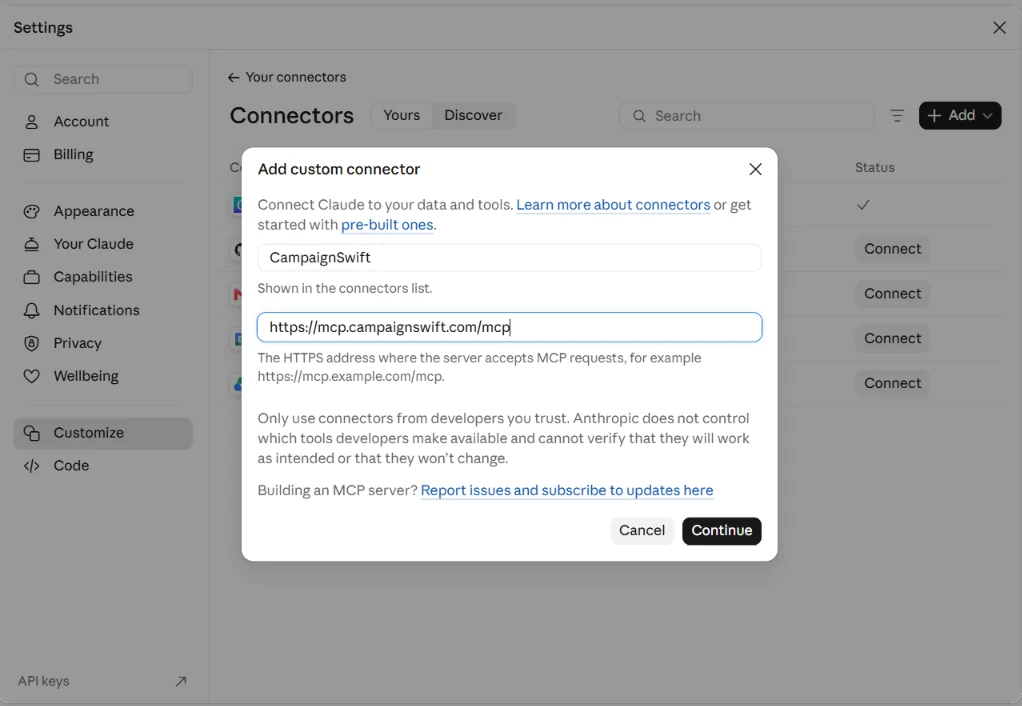
In Claude, open Settings, then Connectors, then Add custom connector. The other apps are in the setup steps below.
Sign in and choose
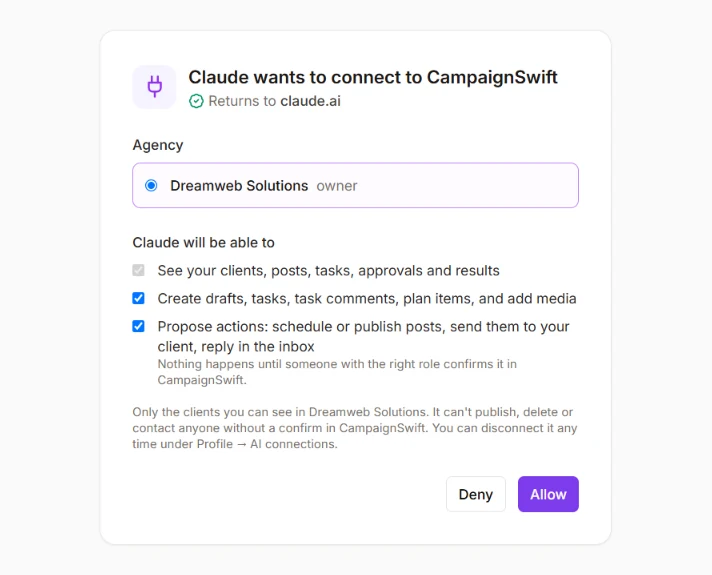
You sign in to CampaignSwift, not the AI app. Reading is always on; tick Drafts and, if your role and plan allow, Propose actions.
No token to copy for Claude or Claude Code: you sign in instead. Tokens are only for agents that run without a person, like a script or a scheduled job.
What the social media MCP server lets your AI do
Ask in plain words, and your AI does the legwork with 42 tools. For owners, admins and managers it reaches every client; for an executive, only the clients they're assigned to.
Understand your agency
Read- Your clients, an agency-wide overview, and a snapshot of any one client
- A client's brand voice and which social accounts are connected
- Posts by status, the content plan, and published posts with reach, impressions, views and engagement
- The best days and hours to post, follower counts per platform and overall follower growth
- Open approvals, tasks, campaigns and each team member's workload
- A client's results and churn risk, who their inbox conversations are with, their mentions, and their media library
Create the work
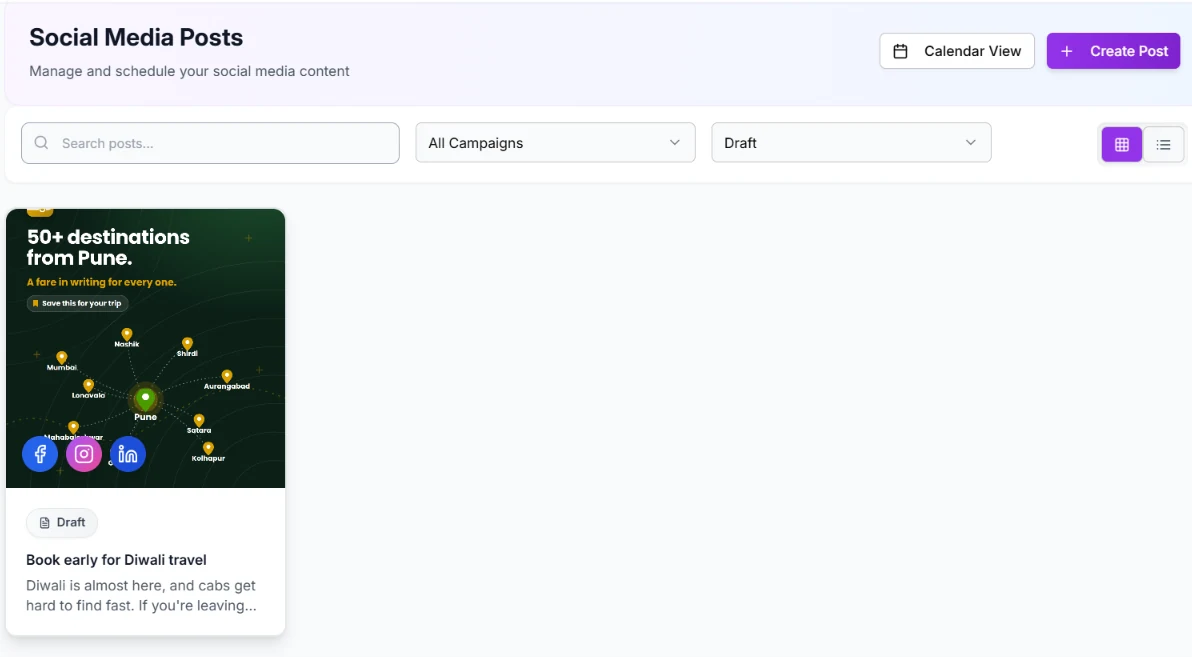
Drafts- Draft posts, with up to ten images or videos from the client's media library
- Media brought in from a public link; agents that run on your computer can also upload files
- Tasks: create, assign, update and complete them, and comment on them
- Content ideas, placed on the client's calendar
Move things forward
Proposed, then confirmed- Schedule a post, publish it now, edit it, take it off the schedule, or delete an unpublished one
- Send a post to the client for approval
- Reply to an inbox conversation, or mark it resolved
- Create, update or delete a campaign
- Approve, reject or request changes on a team approval
- Turn a planned idea into a scheduled post
- Update a client's brand voice
- Add a client, or invite a team member to your workspace
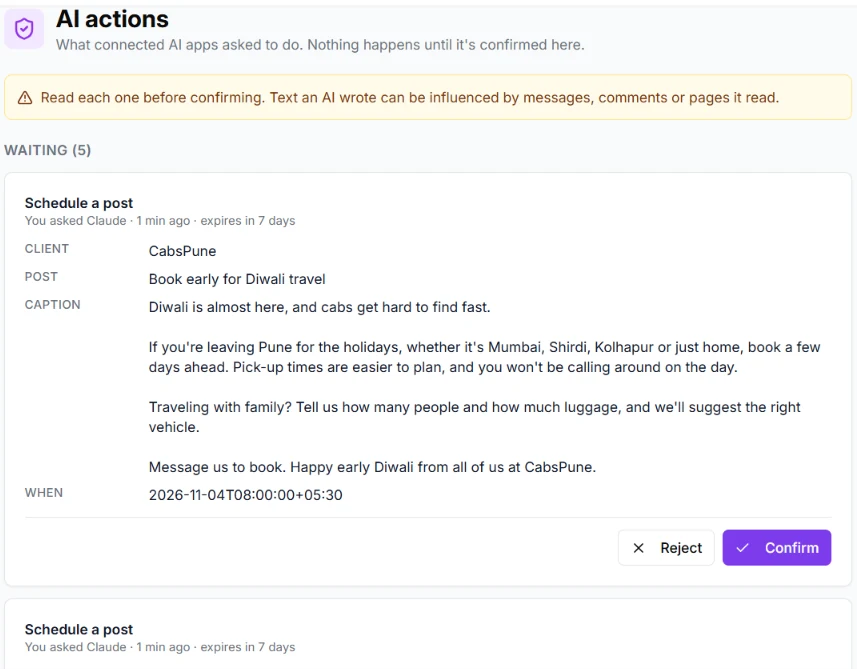
Every action in the third group waits in CampaignSwift under AI Actions until someone with the right role confirms it.
What agencies ask
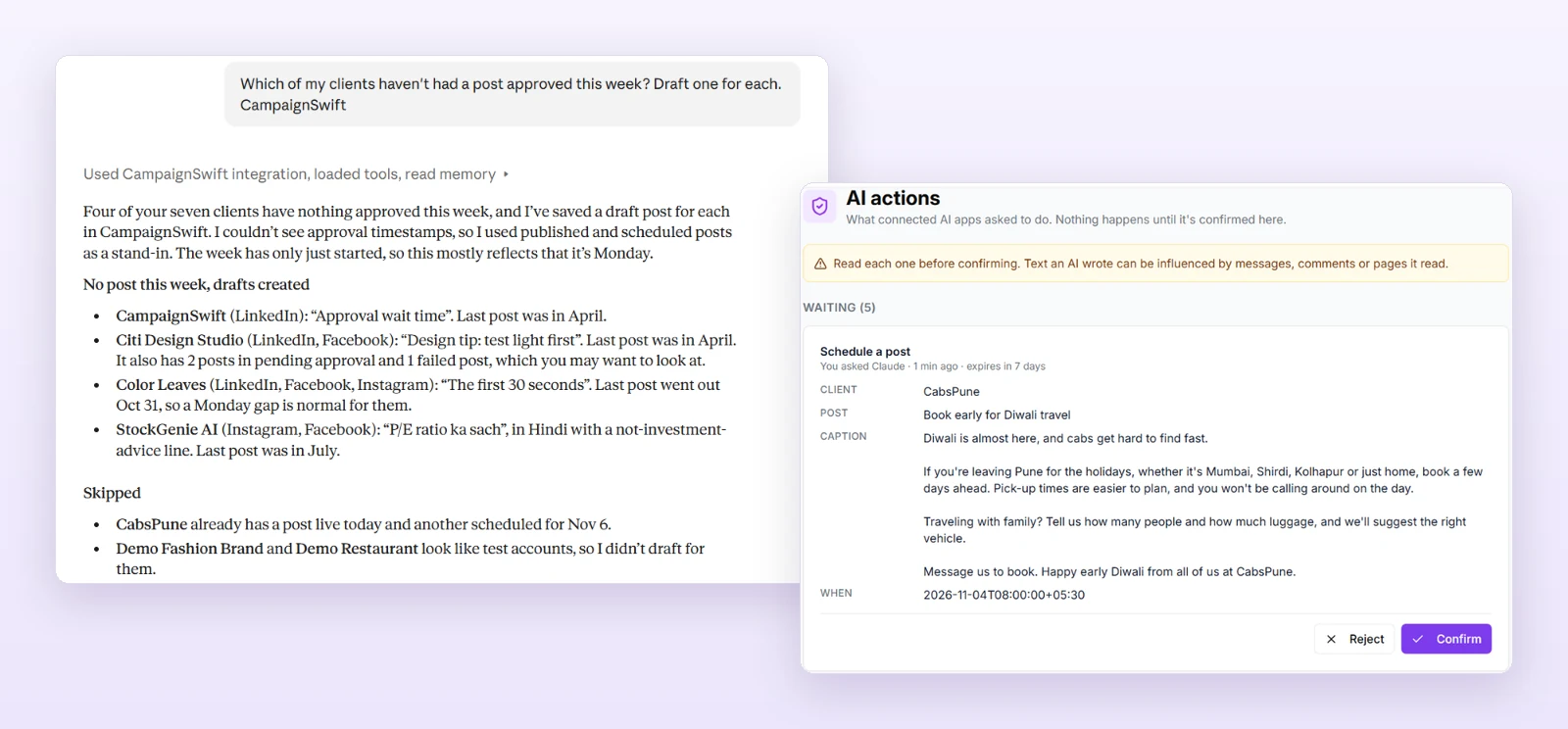
Real requests agencies send through the social media MCP server, and what your AI does with each one.
"Which clients are at risk of churning this month, and why?"
Reads each client's results and risk score from your weekly reporting and explains the top three.
"Draft five Instagram posts for Northwind Coffee for next week, in their brand voice."
Reads the brand voice and the best posting times, then creates five drafts.
"What's overdue across the team, and who has too much on?"
Reads tasks and workload and suggests who could take what.
"Schedule the approved autumn posts at each platform's best time."
Proposes the schedule. Your team confirms it under AI Actions.
"Summarise last month's results for Juniper Florals in five bullet points I can send them."
Reads published posts, their metrics and follower growth.
"Which team approvals have been waiting more than three days?"
Lists open approvals with when each one was submitted.
"Which of the bakery's inbox conversations are unread, and which can be closed?"
Lists who each conversation is with and proposes resolving the handled ones. Nothing changes until someone confirms.
"Plan a four-week content calendar for the gym's January campaign."
Adds content ideas to the client's calendar.
"Import these three product photos from their links and draft a carousel post."
Imports the media and creates the draft.
"Add Willow Yoga as a client and invite Sam as a junior executive."
Proposes both. The owner or an admin confirms them.
Built-in agents and your own AI, side by side
Connecting your own AI doesn't replace anything. Built-in agents you've switched to Autonomous keep doing their jobs on their own schedule, and your AI app is a second way in for the work you want to start yourself, like Claude social media management for one client or a quick question across all of them.
| Built-in agents | Your own AI | |
|---|---|---|
| What it is | Approval Shepherd, Inbox Triage, Content Suggestion and Monthly Planner, Reporting and Retention, Owner Digest, Onboarding, Publish Recovery | Claude, Claude Code, or an agent you build |
| Who starts the work | The agent, on its own schedule, once you switch it to Autonomous | You, by asking in your AI app |
| Where you manage it | In CampaignSwift, under AI Agents | In your AI app, with connections listed under Connect your AI |
| Who confirms changes | Agents you switch to Autonomous act within their job; inbox replies still wait for a person | Your team, in CampaignSwift under AI Actions |
| AI cost | Included in your plan | Your own AI subscription |
The full roster, and what each built-in agent will and won't do, is on the AI agents page.
Your AI proposes. Your team decides.
The social media MCP server works inside your CampaignSwift roles and plan. An AI app never gets more access than the person who connected it.
Nothing goes out without your team
Publishing, scheduling, edits, deletes, sending to clients, inbox replies, new clients and invites are only proposed. They wait under AI Actions until someone with the right role confirms them, and a proposal can't be confirmed after 7 days. Drafts, task updates and media imports happen straight away, within the access you allowed.
Never more access than you
Your AI never gets more access than the person who connected it. An executive's AI sees only the clients they're assigned to. Proposing actions needs a senior executive role or above, and some actions, like adding a client, need an admin.
You choose what it may do
Reading is always on. Drafts and Propose actions are separate choices on the sign-in screen, so you can leave either one off.
Disconnect any time
Every signed-in app is listed under Connect your AI with the date it was last used, and Disconnect stops it at once. Personal access tokens last 90 days at most and are stored as hashes.
Protected from tricks
Inbox items and published-post content reach your AI marked as outside text, which tells it to treat them as data, not instructions. Anything it proposes still needs your confirmation.
Limits on every connection
Each connection has its own request limits, so a runaway agent can't flood your account. Every tool your AI uses is logged with what it did.
How we protect your data more generally is on our security page.
Included in every plan
Your AI subscription pays for the AI. CampaignSwift doesn't charge extra for connecting it to our social media MCP server.
| Plan | Read and drafts | Propose actions |
|---|---|---|
| 30-day free trial | Yes | Yes, up to 20 action proposals a day across the agency |
| Starter ($29/mo) | Yes | No |
| Professional ($97/mo) | Yes | Yes |
| Agency ($197/mo) | Yes | Yes |
| Scale ($397/mo) | Yes | Yes |
Actions also need a senior executive role or above. The pricing page compares everything else in each plan.
Connect your app
The same server link works for every app. Once you're connected, anything your AI proposes, like sending a post for client sign-off, joins your usual approval workflow as a proposal to confirm.
https://mcp.campaignswift.com/mcpClaude
Claude on the web, desktop and mobile.
- In Claude, open Settings, then Connectors, and choose Add custom connector.
- Name it CampaignSwift and paste the server link.
- Click Connect, then sign in to CampaignSwift in the window that opens.
- Choose what Claude may do, then click Allow.
- In a chat, turn CampaignSwift on from the tools menu and ask your first question.
On Claude Team and Enterprise, an owner may need to add the connector for the organization first.
Claude Code
Claude Code in your terminal.
- Run the command below in your terminal.
- In Claude Code, type /mcp, choose campaignswift and pick Authenticate.
- Sign in to CampaignSwift in the browser and choose what it may do.
claude mcp add --transport http campaignswift https://mcp.campaignswift.com/mcpYour own agents
For a scheduled job, a script, an automation tool or an agent you built: anything that runs without a person to click Sign in.
- In CampaignSwift, open Connect your AI and choose Agent or script.
- Create an access token. Give it a name and an expiry of 30, 60 or 90 days, and tick Allow it to propose actions only if it needs them.
- Copy the token. It's shown once.
- Send it with every request to the same server link, as the header below.
- Revoke it from the same page when you're done.
Authorization: Bearer <your token>ChatGPT and Cursor: coming soon. New connections are announced in the changelog.
MCP, answered
Put your AI to work on your agency
Start a 30-day free trial, connect Claude in a minute, and confirm the first action yourself.
No credit card · Cancel anytime
Claude is a trademark of Anthropic. ChatGPT is a trademark of OpenAI. Cursor is a trademark of Anysphere.