Media Library & Asset Management Every File, Perfectly Organized
Stop digging through email threads, shared drives, and chat histories to find the right asset. CampaignSwift's centralized media library gives your team a single source of truth for every image, video, and creative file across all clients and campaigns. Upload once, use everywhere, with smart organization, storage tracking, and recovery safeguards that keep your agency running smoothly.
The Asset Management Problem
Why agencies lose hours searching for files
Files Scattered Across Email & Drives
01Creative assets live in email attachments, Google Drive folders, Slack messages, and local desktops. Nobody knows which version is current or where the final approved file lives. Team members waste hours searching for assets that should be at their fingertips, and duplicate files multiply across systems.
No Version Control for Assets
02When a client sends updated brand guidelines or a designer revises a creative, the old version doesn't disappear. Teams accidentally use outdated logos, wrong color variants, or superseded campaign images. Without a centralized system tracking file history, version confusion leads to embarrassing mistakes in published content.
Storage Usage Is a Black Box
03How much storage is your team actually using? Which clients consume the most space? Are there thousands of orphaned files eating up your quota? Without storage analytics, agencies can't plan capacity, manage costs, or identify cleanup opportunities. You only find out there's a problem when uploads start failing.
Deleted Files Still Used in Posts
04Someone cleans up a folder and deletes files that are still referenced by scheduled or published posts. Broken images appear in client content, links fail, and campaigns look unprofessional. Without file reference tracking, every deletion is a gamble that could break live content across multiple clients.
Complete Digital Asset Management for Agencies
Everything you need to organize, store, and manage media at scale
Hierarchical Folder Management
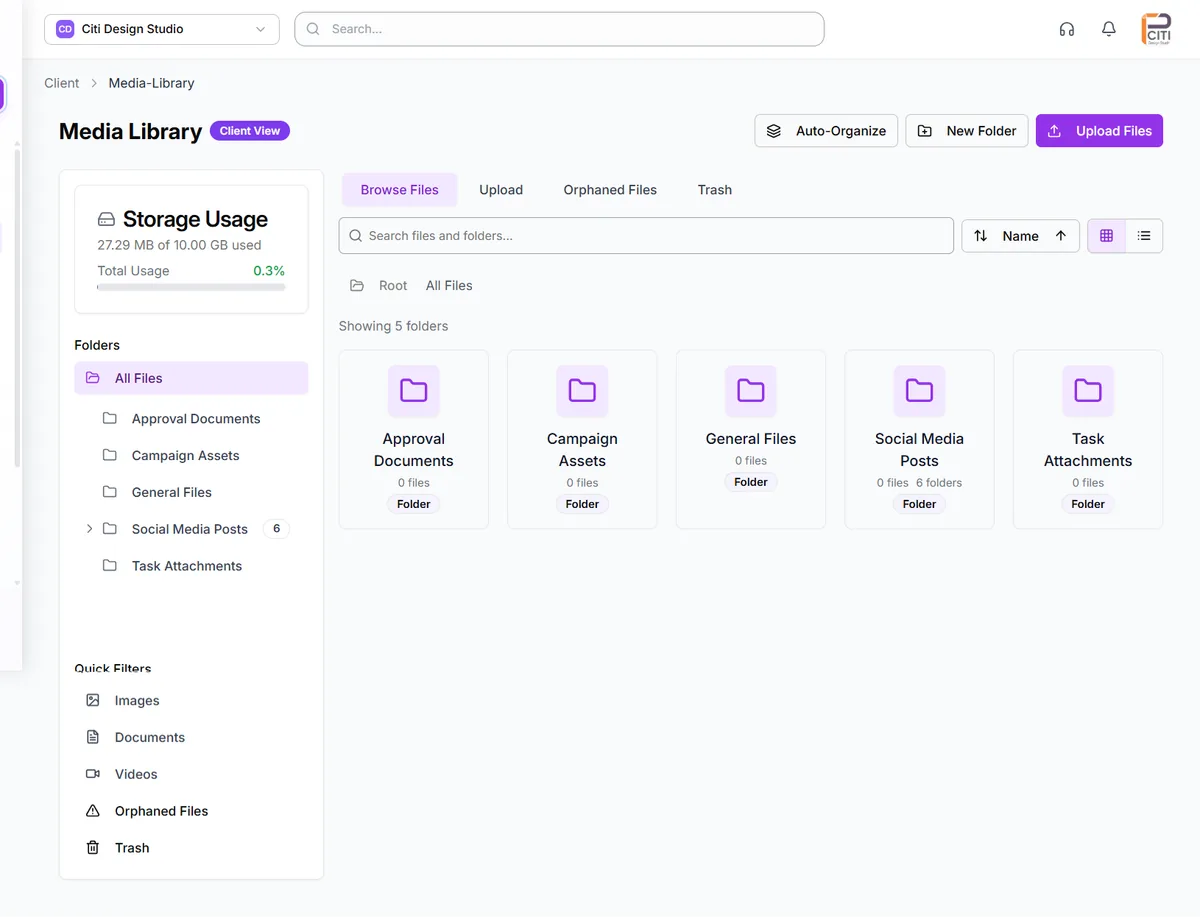
Create nested folder structures that mirror your agency's organizational needs: by client, campaign, content type, or any structure that works for your team. Drag-and-drop folders to reorganize instantly, and navigate complex hierarchies with clickable breadcrumb paths. Your folder structure becomes the backbone of asset organization.
- Nested folders
- Drag-and-drop organization
- Breadcrumb navigation
- Flexible structure
File Upload & Management
Upload files effortlessly with drag-and-drop support and automatic validation for file type, size, and dimensions. Real-time progress bars show upload status for individual files and batch uploads. Select multiple files with keyboard shortcuts like Ctrl+A and Shift+Click, then move, copy, rename, or delete them in bulk. File management that keeps pace with your workflow.
- Drag-and-drop upload
- Automatic validation
- Progress bars
- Multi-select with shortcuts
Grid & List Views
Switch between a visual thumbnail grid for browsing images and videos, or a detailed table layout showing file metadata including name, type, size, dimensions, and upload date. Find any file instantly with search, or narrow results with advanced filtering by file type, date range, and size. Sort by any attribute to surface exactly what you need.
- Thumbnail grid view
- Detailed list view
- Instant search
- Advanced filtering
Storage Quota Tracking
Know exactly where your storage stands with a visual progress bar showing used versus available capacity. Dive deeper with storage analytics that break down consumption by file type and folder, revealing which clients or campaigns are the heaviest users. Historical storage snapshots track usage trends over time so you can plan ahead.
- Visual progress bar
- Analytics by type/folder
- Historical snapshots
- Capacity planning
File Safety & Recovery
Deleted files don't disappear immediately. They move to a 30-day trash where they can be fully restored with one click. Before any deletion, file reference tracking shows exactly which posts and campaigns use each file, with clear warnings to prevent breaking live content. Orphaned file detection identifies unused files for safe cleanup.
- 30-day trash recovery
- File reference tracking
- Safe deletion warnings
- Orphaned file detection
Auto-Organization & Cloud Storage
Let CampaignSwift automatically organize uploaded files into folders by type or date, keeping your library tidy without manual effort. Bulk reorganization tools help you restructure existing libraries at scale. Everything is backed by AWS S3 cloud storage with secure signed URLs, delivering enterprise-grade reliability and scalability for your agency's media.
- Auto-organize by type/date
- Bulk reorganization
- AWS S3 backend
- Secure signed URLs
How Media Library Works
From upload to reuse across every campaign
Upload Your Files
Drag and drop images, videos, and creative files into your library. Files are automatically validated and uploaded to secure cloud storage with real-time progress tracking.
Organize in Folders
Create a folder structure that matches your workflow: by client, campaign, content type, or date. Move files with drag-and-drop and let auto-organization handle the rest.
Use Across Posts & Campaigns
When creating content, pull media directly from your library. Files are referenced, not duplicated, so every post uses the same source asset. Update once, update everywhere.
Track & Manage Storage
Monitor storage usage with analytics dashboards, clean up orphaned files, and recover accidentally deleted assets from the 30-day trash. Stay in control of your media footprint.
Media Library Scenarios
Illustrative scenarios of how teams transform their asset management
Agency Managing 20 Client Brands
Organizing creative assets across 20 active clientsAssets scattered across Google Drive, Dropbox, email threads, and Slack channels. Team members constantly asked 'where's the latest logo?' and 'which version did the client approve?' Finding the right file took 15-20 minutes each time. Wrong assets were used in published content at least weekly.
Every client has a structured folder hierarchy in CampaignSwift's media library. Assets are organized by client, then by campaign or content type. File reference tracking prevents accidental deletion of in-use assets. The team finds any file in seconds, not minutes.
Content Team With 10,000+ Media Files
Managing a massive and growing media libraryThe media library grew organically with no structure. Thousands of duplicate files consumed storage. No one knew what was still being used and what was obsolete. Storage costs climbed steadily with no visibility into what was driving them.
Auto-organization sorted existing files by type and date. Orphaned file detection identified 3,000+ unused files for cleanup. Storage analytics revealed which folders and file types consumed the most space. Bulk reorganization tools restructured the entire library in hours.
Brand Team Enforcing Asset Guidelines
Ensuring only approved assets are used in contentOutdated logos, wrong color variants, and unapproved images appeared in published content regularly. No single source of truth for approved brand assets existed. Brand consistency suffered across channels and campaigns.
Approved brand assets live in a dedicated folder structure with clear naming conventions. File reference tracking shows which content uses each asset. When brand guidelines update, old assets are moved to trash and new ones take their place. The team always uses the right files.
Why Centralized Media Storage Matters at Agency Scale
The conversation stops being theoretical at the first wrong-logo incident
The first time an agency mistakenly posts last quarter's brand logo for a client, the conversation about media library structure stops being theoretical. At 5 clients, scattered Google Drive folders work. At 15, the cost of one wrong asset reaching the wrong client is bigger than the cost of structure. This is where dedicated brand asset management stops being optional.
Assets that already live in cloud drives don't need a migration project first: the library connects to them directly, and the Google Drive integration guide walks through the connect flow, permissions, and storage limits. The same goes for client folders in Dropbox. The Dropbox integration guide covers importing those files into posts and the library without the download-reupload detour.
The trait clean-scaling agencies share
The agencies that scale cleanly past 20 clients usually share one trait: every approved asset lives in one place, tagged by client and campaign, and connects directly to the content calendar where posts get scheduled, typically alongside dedicated creative asset management software for the design team. No more "do we have the new logo?" Slack threads at 9pm before a launch. The structural pattern ties into our Instagram template guide and how agencies consolidate their tool stacks.
Media Library FAQs
Common questions about asset management
Storage allocation depends on your plan tier. All plans include generous cloud storage backed by AWS S3. You can monitor your usage in real time through the storage quota dashboard, which shows a visual progress bar and detailed breakdown by file type and folder. If you're approaching your limit, storage analytics help you identify cleanup opportunities before you need to upgrade.
The media library supports all common image formats (JPG, PNG, GIF, WebP, SVG), video formats (MP4, MOV, AVI, WebM), and document formats used in social media content. File uploads are automatically validated for type, size, and dimensions to ensure compatibility with social platforms. If a file type isn't supported for a specific platform, you'll see a clear notification during upload.
Yes, the folder system is fully hierarchical. You can create nested folders to any depth. Most agencies organize by client at the top level, then by campaign, content type, or date within each client folder. Drag-and-drop makes reorganization easy, and breadcrumb navigation keeps you oriented within deep folder structures. You can also use auto-organization to sort files by type or date automatically.
Deleted files move to a trash bin with a 30-day retention window. During this period, you can fully restore any file with one click. Before deletion, the system checks for file references. If the file is used in any posts or campaigns, you'll see exactly where it's referenced and can confirm or cancel the deletion. After 30 days in trash, files are permanently removed.
Every time a media file is attached to a post, campaign, or content item, CampaignSwift tracks that reference. When you view a file's details, you can see all the posts and campaigns that use it. When you attempt to delete a referenced file, the system warns you with specific details about where it's in use. Orphaned file detection also identifies files that are no longer referenced by any content, making cleanup safe and easy.
Yes. All media files are stored on AWS S3, which provides 99.999999999% (11 nines) durability and 99.99% availability. File access uses time-limited signed URLs, meaning files can only be accessed through authorized CampaignSwift requests, not through public URLs. This enterprise-grade infrastructure ensures your agency's and clients' creative assets are always secure and available.
Still have questions?
Our team is here to help. Book a 15-minute call to get all your questions answered.
Ready to put the busywork on agents?
Start with one client. Connect accounts, send your first approval link, and let the agents take the follow-ups. Plans start at $29/mo.
30-day free trial · No credit card · Cancel anytime
Questions? Book a 15-min demo call
Schedule Demo