Social Media Scheduling Tool Built for Agencies
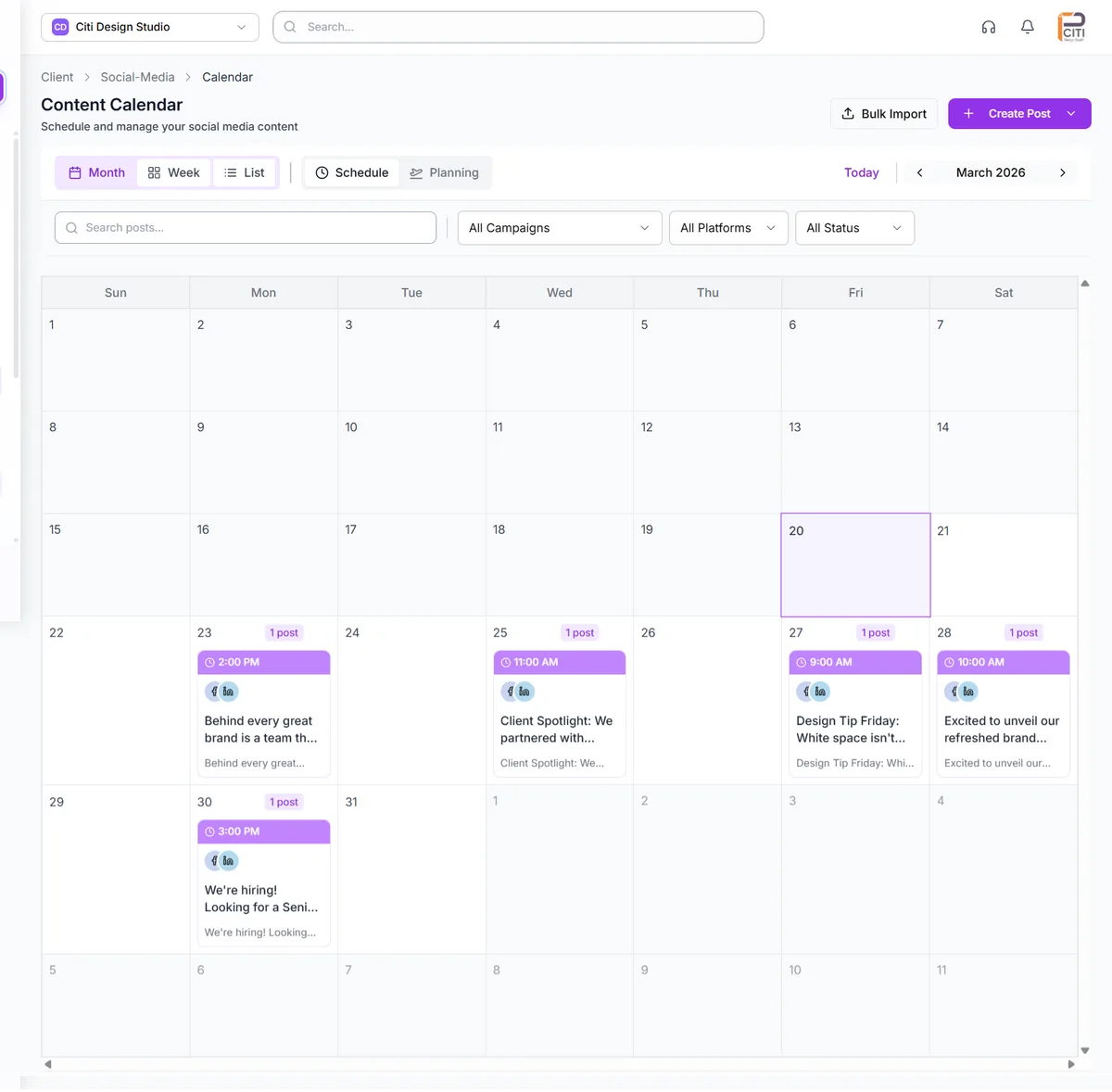
Stop juggling seven different platform dashboards for social media scheduling. CampaignSwift is the social media scheduling tool built for agencies: plan, schedule, and publish across Instagram, Facebook, Twitter/X, LinkedIn, YouTube, TikTok, and Pinterest from one visual calendar. Drag-and-drop posts across dates, switch between four calendar views, bulk import hundreds of posts via CSV, and let AI optimize your posting times, all without leaving the platform.
The scheduling problem
Why content scheduling consumes so much agency time.
Manual Posting Across Platforms
01Your team logs into seven different platforms every day to publish content. Each platform has its own interface, its own quirks, and its own scheduling limitations. A single multi-platform post takes 15 minutes instead of 2. Multiply that across dozens of clients and hundreds of posts per week, and you've lost entire days to platform-hopping.
No Visual Planning
02Spreadsheets and task lists can't show you the full picture. Without a visual calendar, gaps in your content schedule go unnoticed, posting frequency is inconsistent, and campaign timing conflicts slip through. Teams need to see the month at a glance, not scroll through rows of dates in a spreadsheet.
Can't Schedule in Bulk
03When a client approves 40 posts for the month, your team schedules them one by one. There's no way to import a batch of content, map it to dates, and queue everything in minutes. Bulk content months and campaign launches become multi-day scheduling marathons.
Platform-Specific Formatting
04Every platform has different character limits, media requirements, hashtag best practices, and content types. Writing a single post that works everywhere means compromising on every platform. Your team needs a way to customize content per platform without creating separate posts from scratch.
Social media scheduling capabilities
Everything you need to plan, schedule, and publish content at scale.
Dual-Mode Calendar
Switch between Schedule Mode and Planning Mode instantly. Schedule Mode shows what's actually going out: scheduled and published posts across all platforms. Planning Mode shows content intentions: ideas, themes, and content slots that haven't become full posts yet. Plan your strategy in one view, execute it in another, and convert planning items to real posts when ready.
Four Calendar Views
Different workflows need different perspectives. Month View gives you the big picture with color-coded campaign indicators on each day. Week View shows detailed daily breakdowns with time slots. List View provides a chronological feed for quick scanning and bulk operations. Timeline View offers a horizontal visualization that highlights content distribution and gaps.
Multi-Platform Publishing
Publish to Instagram, Facebook, Twitter/X, LinkedIn, YouTube, TikTok, and Pinterest from one place. Support for 7 content types including posts, carousels, reels, stories, YouTube videos, YouTube Shorts, and TikTok videos. Write platform-specific captions, hashtags, and settings within a single post, and each platform shows its character limits and media requirements in real time.
Drag-and-Drop Scheduling
Reposition posts across dates and times by simply dragging them on the calendar. Timezone-aware date and time conversion ensures accuracy when your team spans multiple regions. Visual feedback during drag operations highlights valid drop zones, making rescheduling intuitive and fast. Move a week's worth of content in seconds, not minutes.
Bulk Post Import
Upload hundreds of posts at once with a guided 5-step CSV import wizard. Upload your file, map columns to post fields, validate data with automatic error detection, resolve conflicts for duplicates, and confirm the import with real-time progress tracking. Perfect for monthly content batches, campaign launches, or migrating from another tool.
Content Templates & AI Tools
Save frequently used post structures as reusable templates with template variables for dynamic content insertion. AI-powered caption generation creates platform-optimized copy in your chosen tone: professional, casual, witty, or inspirational. AI hashtag suggestions recommend tags based on content context, trending topics, and niche relevance. Sentiment analysis and engagement prediction help you optimize before publishing.
From connected accounts to automated publishing
Connect Your Accounts
Link your social platforms via secure OAuth. Connect Instagram, Facebook, Twitter/X, LinkedIn, YouTube, TikTok, and Pinterest in minutes. Multi-account support means you can manage multiple pages and profiles per platform.
Plan Your Content
Use Planning Mode to map out content ideas across your calendar. Set content intentions by platform and type without creating full posts. Visualize your content strategy before committing to production.
Schedule Your Posts
Create posts with platform-specific captions, media, and hashtags. Drag them onto your calendar or set exact dates and times. Use bulk import for large content batches. AI suggests optimal posting times for maximum engagement.
Auto-Publish Everywhere
Posts publish automatically at their scheduled times via background processing. Monitor publishing status in real time. Failed posts trigger automatic retry with error reporting so nothing gets missed.
Scheduling scenarios
Illustrative scenarios of how teams transform their content workflow.
Agency Managing 200+ Posts Per Week
Team members logged into each client's social accounts individually. Posts were scheduled one platform at a time. Content calendars lived in spreadsheets that were always out of date. Missed posts and scheduling conflicts were weekly occurrences.
All 20 clients managed from one calendar with campaign color coding. Bulk import handles monthly content batches in minutes. Drag-and-drop rescheduling makes last-minute changes effortless. Missed posts dropped to near zero with automated publishing.
Solo Marketer Batching Content
Content creation and scheduling were interleaved throughout the month. Every day started with 'what should I post today?' Planning ahead meant maintaining a separate spreadsheet that required constant updating.
Monthly content batch created and scheduled in a single focused session. Planning Mode maps out the month's themes first, then posts are created and dragged into place. One day of work replaces 30 days of daily scrambling.
Enterprise Multi-Brand Coordination
Each brand team scheduled independently with no visibility into other brands. Campaign timing conflicts caused audience fatigue. No centralized view of what was going out across the portfolio.
Unified calendar shows all brands with color-coded campaigns. Timeline view reveals scheduling conflicts before they happen. Month view gives leadership a complete picture of content output across the portfolio.
Scheduling Is the Easy Part: Coordination Is Where Tools Fail
Every tool schedules, but most fail at what happens around the schedule
Almost every social tool can schedule a post. Where most fall apart is what happens before and after. Before: how does the post get reviewed and approved through your social media approval software? After: where does its performance show up alongside the rest of the client's data? An agency-grade scheduler treats the scheduled time as one step in a longer flow, covered in our roundup of the best social media scheduling tools and our piece on managing scheduled posts across multiple clients.
The workflow around it (approvals upstream, reporting downstream) is the part that actually saves agency hours. A great scheduler with no surrounding workflow saves nothing.
The workflow agencies that scale past 15 clients use
The agencies we've talked to that scale past 15 clients without burning out their team usually share one workflow:
- Bulk-schedule a month at a time using bulk scheduling, not post-by-post in an end-of-week scramble
- Route everything through structured approval workflows before the queue locks, so client sign-off happens once at the batch level
- Switch between clients in one click through a unified client workspace instead of logging into separate dashboards. Context switching is the silent agency tax
How CampaignSwift Compares to Other Social Media Scheduling Tools
Most agencies evaluating a social media scheduling tool end up comparing the same four or five platforms. The table below shows how CampaignSwift stacks up against the most common alternatives on the criteria that actually matter for multi-client agency work. For a broader roundup of the field including free options, see our full guide to the best social media scheduling tools.
| Feature | CampaignSwift | Hootsuite | Buffer | Later | Loomly |
|---|---|---|---|---|---|
| Multi-client unified calendar | Yes | Limited | No | Limited | Yes |
| Bulk CSV import (100+ posts) | 5-step wizard | Basic | Basic | Basic | No |
| Integrated approval workflow | Native | Add-on | No | No | Yes |
| Dual-mode calendar (plan + schedule) | Yes | No | No | No | Partial |
| AI captions + hashtag suggestions | Built-in | Add-on | Yes | Yes | Limited |
| Per-client pricing model | Flat agency rate | Per-user fees | Per-channel fees | Per-user fees | Per-user fees |
| Seven platforms, seven content types | Yes | Yes | Most | Most | Yes |
Most generic social media scheduling tools were built for in-house teams managing one brand. Agencies running 10+ clients on those tools end up patching gaps with spreadsheets, separate approval tools, and Slack threads: the same overhead CampaignSwift was built to eliminate.
Social Media Scheduling for Multiple Clients & Agencies
Most social media scheduling software treats every account as a separate workspace. Open the tool, you're in one brand's world. To switch brands you log out, log back in, lose context, and start over. For agencies managing 8, 12, or 20 clients, this is a 40-times-a-day tax on your team's attention. That's why a social media scheduler for agencies has to be built differently from one designed for in-house teams.
Social media bulk scheduling across clients is where the agency model breaks most consumer-grade tools. A social media scheduling tool built for agencies has to handle multiple accounts in one upload, route posts to the right client automatically, and respect each client's approval routing, all without requiring your team to log out and back in between every batch.
CampaignSwift was built on the inverse model: client-as-context, not client-as-workspace. You stay inside one application. Pick the client you're working on, and their entire scheduling world surfaces: calendar, queue, drafts, approvals, platform connections. Move to the next client with a single click. The tool changes contexts, your team's brain doesn't have to reload from scratch. Those platform connections all run through one place: the integrations directory lists every network, ad platform, and storage tool CampaignSwift connects to, with setup guides for each.
This pairs naturally with bulk social media scheduling for monthly content batches, and with the client approval workflow for sign-offs before content goes live. For agencies, the win is a better scheduler that also removes the tool-switching cost, which was never the visible problem but always the real one.
Why agency teams choose a scheduler built for portfolios
- One calendar, all clients: see every brand's content across every platform in one color-coded view, instead of clicking through twelve dashboards to find a gap
- Bulk operations across clients: reschedule a whole campaign, duplicate a template across accounts, or pause a content batch for one client without affecting others
- Approval-aware scheduling: posts pending client sign-off are flagged visually on the calendar so nothing publishes before it's approved
- Flat agency pricing: predictable cost as you add clients, instead of per-user or per-channel fees that scale with your team and your portfolio
If your team is currently using a general-purpose social media scheduling tool and feeling the cracks at 8+ clients, that's the signal to look at a tool built for the agency portfolio model.
Social media scheduling FAQs
Common questions about scheduling and content calendar features.
Ready to put the busywork on agents?
Start with one client. Connect accounts, send your first approval link, and let the agents take the follow-ups. Plans start at $29/mo.
30-day free trial · No credit card · Cancel anytime
Questions? Book a 15-min demo call
Schedule Demo