Content Calendar Software for Agencies
CampaignSwift is content planning software built for agencies, not single brands. Most content calendar software handles one brand and a handful of posts. Agencies need a calendar that carries dozens of clients, several channels per client, and a team moving between all of them: briefs, deadlines, reviews, approvals and publishing in one place instead of a spreadsheet, a project tracker and a scheduler that never agree.
Where Content Planning Breaks for Agencies
The problems that show up the moment you scale past five clients
Tools Everywhere, No Single Source of Truth
01One team member plans content in Notion, another tracks deadlines in Asana, and someone else has a Google Sheet with posting dates. The social media scheduler is a fourth tool entirely. When your CEO asks 'what are we publishing for Client X this week?' answering that question takes 15 minutes and three tabs. Fragmented tools mean fragmented visibility, and no content plan tool in the stack owns the whole picture.
No Multi-Client Calendar View
02You can see what is coming up for one client at a time, but there is no way to zoom out and see everything. That matters when two clients are in the same industry and you accidentally schedule similar posts on the same day. Or when your designer is assigned content for six clients on Thursday and nobody noticed the overlap until Wednesday night. This is the single clearest gap between single-brand tools and multi-client agency software.
Scheduling Is Not Planning
03Most social media scheduling tools let you pick a date and time. That is not planning. It is the last 5% of the process. Real content planning involves deciding themes, assigning writers, getting drafts reviewed through a structured approval workflow, and coordinating with the client's own marketing calendar. When your 'content calendar' is really just a scheduling queue, all the upstream work happens outside the system.
Content Output Hits a Ceiling
04You keep adding clients but your content volume plateaus. The bottleneck is not talent or hours. It is process. Without a system that connects planning to production to publishing, every new client adds linear overhead. Your team spends more time coordinating content than creating it, and the quality starts to slip as capacity gets stretched.
Best Content Calendar Software Features for Agencies
The capabilities that separate real planning tools from basic schedulers
Multi-Client Calendar Views
See every client's content on one calendar, or filter down to a single client. Color-code by client, channel, content type, or status. Monthly, weekly, and daily views let you plan at different altitudes. This is the feature that most single-brand tools simply do not offer, and it is the one agencies need most.
- Per-client color coding
- Filter by client or channel
- Monthly/weekly/daily views
- Cross-client conflict detection
Support for Every Content Type
Your calendar should handle more than social posts. Blog articles, email newsletters, video shoots, podcast episodes, ad campaigns: agencies produce all of these, often for the same client. CampaignSwift treats every content type as a first-class calendar item with its own fields, statuses, and workflows, with approved assets pulled straight from the shared media library.
- Social posts and stories
- Blog and long-form content
- Video and multimedia
- Email and newsletter planning
Team Assignment and Workload Visibility
Assign writers, designers, and reviewers to each piece of content directly on the calendar. See who is overloaded and who has capacity. When a new brief comes in, you can check the calendar before assigning it, not after the deadline has already been missed because someone was buried. Agencies running formal resourcing pair this with agency project management software.
- Drag-and-drop assignment
- Workload heat maps
- Capacity planning
- Role-based task views
Direct Publishing Integration
Content that gets planned should flow into publishing without a manual handoff. When a post is approved and its scheduled date arrives, it publishes automatically to the right channel. No copy-pasting into native tools, no re-uploading media, no last-minute scramble to push things live. Once live, engagement sits next to the content that produced it, so replanning does not mean opening a separate agency analytics tool.
- Auto-publish on schedule
- Multi-platform support
- Media auto-formatting
- Post-level engagement in context
Client Collaboration and Approval
Share a filtered calendar view with clients so they can see what is coming up, leave comments, and approve content through the client portal. Clients do not need to log in. They get a secure link. This replaces the weekly 'here is what we are posting' email with a living, always-current view.
- Shareable client calendar
- Comment and approve in context
- No client login required
- Real-time status updates
AI Content Planning That Fills the Calendar
A blank month is the hardest part of content planning. CampaignSwift's Monthly Planner agent drafts a month of on-brand content per client from their voice, goals and past results, then puts it on the calendar as drafts for your team to edit. Nothing publishes on its own: the agent proposes, a human confirms. Ask the AI Copilot to reshuffle a week and it will show you the change before applying it. Treat it as a first pass that removes the blank-page problem, not an autopilot.
- Drafts a month of content per client
- Grounded in client voice and goals
- Lands as editable drafts, not live posts
- Every action proposed, human-confirmed
How Content Planning Software Works, Start to Publish
Four steps from a blank calendar to a running publishing pipeline
Set Up Client Workspaces
Create a workspace for each client with their channels, brand guidelines, and posting cadence, the same structure agency social media management runs on. Define content categories (e.g., educational, promotional, engagement) and assign team members. This structure makes every future planning session faster.
Plan Content on the Calendar
Drag content ideas onto dates. Assign writers and set deadlines for drafts, review, and final approval. Use recurring slots for regular content series. The calendar shows the full pipeline, not just what publishes but what needs to happen before it can.
Produce, Review, and Approve
Writers and designers work from calendar assignments. Completed content enters the review flow. Clients approve via a shared link, with each stage tracked in the approval workflow. As items move through stages, the calendar updates in real time so everyone sees current status.
Publish and Measure
Approved content publishes automatically on schedule. Performance data flows back into the calendar. Your team reviews what performed well and uses those insights to plan the next cycle. The calendar becomes both a planning tool and a performance record.
How Agencies Use Content Calendar Software
Three common scenarios where the right tool changes everything
Growing Social Media Agency
Agency with 25 clients, each posting 3-5 times per week across 2-3 channelsContent was planned in per-client Google Sheets and scheduled through individual platform tools. The content manager spent Monday mornings building a master overview in another spreadsheet. By Wednesday, it was already out of date. Client-facing content previews were sent as PDF attachments that nobody opened.
All 25 clients live on one calendar. The content manager filters by status to see what is still in draft, what is in review, and what is approved and ready to publish. Clients check their own calendar link instead of waiting for email updates. Monday morning overview meetings dropped from 90 minutes to 20.
Full-Service Marketing Agency
Agency producing social, blog, email, and video content for 12 mid-market clientsSocial content lived in Buffer. Blog content was tracked in Asana. Email campaigns were planned in a shared Google Doc. Video production had its own project tracker. Nobody had a unified view of what was going out when. Content gaps appeared when a channel got missed in the planning shuffle.
Every content type sits on the same calendar. The team plans monthly themes and then fills in channel-specific content underneath. Cross-channel campaigns are visible as a group, so nothing gets orphaned. The agency added four clients without hiring because the planning overhead per client dropped significantly.
Content-First Agency
Agency specializing in thought leadership content for B2B SaaS companiesContent production depended on subject matter expert interviews that were hard to schedule. Long-form articles took 3-4 weeks from brief to publish, and the pipeline visibility was poor. The team frequently discovered bottlenecks only after a deadline had passed.
The calendar shows the full production pipeline for each article: interview date, first draft, client review, edits, final approval, publish date. Bottlenecks are visible weeks in advance. The team started batching similar interview topics together, cutting average production time from 4 weeks to 12 days.
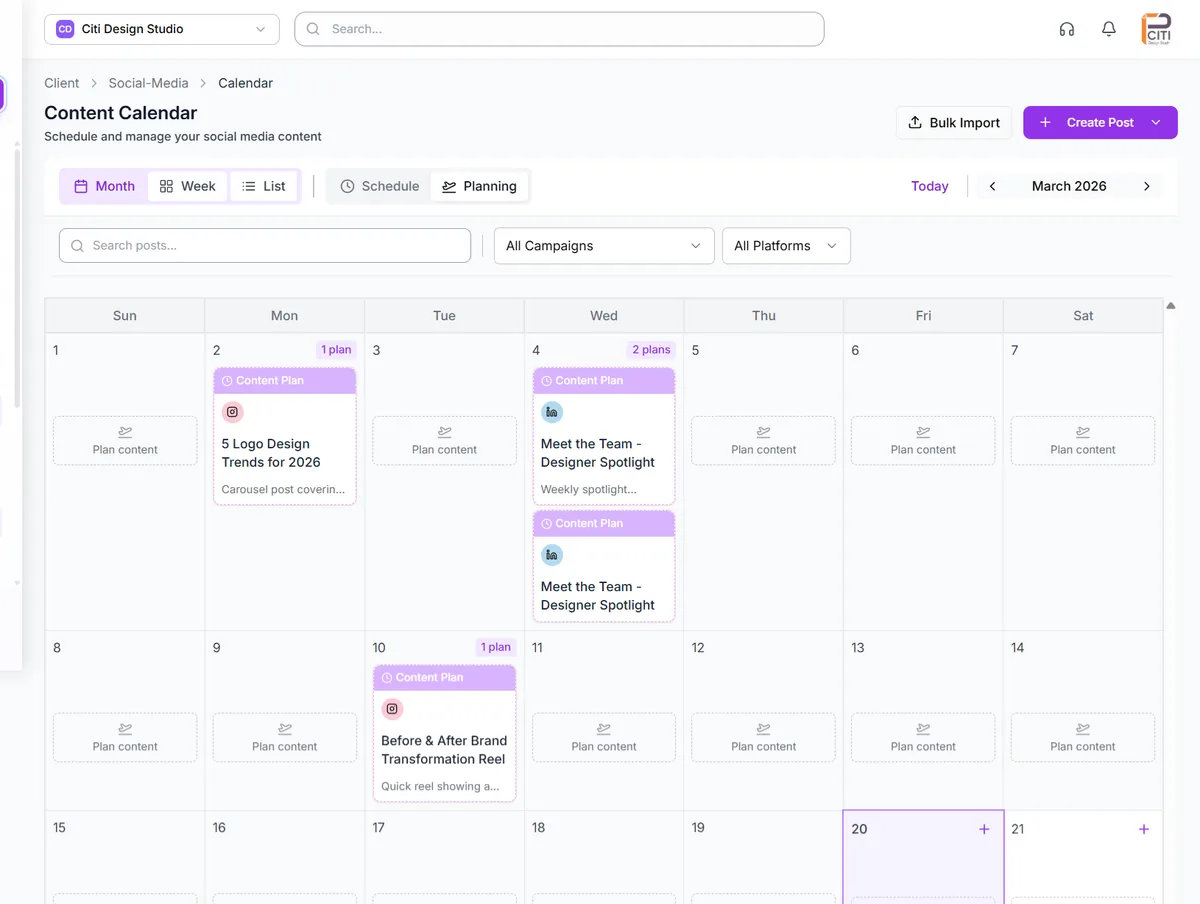
Content Marketing Calendar Software: What Agencies Should Look For
When agencies evaluate content marketing calendar software, the conversation usually starts with features: drag-and-drop, color coding, integrations. Those matter, but they are table stakes. The real differentiator is whether the tool understands how agencies actually work: multiple clients, overlapping campaigns, and teams that shift between accounts throughout the day.
We have seen agencies try to force single-brand tools into multi-client management workflows. It usually involves workarounds: separate workspaces per client, manual cross-referencing between them, and a lot of tab switching. The calendar "works" in the sense that dates exist, but nobody trusts it as the source of truth. The content marketing planning process remains scattered across the tool, email, and whatever Slack channel has the latest update.
What separates a content marketing calendar from a generic planning tool:
- Content-specific fields: status, content type, channel, assigned creator, reviewer
- Production pipeline visibility, not just publication dates
- Built-in approval steps so finished content does not sit in someone's inbox
- Client-facing views that show what is coming without exposing internal notes
- Analytics feedback loop so next month's plan builds on last month's results
The agencies that get the most value from their content calendar software are the ones that use it as the operational backbone of their content workflow, not just a place to note what publishes when. When planning, production, structured approvals, and publishing all happen in the same system, you stop losing time to handoffs. Your team creates more content with the same hours, and the quality stays consistent because nothing falls through the gaps between tools.
If you are comparing content calendar options for your agency, start with how many clients you will manage and how many content types you produce. That will narrow the field quickly. Most tools built for individual brands will not scale to 10+ clients without significant friction. Pair the calendar with a native editorial calendar view so production and publishing share the same source of truth.
How to Pick a Content Calendar Tool for Agencies
Most comparisons of content planning software stall on feature checklists. A faster method is to test each tool against the four moments where agency calendars actually fail. Ask a vendor to show you each one on a live account rather than a demo environment.
| The moment it breaks | What to ask for | Why single-brand tools fail it |
|---|---|---|
| Onboarding client six | Show every client on one calendar, then filter to one | One workspace per client means no cross-client view exists |
| A draft slips | Set a draft deadline separate from the publish date | Only the publish date is tracked, so slippage shows up late |
| The client goes quiet | Send content for approval without creating an account | Approvals happen over email, outside the calendar entirely |
| Two clients collide | Flag duplicate topics and overloaded staff before publish | Nothing compares activity across separate client accounts |
Content Calendar Software With Built-In Conflict Detection
Conflict detection is the capability agencies ask about most and find least often. It exists because a calendar that only validates one client at a time cannot see the problems that come from managing many. CampaignSwift checks three kinds of collision as you plan.
Topic collisions catch two clients in the same industry publishing near-identical content on the same day, which is embarrassing when both audiences overlap. Workload collisions catch a designer assigned work for six clients on one afternoon, surfacing on the calendar rather than in a status meeting. Cadence collisions catch a client receiving three posts in an hour and nothing for the rest of the week, which is the usual outcome of bulk-loading a month at once. All three are visible while you are still planning, which is the only point at which they are cheap to fix. If you plan in batches, pair this with bulk scheduling so a month of content still gets spaced sensibly.
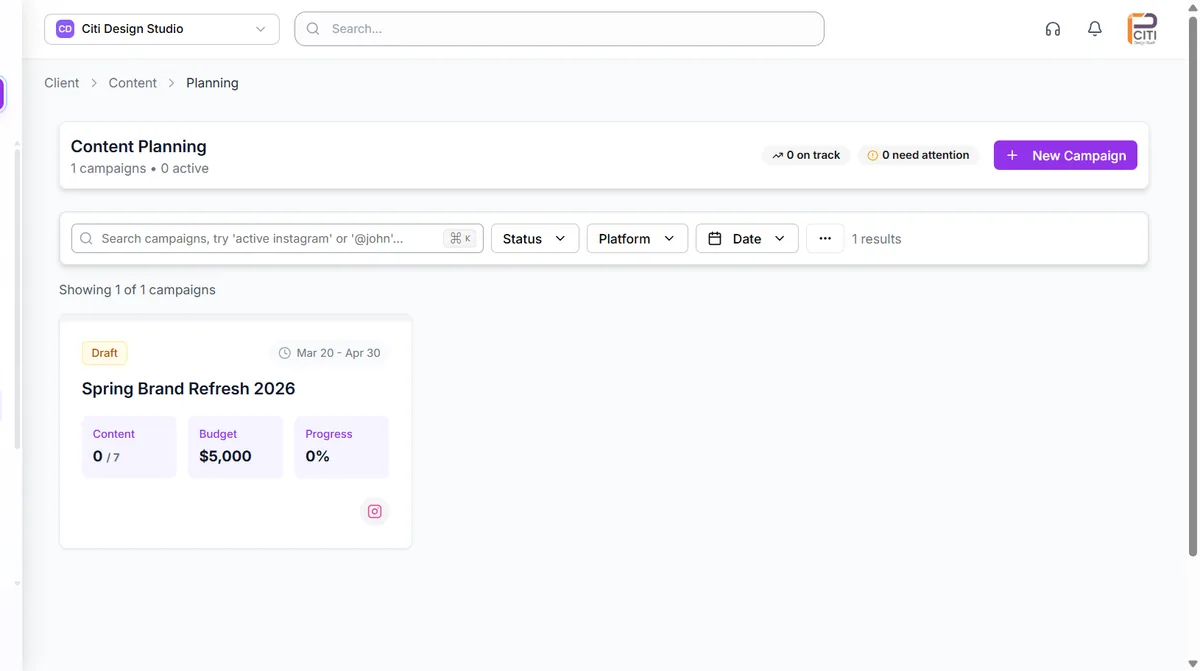
A Content Planning System With Team Feedback and Deadlines
The gap between a calendar and a planning system is where feedback lives. If a designer's revision note sits in Slack and the client's change request sits in email, the calendar records a publish date and nothing about whether the work is actually on track.
In CampaignSwift, each item carries per-stage deadlines for draft, internal review and client approval, separate from the publish date. Comments attach to the content itself, so the revision history travels with the post rather than scattering across channels. Assignees are notified when work lands on them and when a deadline approaches. The practical effect is that a post scheduled for the 20th shows as at risk on the 12th, when its draft deadline passes, instead of on the 19th when someone finally checks. Reviews route through the same social media approval software that handles client sign-off, so internal and external feedback share one trail.
AI Social Media Content Planner and Calendar, With a Human in Control
An AI social media calendar is useful in exactly one way: removing the blank page. CampaignSwift works as an AI social media content planner rather than an autopilot. The Monthly Planner agent reads a client's brand voice, goals and past performance, then drafts a month of content and places it on the calendar as editable drafts. It does not publish, and it does not approve. Every action is proposed and waits for a human to confirm it.
That distinction matters when you compare tools. A social media calendar AI that only generates captions leaves you with better copy and the same planning problem, because nothing decides what belongs in which week or which client has gone three posts without a case study. Most social media content calendar AI features stop at generation; the planning layer, where cadence and content mix get decided, is the part that actually saves an account manager time.
Used well, social media calendar automation of this kind saves the two or three hours a planner spends staring at an empty month, and your team spends its time editing rather than generating. Used badly, it fills a calendar with generic posts nobody edits, which clients notice quickly. Treat the output as a first draft: keep the structure, rewrite the copy, and cut anything that does not sound like the client. The same applies to AI content generation for individual posts, and to the wider set of AI agents that handle approvals, inbox triage and reporting on the same human-confirmed model.
A Social Media Scheduling Tool With Calendar Integration Built In
Agencies usually arrive at this page looking for one of two things: a calendar that can publish, or a social media scheduling tool with calendar integration that does not require exporting anything. In CampaignSwift they are the same product, which removes the handoff that breaks most stacks.
The handoff is worth naming, because it is where content quietly goes missing. In a split stack, a planner approves a post in the calendar tool and someone then re-enters it in the scheduler: re-uploading the media, re-writing the caption, re-picking the time. Every re-entry is a chance to publish the wrong version, or to publish nothing at all because the second step never happened. When an approved calendar item is already the scheduled post, there is no second step to forget. Approved content moves into the publishing queue for all 7 connected networks with the media, copy and timing it was approved with. See social media scheduling for how the publishing side works.
Marketing Calendar Software for Cross-Channel Campaigns
Social posts rarely travel alone. A product launch is a landing page, an email sequence, a paid campaign and three weeks of organic content, and the value of marketing calendar software is seeing those pieces as one campaign rather than four disconnected queues. In CampaignSwift, cross-channel work groups under a single campaign on the calendar, so a slipped landing page visibly puts the supporting posts at risk instead of quietly orphaning them.
This is also where the calendar stops being a planning artifact and starts being a reporting one. Because the campaign grouping persists after publishing, performance rolls up by campaign as well as by post, which feeds client reporting without rebuilding the structure in a spreadsheet. Agencies running formal campaign cycles usually pair the calendar with campaign management software, and larger teams add campaign orchestration for multi-stage launches.
Content Planning Software vs Spreadsheets
Spreadsheets are the honest baseline. They are free, infinitely flexible, and every agency starts there for good reason. The switch to dedicated content planning software is worth making at the point where the spreadsheet's flexibility becomes its weakness, which in our experience is somewhere between the fifth and eighth client.
The failure is not the grid, it is everything the grid cannot do: a spreadsheet cannot publish, cannot collect a client approval, cannot notify a designer, and cannot stop two people editing the same row differently. It also cannot show a client their own content without showing them everyone else's, which is why agency spreadsheets end up duplicated per client and immediately drift out of sync. If your spreadsheet is still working, keep it. When you find yourself maintaining a second spreadsheet to summarise the first, that is the signal.
There is a newer argument for the switch, and it is worth weighing honestly rather than overselling. Comparing an AEO content planning tool vs spreadsheets comes down to whether your planning captures the things answer engines reward: which question a piece answers, when it was last verified, and what evidence sits behind the claim. A spreadsheet column can hold that, but nothing enforces it, so in practice the fields go stale. A content marketing planning tool that tracks review dates and source notes alongside the publish date keeps that record current as a by-product of normal work. This matters more than it did two years ago, because a growing share of impressions now come from answers rather than links, and stale or unsourced content is exactly what gets skipped. For teams running many brands at once, multi-client social media management covers the wider operational shift, and agency social media management covers what changes beyond the calendar.
Check our pricing to see how CampaignSwift handles multi-client content planning, or reach out directly. We are happy to walk through how it would work for your specific setup.
Content Calendar Software FAQ
Common questions about choosing and using content calendar software
Content calendar software is a tool that lets you plan, organize, and schedule content across channels and time periods. Unlike a basic spreadsheet or scheduling queue, it connects the planning phase to the production and publishing phases, so your team can see not just what is going out but where each piece is in the creation process. For agencies, this means managing content for multiple clients in one shared system.
A social media scheduler handles the last step: picking a date, time, and platform for a finished post. Content calendar software covers the full upstream process: deciding what to create, assigning it to team members, tracking drafts and revisions, getting approvals, and then publishing. Think of a scheduler as a 'when and where' tool. A content calendar is a 'what, who, when, where, and how is it going' tool. Most agencies need both, which is why CampaignSwift combines them. If you are still comparing standalone options, our roundup of the best social media scheduling tools covers where each one stops.
The best content calendar software for agencies depends on your client load and content types. Key things to evaluate: Does it support multi-client views so you can see all clients in one calendar? Does it handle content types beyond social posts (blogs, video, email)? Does it connect planning to approvals and publishing? Does it let clients view and approve content without needing a login? CampaignSwift was built specifically for multi-client agencies, so these features are core to the platform, not afterthoughts.
Yes, and you should. Agencies produce blog posts, newsletters, case studies, whitepapers, podcast episodes, and video content alongside social posts. A good content plan tool treats every content type as a calendar item with its own workflow. In CampaignSwift, you can plan a blog article, a supporting social series, and an email newsletter as part of the same campaign, all visible on the same calendar.
Each client gets their own workspace with dedicated channels, brand assets, and team assignments. The calendar can show all clients at once or filter to a single client. Team members only see the clients they are assigned to. Clients can view their own content calendar through a shared link. They see their content, not anyone else's. This multi-tenant architecture is what separates agency-grade software from tools built for individual brands, and it is covered in more depth under multi-client management.
For content-related work, it can. If you are using Asana or Monday primarily to track content production tasks, a content calendar with built-in assignment, status tracking, and deadlines can replace that layer. You still might keep a project management tool for non-content work, but the content workflow moves into a purpose-built system where planning, production, and publishing are connected.
Yes. CampaignSwift generates a shareable calendar link for each client. They see upcoming content with previews, leave comments, and approve or request changes, all without creating an account. This replaces the back-and-forth of emailing content previews and waiting for replies. Agencies that want a branded destination rather than a bare link use the white-label client portal instead.
Five, in priority order. First, a multi-client calendar that shows every client at once and filters down to one. Second, planning stages ahead of the publish date, so briefs, drafts and reviews live on the same calendar as the scheduled post. Third, client approval built in rather than handled over email. Fourth, publishing that runs from the calendar, so an approved item does not need re-entering somewhere else. Fifth, permissions that keep freelancers and clients scoped to their own accounts. Anything beyond those is preference; without them, an agency outgrows the tool at around five clients.
A content calendar is the view. Content planning software is the system underneath it: briefs, owners, deadlines, statuses, approvals and publishing. Plenty of tools give you a calendar view over a scheduling queue and call it planning. The practical test is whether work that happens before the publish date, such as assigning a writer or chasing a client sign-off, is tracked in the same tool. If that work happens in Slack and spreadsheets, you have a calendar, not planning software.
Yes. In CampaignSwift each calendar item carries its own internal deadlines for draft, review and approval, separate from the publish date. Assignees are notified when work lands on them, when a deadline is close, and when a client leaves feedback. Because the deadlines are per stage rather than per post, you can see that a post going out on the 20th is already late, because its draft was due on the 12th.
It should, and this is where single-brand tools fall short. CampaignSwift flags conflicts across the whole book of business: two clients in the same industry publishing near-identical content on the same day, one designer assigned work for six clients on the same afternoon, or a client receiving three posts in an hour and nothing for the rest of the week. The conflicts surface on the calendar while you are planning, not after publishing.
It is built for the multi-client case specifically. Most marketing calendar software assumes one brand and one team. CampaignSwift assumes many clients, several channels each, and staff moving between accounts, so client separation, per-client permissions and cross-client views are core rather than add-ons. If you manage a single in-house brand, a simpler and cheaper tool will serve you just as well. For campaign-level planning above the calendar, see campaign management software.
CampaignSwift is paid software starting at $29/month, with agency plans from $197/month. There is a 30-day free trial, no credit card required, so you can plan real content for real clients before paying. Free content planning tools do exist and work fine at small scale; they usually break down on multi-client permissions, client approvals and publishing, which is the point at which agencies start paying for a dedicated tool.
Yes. CampaignSwift offers a 30-day free trial with full access to the content calendar and all other platform features. No credit card required. Set up your clients, plan real content, and see how the calendar works with your team's actual workflow before committing.
Still have questions?
Our team is here to help. Book a 15-minute call to get all your questions answered.
Ready to put the busywork on agents?
Start with one client. Connect accounts, send your first approval link, and let the agents take the follow-ups. Plans start at $29/mo.
30-day free trial · No credit card · Cancel anytime
Questions? Book a 15-min demo call
Schedule Demo