Campaign Orchestration Plan, Execute, Measure
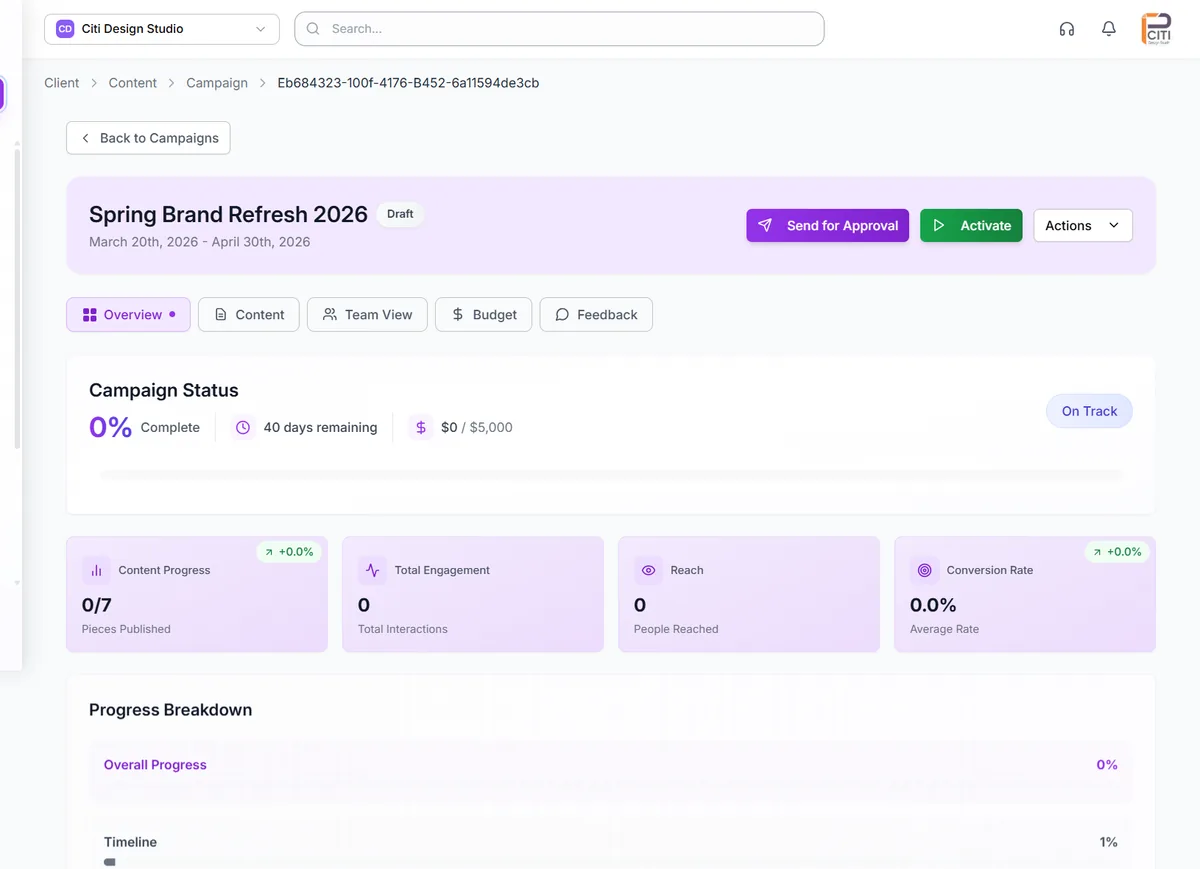
Campaigns are more than a collection of posts. They have objectives, budgets, timelines, and targets. CampaignSwift's campaign orchestration lets you organize content around strategic campaigns with full budget and expense tracking, visual content progress bars, team contribution stats, and 6-tab analytics covering Overview, Content, Team, Budget, Feedback, and Settings. Know exactly where every campaign stands, in real time.
The Campaign Management Problem
Why campaigns fall apart without proper orchestration
Campaigns Scattered Across Tools
01Your campaign plan lives in a Google Doc, content lives in a separate social media scheduling tool, tasks live in your project management app, and budget lives in a spreadsheet. No single place shows the complete picture of a campaign: its strategy, content, progress, spend, and results. Teams work from fragmented information, leading to misalignment and missed opportunities.
No Budget Visibility
02Campaign budgets are set at the start and never tracked in real time. By the time someone checks, the campaign has overspent or underspent with no way to course-correct. Expense categorization is nonexistent, making it impossible to understand where money went. Financial reporting requires manual reconciliation across multiple tools.
Can't Track Content vs. Targets
03You set a goal of 60 posts in a 30-day campaign, but have no way to visualize whether you're on track. Daily content targets aren't calculated. Gaps in the publishing schedule aren't surfaced until it's too late. The disconnect between content goals and actual output grows silently until the campaign underdelivers.
No Unified Campaign Performance View
04After a campaign ends, understanding its performance requires pulling data from social analytics, ad platforms, budget spreadsheets, and client feedback emails. There's no unified view that shows content performance, team contributions, budget utilization, and client sentiment in one place. Post-campaign analysis takes days instead of minutes. See our playbook on how to track social media sentiment for campaigns for the sentiment-side of campaign measurement.
Campaign Orchestration Capabilities
Everything you need to plan, execute, and measure campaigns
Campaign Creation & Setup
Define every aspect of a campaign from the start. Set the campaign name, objective, timeline with start and end dates, budget with currency support, target platforms, and categorization tags. Attach internal notes for team reference. Every campaign attribute is editable after creation, so plans can evolve as strategy shifts. Campaigns become the organizing principle that ties content, tasks, budget, and analytics together.
- Name, objective, timeline
- Budget with currency support
- Platform targeting
- Tags and internal notes
Content Progress Tracking
Visual progress bars show exactly how much content has been created versus your target. Daily content targets are automatically calculated from your campaign timeline: if your 30-day campaign needs 60 posts, the system knows you need 2 per day. Gap identification highlights days without scheduled content so you can fill holes before they become problems. Color-coded campaign indicators carry through to the content calendar for visual identification.
- Visual progress bars
- Auto-calculated daily targets
- Gap identification
- Calendar color coding
Budget & Expense Management
Set campaign budgets and track expenses against them in real time. See the remaining balance at a glance. Categorize expenses for clear financial reporting: distinguish between creative production, ad spend, influencer fees, and other costs. Budget data integrates with campaign analytics and client reporting, so financial performance is always part of the campaign picture.
- Budget setting & tracking
- Real-time balance calculation
- Expense categorization
- Financial reporting integration
Team Contribution Stats
See who created what within each campaign. Team contribution statistics break down content creation by team member, showing individual output and activity. An activity timeline captures all campaign events chronologically: posts created, tasks completed, approvals received, and budget updates. Managers get visibility into team productivity, and team members see how their work fits into the bigger picture.
- Per-member output stats
- Activity timeline
- Contribution visibility
- Workload insights
6-Tab Campaign Analytics
Every campaign has a dedicated analytics view with six tabs providing complete insight. Overview shows key performance indicators and campaign health. Content breaks down per-post performance within the campaign. Team shows contribution and performance metrics by team member. Budget tracks spend, ROI calculations, and budget pacing. Feedback aggregates client sentiment from approval workflows. Settings provides campaign configuration review and editing.
- Overview with KPIs
- Per-post content breakdown
- Team performance metrics
- Budget and ROI tracking
Soft Delete with Impact Analysis
Deleting a campaign is a significant action that affects content, tasks, and data. CampaignSwift shows you exactly what will be impacted before you confirm deletion: how many posts, tasks, and expense records are connected to the campaign. Deleted campaigns enter a recovery period before permanent removal, so accidental deletions can be reversed. This safety net prevents costly data loss.
- Pre-deletion impact preview
- Recovery period
- Content and task visibility
- Accidental deletion protection
How Campaign Orchestration Works
From strategy to measurable results
Create Your Campaign
Define the campaign with a name, objective, timeline, target platforms, and tags. Set the foundation that will organize all related content, tasks, and analytics.
Set Budget & Targets
Assign a budget with currency support and set content targets. The system calculates daily publishing goals from your timeline. Track expenses as they occur with categorization for clear reporting.
Track Content Progress
As your team creates and schedules content, visual progress bars update in real time. See how actual output compares to targets. Identify gaps in the schedule before they affect campaign performance.
Analyze Results
Use the 6-tab analytics view to understand campaign performance from every angle: content engagement, team contributions, budget utilization, client feedback, and overall campaign health.
Campaign Orchestration Scenarios
Illustrative scenarios of how teams plan and execute campaigns
Quarterly Content Campaign
Agency running a 90-day content campaign with 180 planned posts across 7 platformsThe content plan lived in a Google Sheet that quickly became outdated. Nobody tracked whether the team was on pace. Budget was approved at the start and never revisited. At the end of the quarter, the team had produced 120 posts instead of 180 and had no visibility into when they fell behind.
Campaign set up in CampaignSwift with 180-post target. Daily target of 2 posts automatically calculated. Progress bars showed the team falling behind in week 3, triggering a reallocation of resources. Budget tracking surfaced that ad spend was eating into content production budget. The campaign finished with 175 posts and on budget.
Product Launch Across 7 Platforms
Brand coordinating a product launch with organic, paid, and influencer contentProduct launch coordination happened in meetings, Slack channels, and email threads. Content was scheduled in one tool, ads in another, and influencer deliverables tracked in a spreadsheet. No unified view of launch readiness. The team discovered gaps in platform coverage 2 days before launch.
All launch content organized under one campaign in CampaignSwift. Platform coverage visible at a glance through campaign analytics. Content progress tracking showed all 7 platforms were covered. Budget tab tracked spend across content production, paid ads, and influencer payments. Team tab showed who contributed what to the launch effort.
Client Campaign with Budget Tracking
Agency managing a client's monthly campaign with a $15,000 budgetThe client allocated $15,000 for the month's campaign. The agency tracked expenses in a spreadsheet that was updated weekly at best. Mid-month budget checks required asking three different people for their spend numbers. End-of-month reports showed actual spend didn't match the spreadsheet.
Campaign budget set to $15,000 in CampaignSwift with expenses tracked in real time. Categorized expenses showed $8,000 on ad spend, $4,000 on content production, and $3,000 on influencer fees. The remaining balance was visible at all times. Client received accurate budget reporting as part of their automated campaign report.
Why Campaign Orchestration Matters at Scale
Spreadsheets stop working at the third or fourth client
Most agencies start with a spreadsheet. One client, one calendar tab, one row per post. It works fine until the third or fourth client, covered in our piece on multi-client social media management. Then the spreadsheet sprawls into something nobody can read on a Monday morning, the cross-channel view disappears, and you start missing things: a launch tied to a paid campaign through your campaign management software, a holiday promotion that should have gone live yesterday. Real campaign orchestration is what replaces that spreadsheet before it costs you a client.
What the orchestrator coordinates
A real campaign orchestrator manages the moving parts that used to live in 4-5 separate tools:
- Organic posts and paid placements: coordinated by launch date, not separately scheduled
- Approvals: routed through a structured social media approval tool instead of email threads
- Email triggers and content drops: tied to social launches so messaging stays consistent
- Reporting setup: analytics tagging happens at launch, not as an afterthought when the client asks how it went
The single source of truth past 10 clients
For agencies juggling 10+ accounts, the orchestrator becomes the single source of truth for what is going live, where, and when. Pair it with a unified content calendar and your campaign management software stack, and the operational chaos that broke your spreadsheet stops being a daily problem.
Campaign Orchestration FAQs
Common questions about campaign management
CampaignSwift supports flexible campaign objectives that match your strategic goals. When creating a campaign, you define the objective as part of the setup alongside the campaign name, timeline, budget, and target platforms. Objectives help organize your campaign analytics and provide context for performance evaluation. Whether your campaign is focused on brand awareness, engagement, lead generation, or sales, the objective frames how success is measured.
Set a campaign budget with currency support during creation. As expenses occur, log them against the campaign with categorization: distinguish between ad spend, content production, influencer fees, or any custom category. The remaining balance updates in real time. Budget data appears in the campaign's Budget analytics tab with spend tracking, ROI calculations, and budget pacing. This data also flows into automated client reports, so budget performance is always part of the campaign story.
When you set a content target for a campaign (e.g., 60 posts) and define a timeline (e.g., 30 days), CampaignSwift automatically calculates daily content targets, in this case 2 posts per day. Visual progress bars show actual content created versus the target in real time. The system identifies days without scheduled content, highlighting gaps so your team can fill them before they impact the campaign. This keeps content production on pace throughout the campaign lifecycle.
The Team tab in campaign analytics shows who created what within the campaign. Each team member's content contributions are tracked: how many posts they created, which platforms they covered, and when their content was published. An activity timeline captures all campaign events chronologically, including content creation, task completions, approvals, and budget updates. This gives managers visibility into team productivity and helps team members understand how their individual work contributes to campaign goals.
CampaignSwift uses soft delete with impact analysis for campaigns. Before deletion, you'll see exactly what will be affected: how many posts, tasks, and expense records are connected to the campaign. This prevents accidental deletion of campaigns with active content. After confirming, the campaign enters a recovery period during which it can be fully restored with all associated data. Only after the recovery period expires is the campaign permanently removed.
Every campaign has a dedicated analytics view with six tabs. Overview shows key performance indicators and overall campaign health. Content provides per-post performance breakdowns for all content within the campaign. Team shows contribution and performance metrics by team member. Budget tracks expenses, remaining balance, ROI calculations, and budget pacing. Feedback aggregates client sentiment and comments from approval workflows. Settings provides campaign configuration review and editing. Together, these tabs give you a 360-degree view of campaign performance.
Still have questions?
Our team is here to help. Book a 15-minute call to get all your questions answered.
Ready to put the busywork on agents?
Start with one client. Connect accounts, send your first approval link, and let the agents take the follow-ups. Plans start at $29/mo.
30-day free trial · No credit card · Cancel anytime
Questions? Book a 15-min demo call
Schedule Demo