Agency Project Management Software Built for How Agencies Work
Generic project tools were not designed for agencies. CampaignSwift is agency project management software built for multi-client teams: parallel campaigns, external client approvals, and the handoffs corporate tools never account for. Stop forcing your team into software designed for internal teams.
Why Generic Tools Fail Agencies
The problems that Asana, Monday, and ClickUp were never designed to solve
Tools Not Built for Multi-Client Work
01Asana, Monday, and Trello are great for internal teams at single companies. They are terrible for agencies managing 20+ external clients. You are hacking workarounds constantly. Workspaces, permissions, and views do not match how agencies actually operate.
Approval Process Hell
02Getting client approval means exporting, emailing, waiting, chasing, and manually updating status. Every approval cycle wastes hours because generic tools lack features for external stakeholders. Your team spends more time managing the process than doing the work.
No Client Visibility Without Oversharing
03Clients ask 'where is my project?' and you scramble to compile an update. There is no clean way to give clients visibility without exposing other accounts or internal discussions. You need a tool that lets clients see their work and nothing else.
Templates That Cannot Handle Agency Complexity
04Every client project is similar but not identical. Generic tools make it hard to standardize without losing flexibility. You need templates for the 80% that repeats while customizing the 20% that differs per client.
What agency project management software should include
Every feature designed for how digital marketing agencies actually operate
Multi-Client Workspaces
Each client gets their own workspace, while your team keeps a cross-client view for resource planning. One click moves you between accounts, and no client ever sees another client's data, files, or internal notes.
- Client separation
- Cross-client views
- Easy switching
- Unified dashboard
Agency Workflow Templates
Pre-built templates for campaigns, content production, website projects, and more. Customize once, deploy for every new client. Templates include tasks, timelines, dependencies, and approval stages tailored to agency work.
- Campaign templates
- Content workflows
- Custom stages
- Quick launch
Built-In Approval Workflows
Send deliverables for client approval with one click. Clients review and approve in-platform with visual markup. Track approval status across all clients from a single dashboard. Automated reminders keep things moving.
- One-click send
- In-platform review
- Approval tracking
- Auto reminders
Client Portals
Give clients visibility into their projects without exposing your internal work. They see status, approve content, and download deliverables, and you control exactly what is visible. The result: far fewer 'any update?' emails, because the answer is always one click away for them.
- Controlled access
- Status visibility
- Asset delivery
- White-label option
Resource Management Across Projects
See who is working on what across all clients. Assign work based on availability and skills. Prevent overload and missed deadlines. Forecast capacity weeks ahead so you can plan hiring or redistribute work before bottlenecks hit.
- Capacity planning
- Skill matching
- Workload balance
- Forecasting
Time & Budget Tracking
Track hours against project budgets. See which clients are profitable and which drain resources. Make informed decisions about scope, pricing, and staffing. Know your numbers while projects are running, not after they end.
- Time tracking
- Budget monitoring
- Profitability insights
- Utilization reports
Get Your Projects Organized Fast
Four steps to agency-grade project management
Set Up Client Workspaces
Create workspaces for each client. Import existing projects or start fresh with templates. Each client's work stays organized and separate while your team maintains cross-client visibility.
Configure Your Workflows
Use our agency templates or build custom workflows for your project types. Define stages, approvals, and automations. Set up once, then launch new projects in seconds.
Invite Your Team
Add team members with role-based permissions. Set up skills and availability for resource planning. Everyone sees exactly what they need, nothing more.
Launch Client Portals
Give clients access to their dedicated portals. They will love the transparency and self-service access. You will love the reduction in status update requests and email chains.
How Agencies Use CampaignSwift
Illustrative scenarios based on common agency workflows
The Juggling Full-Service Team
Nexus Digital, a 15-person agency managing 40 clients across SEO, social, paid, and web developmentUsing Monday for task tracking, but client communication lived in email and Slack. Constant context switching between tools. Deadlines were missed weekly because nothing was connected. Operations felt like a patchwork of workarounds.
All projects, approvals, and client communication run through one platform. The team knows exactly what to work on each morning. Deadlines are visible at a glance and missed deliverables dropped by 90%.
The Content Machine
Prose & Pixel, a 10-person content agency producing 200+ pieces per month for 25 clientsContent approval took days of back-and-forth emails. Writers waited for feedback while drafts sat in someone's inbox. Clients were frustrated by slow turnaround. Every piece felt like a mini-project in email management.
Clients approve directly in the portal. Writers see assignments and deadlines in one view. The content calendar software shows status across all clients. Feedback turnaround dropped from days to hours.
The Scope-Creep Survivors
BuildRight Agency, a web development shop handling 8-12 concurrent site buildsProjects started strong but delivery always slipped. Scope crept on every project. Nobody knew how much time was actually being spent until the invoice went out. Profitability was a mystery until month-end.
Clear project scopes with structured task hierarchies. Real-time time tracking shows hours spent per project so the team course corrects before deadlines slip. Profitability is visible on day one, not day ninety.
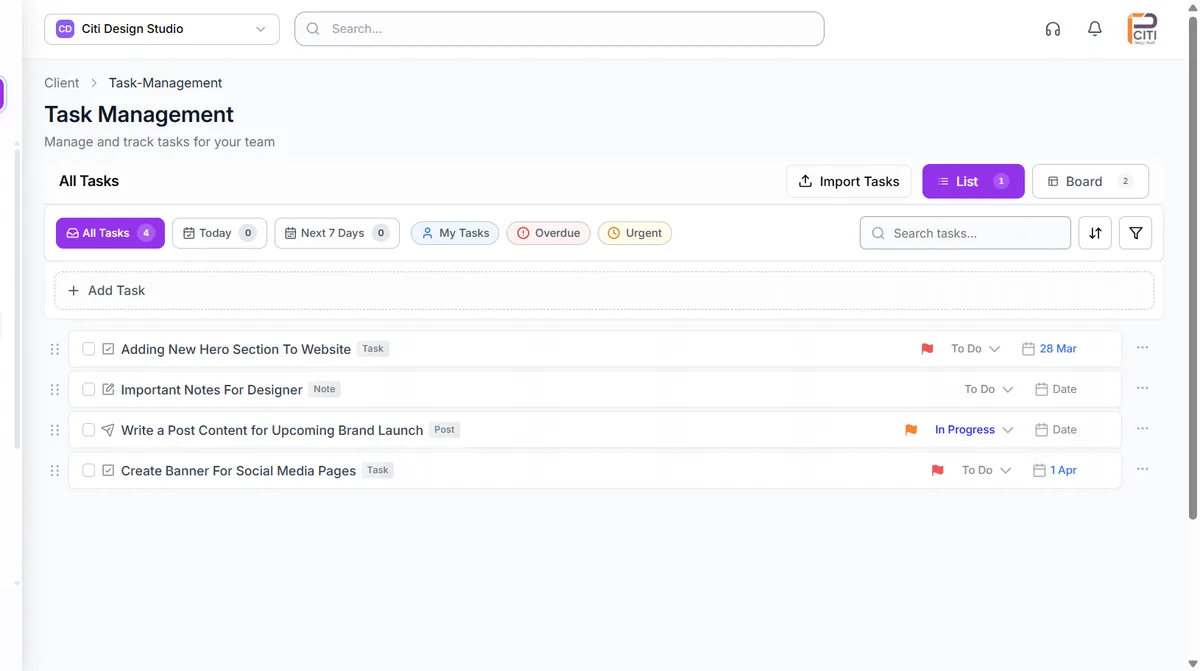
Why Generic Project Tools Fail Agencies
Asana is excellent. Monday is powerful. ClickUp is feature-rich. We are not here to argue otherwise. But they were all designed for software engineering teams and internal corporate workflows. Agencies are a fundamentally different animal.
The difference comes down to one word: clients. Internal project tools assume everyone on the project is an employee. Agencies need external stakeholders (people who are not on your team) to review work, approve deliverables through structured sign-off, and provide feedback. That single requirement breaks the assumptions baked into generic project management.
Three things agencies need that generic tools lack:
- Client-facing workflows: Approval gates where external stakeholders review and sign off, without seeing your internal notes or other client data
- Multi-tenant architecture: Clean separation between client accounts with a unified team view across all of them
- Campaign-aware task structures: Tasks that connect to campaigns, channels, and content calendars, not just generic to-do lists
We have talked to agencies who spent months customizing Asana to approximate these features. Custom fields, third-party integrations, Zapier automations, elaborate folder structures. It works, sort of, until something breaks or a new team member joins and cannot figure out the system.
The real cost is not the tool subscription. It is the maintenance overhead. Someone on your team becomes the unofficial Asana administrator, spending hours each week managing the workarounds that keep it functional. That time adds up to thousands of dollars in lost productivity annually, the same calculation behind how growing agencies avoid burnout by ditching tool sprawl.
We built CampaignSwift because we saw this pattern repeat at agency after agency. Client workspaces, approval workflows, resource management for billable team capacity, and campaign-connected task structures are not add-ons. They are core architecture. For design-heavy deliverables, dedicated creative approval workflows handle visual review the same way, so the whole project, copy and creative alike, moves through one sign-off chain. The result is a tool that works for agencies on day one, without the customization tax.
If you are currently bending a generic tool into an agency shape, check out our plans or book a walkthrough to see the difference purpose-built design makes.
Best Project Management Software for Agencies
What makes project management software "the best" for agencies is not the feature count. It is whether the tool was designed around the way agencies actually work. Agencies have external clients who need visibility, approval gates, and branded deliverables. They run parallel campaigns for competing clients who must never see each other's data. They onboard new clients monthly and need to spin up standardized workflows without rebuilding from scratch every time.
Most "best of" lists rank tools by feature volume or price. But agencies need to ask a different question: does this tool reduce the operational overhead that comes with managing external relationships? A tool with 200 features that still requires you to email PDFs for client approval is not better than a focused tool that handles approvals natively. A tool with beautiful Gantt charts that cannot separate client workspaces just creates more problems as you scale.
The best agency PM software passes a simple test: can a new team member join, understand the system in a day, and start contributing without an hour-long orientation on "how we use this tool differently from how it was designed?" If the answer is no, you are paying for software and then paying again in training time and lost productivity. CampaignSwift is built so that agency workflows, including client workspaces, approval stages, multi-campaign views, and resource allocation, are default behavior, not configurations you have to invent.
Software That Helps Agencies Manage Multiple Projects
Managing one project well is easy. Managing 40 projects across 15 clients with the same team is where agencies break down. The challenge is not the individual tasks. It is the cross-project coordination. When your designer is working on three client campaigns simultaneously, your strategist is reviewing deliverables for five accounts, and your project manager is trying to figure out who has capacity for the new client that just signed, you need more than a task list. You need a system that shows the whole picture.
CampaignSwift gives agency leaders a cross-client dashboard that shows every active project, who is assigned to what, and where bottlenecks are forming. The view doubles as a resource planning tool, not just a status board. You can see that your content team is overloaded next week while your design team has open capacity. You can spot a client whose project has stalled in the approval stage for three days, the exact bottleneck our agency approval workflow playbook is built to eliminate. You can catch a deadline conflict before it becomes a missed delivery.
The agencies that grow past 20 clients without burning out their teams are the ones that solved the multi-project visibility problem early. They do not rely on Monday morning stand-ups to find out what is behind schedule. They do not wait for a client to complain before realizing a project stalled. They have a system that surfaces problems before they become emergencies and distributes work before anyone drowns. That is what multi-project management actually means at an agency. It is not only tracking tasks, but keeping the entire machine running smoothly.
Frequently Asked Questions
What agencies ask before switching from generic tools
Both. CampaignSwift is agency workflow software and project management software in one. Project management handles the tasks, timelines, and deliverables; the agency workflow layer handles what generic project tools miss: client approval routing, multi-client data separation, and the handoffs between creators, account managers, and clients. For an agency, the workflow around the work matters as much as the task list itself.
Asana and Monday are built for internal teams at single companies, not agencies managing external clients. CampaignSwift includes client workspaces for data separation, approval workflows for external stakeholders, white-label client portals, and agency-specific templates. The multi-client architecture is fundamentally different from what generic tools offer.
Yes. Client portals give your clients secure access to their projects. They can see status, approve content, view deliverables, and communicate with your team, all without seeing other clients or your internal work. You control exactly what each client can access.
Send any deliverable for client approval with one click. Clients receive a notification, review in-platform with visual markup tools, and approve or request changes. All feedback is captured with full version history. Automated reminders ensure approvals do not get stuck.
Absolutely. Start with our built-in templates for common project types, then customize to match your exact workflows. Templates include task structures, timelines, dependencies, and approval stages. Once set up, launch new projects in seconds with consistent structure every time.
Add team members with their skills and weekly capacity. When assigning work, see who is available and qualified. The system prevents over-assignment and helps balance workloads. Forecast capacity weeks ahead to plan hiring or redistribute work before bottlenecks form.
Yes. Optional time tracking lets team members log hours against projects and tasks. You see time spent versus budgeted, which helps you understand profitability and improve future estimates. Track at the project, task, or client level depending on your needs.
CampaignSwift benefits any agency managing 5 or more concurrent clients. That includes marketing agencies, creative shops, web development firms, SEO agencies, PR firms, and advertising agencies. If you juggle multiple client projects with approvals and deadlines, it is built for you.
Most agencies are fully operational within one to two weeks. We help migrate existing projects, configure workflows, set up client workspaces, and train your team. Unlike generic tools that need extensive customization, CampaignSwift works for agencies out of the box.
Still have questions?
Our team is here to help. Book a 15-minute call to get all your questions answered.
Ready to put the busywork on agents?
Start with one client. Connect accounts, send your first approval link, and let the agents take the follow-ups. Plans start at $29/mo.
30-day free trial · No credit card · Cancel anytime
Questions? Book a 15-min demo call
Schedule Demo