How to Reduce Your Agency Tool Stack Costs
Price out a typical 12-tool stack (scheduling, analytics, approvals, project management, CRM, reporting) and the subscriptions alone often land north of $1,400/month before per-seat fees. Between pricing traps, duplicate functionality, and the invisible cost of context switching, disconnected software is quietly eating your margins. This is a practical way to audit, consolidate, and reduce your agency tool stack costs.

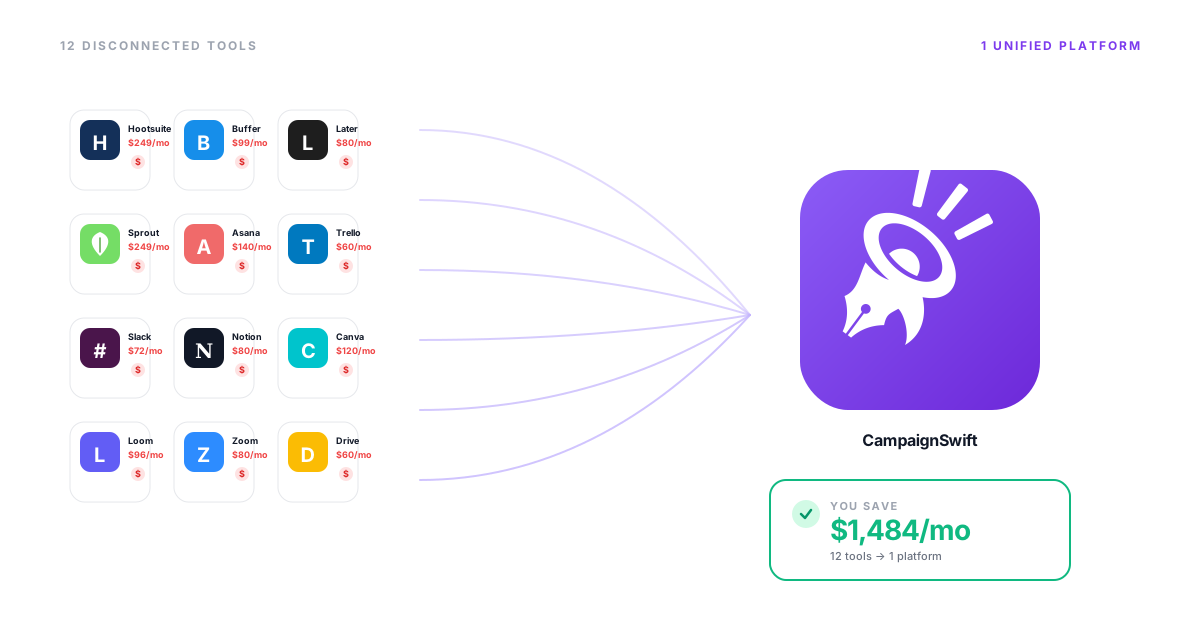
The Hidden Costs of a Bloated Tool Stack
What disconnected SaaS tools are really costing your agency
Context Switching Kills Productivity
01Every jump between disconnected tools breaks focus. UC Irvine research found it takes around 23 minutes to fully refocus after an interruption. Multiply that across a team toggling between a dozen apps all day, and the lost time adds up to entire workdays every week: hours that could be spent on client work, strategy, or growth.
Per-Seat Pricing Traps Scale Against You
02That $29/seat/month tool seemed affordable when you had 3 people. Now you have 15 team members across 8 different tools, and per-seat pricing has quietly ballooned into your second-largest expense after payroll. Every new hire multiplies the cost across every tool.
Data Silos Fragment Your Reporting
03Client data lives in your social media scheduling tool, analytics in another, CRM in a third, and project status in a fourth. Building a single client report means logging into 5+ dashboards, exporting CSVs, and manually stitching data together. No one has the full picture.
Duplicate Features Waste Budget
04Your project management tool has a calendar. So does even the most basic of scheduling tools for agencies. And your CRM. And your team chat. You're paying for the same basic features (calendars, notifications, file storage, reporting) four or five times over across overlapping tools.
Six Ways to Cut Your Agency Tool Stack Costs
Practical strategies to reduce SaaS spend and reclaim productivity
Audit Every Active Subscription
Start by listing every tool your agency pays for, including the ones people forgot about. Check credit card statements for recurring charges. You'll likely find 2-3 tools nobody uses, trials that converted to paid, and overlapping subscriptions across departments.
- Find zombie subscriptions
- Identify overlap
- Calculate true total cost
- Map feature redundancy
Map Tools to Actual Workflows
For each tool, document who uses it, how often, and for what specific tasks. If a $200/month tool is only used for one feature that a cheaper alternative covers, that's an easy cut. If three tools each handle part of the same workflow, that's a consolidation opportunity.
- Usage frequency tracking
- Feature utilization audit
- Workflow dependency map
- Elimination candidates
Replace Point Solutions With a Unified Platform
The biggest savings come from replacing 5-8 single-purpose tools with one platform that covers the full workflow. Instead of separate tools for scheduling, analytics, inbox management, client approvals, and reporting, choose one agency platform that handles all of it.
- Eliminate tool switching
- Single source of truth
- Unified client data
- Predictable pricing
Negotiate Annual Plans and Volume Discounts
If you must keep individual tools, negotiate. Most SaaS companies offer 20-40% discounts for annual billing. If you're a larger team, ask for volume pricing. Mention competitors. The discount you don't ask for is the one you never get.
- Annual billing savings
- Volume pricing tiers
- Competitor quote comparisons
- Contract flexibility
Eliminate Per-Seat Pricing Where Possible
Per-seat pricing is the silent margin killer for growing agencies. Seek out platforms with flat-rate or unlimited-user pricing models. When your team grows from 10 to 20 people, your tool costs shouldn't double. Flat pricing aligns vendor costs with your growth.
- Flat-rate models
- Unlimited user plans
- Growth-friendly pricing
- Predictable budgeting
Centralize Reporting and Analytics
The hours spent manually compiling reports from multiple dashboards represent a massive hidden cost. Consolidating analytics into a single reporting layer eliminates export-and-stitch workflows and gives your team, and your clients, real-time visibility without the busywork.
- Automated report generation
- Cross-channel insights
- Client portal access
- White-label delivery
The 4-Step Agency Tool Stack Audit
A practical framework to identify savings
Inventory and Categorize
Pull every SaaS charge from your accounting software or credit card statements for the past 3 months. Categorize each tool: social media, project management, CRM, communication, analytics, design, accounting, and other. Calculate the total monthly cost per category and per seat.
Score Usage and Overlap
Survey your team: which tools do they use daily, weekly, rarely, or never? For each tool, list the specific features used. Then map overlaps: if three tools offer task management, that's redundancy. Score each tool: critical (daily, no alternative), useful (regular but replaceable), or eliminable (rarely used or redundant).
Model Consolidation Scenarios
Build three scenarios: light cuts (cancel unused tools, save 10-15%), moderate consolidation (replace redundant tools, save 25-35%), and full platform migration (move to unified solution, save 40-60%). Calculate savings for each, including the hidden cost of context switching time at your team's hourly rate.
Execute and Measure
Start with the easy wins: cancel unused subscriptions immediately. Then plan the consolidation migration over 2-4 weeks with proper data export and team training. Track savings monthly and measure productivity gains through reduced context switching and faster reporting turnaround.
Agency Tool Stack Consolidation in Action
Worked examples showing the cost-saving impact of consolidation
15-Person Social Media Agency
Growing team drowning in per-seat costs across 9 toolsPaying for Hootsuite ($599/mo), Sprout Social ($749/mo for 3 seats), Asana ($225/mo), Slack ($187/mo), Canva Teams ($150/mo), Google Workspace ($210/mo), HubSpot ($450/mo), Meltwater ($833/mo), and Toggl ($135/mo). Total: $3,538/month. Every new hire added $200+ across tool stack.
Consolidated social management, analytics, client portal software, and reporting into CampaignSwift's Scale plan ($397/mo, unlimited seats). Kept Slack ($187), Google Workspace ($210), and Canva ($150). Dropped 5 tools entirely. New total: $944/month with room to grow without per-seat penalties.
Solo Agency Scaling to 5 People
Founder's personal tools becoming unsustainable as team growsStarted with free or cheap solo plans across 12 tools. As each team member joined, per-seat costs multiplied. Tool stack went from $180/month to $1,100/month in 8 months. Budget shock with every hire.
Replaced 8 separate tools with CampaignSwift's unified platform. Flat per-plan pricing meant the 5th hire didn't increase tool costs at all. Simplified onboarding from 2 days of tool training to half a day.
Multi-Client Agency With Reporting Chaos
Spending 2 full days per month on manual client reportingAccount managers spent 15+ hours monthly pulling data from separate analytics, social, and ad platforms to build client reports. Data often conflicted between tools. Reports were late and inconsistent.
Unified analytics and automated reporting through CampaignSwift's client portals. Reports generated automatically with white-label branding. Clients access real-time dashboards instead of waiting for monthly PDFs.
The Agency Tool Stack Cost Breakdown
Most agency owners know their tool costs are high, but few realize just how high until they see the full picture. Below is a typical cost breakdown for a 15-person digital marketing agency running disconnected point solutions.
| Category | Typical Tool | Monthly Cost | Per-Seat Impact |
|---|---|---|---|
| Social Media Management | Hootsuite / Sprout Social | $299 - $749 | $50 - $249/seat |
| Project Management | Asana / Monday.com | $150 - $300 | $10 - $24/seat |
| CRM | HubSpot / Salesforce | $200 - $800 | $45 - $150/seat |
| Analytics / Reporting | Meltwater / Brandwatch | $500 - $1,000 | Custom pricing |
| Team Communication | Slack / Teams | $100 - $200 | $7 - $12/seat |
| Time Tracking | Toggl / Harvest | $75 - $150 | $9 - $12/seat |
| Client Approvals | Gain / ContentCal | $50 - $200 | Varies |
| Total | $1,374 - $3,399 | Scales with every hire |
The Invisible Cost You're Not Counting
The table above only shows subscription fees. Run your own worked example: if tool switching costs your team a combined 15-20 hours per week at a blended rate of $60-$100/hour, that's an additional $3,600 - $8,000/month in lost productivity, often more than the subscriptions themselves. Use our ROI Calculator to estimate your agency's true cost with your own numbers.
Your Tool Stack Audit Checklist
Use this checklist to evaluate every tool in your agency's stack. Print it out or save it, and be honest about usage.
- 1. List every recurring SaaS charge from the past 90 days: check credit cards, PayPal, and direct debits. Include forgotten trials.
- 2. Calculate actual per-user cost by multiplying per-seat fees by total users. Include admin seats, client seats, and contractor access.
- 3. Tag each tool as Critical, Useful, or Eliminable. Critical means daily use with no alternative. Useful means weekly use but replaceable. Eliminable means rarely used or fully redundant.
- 4. Map feature overlap. List the top 3 features you use in each tool. Highlight duplicates. If three tools offer task management, that's three subscriptions for one need.
- 5. Estimate context switching time. Ask each team member how many tools they use daily and how often they switch. Multiply switches by 2-5 minutes of lost focus per switch.
- 6. Calculate reporting assembly time. How many hours per month does your team spend building client reports by pulling data from multiple dashboards?
- 7. Model the consolidated alternative. Price out a unified platform that covers your Critical and Useful needs. Compare total cost including time savings.
What Consolidation Actually Looks Like
This is a before-and-after comparison for a typical 15-person agency making the switch:
Before: 9 Disconnected Tools
- Social scheduling: $399/mo
- Analytics platform: $599/mo
- Client approval tool: $149/mo
- Project management: $225/mo
- CRM: $450/mo
- Reporting tool: $299/mo
- Inbox management: $199/mo
- Time tracking: $135/mo
- Team chat: $187/mo
Total: $2,642/month
After: 3 Tools (Unified Core)
- CampaignSwift Scale plan (social, analytics, approvals, reporting, inbox, projects, unlimited seats): $397/mo
- Team chat (Slack): $187/mo
- Time tracking (Toggl): $135/mo
Total: $719/month
Saving $1,923/month ($23,076/year)
The math is straightforward: consolidating your operational core into one platform eliminates redundant subscriptions, removes per-seat multiplication across tools, and reclaims the hours your team spends switching between disconnected interfaces. Explore the full feature set to see what's included. Analytics is usually the first category worth consolidating. Many agencies consolidate into one of the best social media analytics tools rather than paying for three overlapping dashboards.
Ready to Cut Your Tool Stack Costs?
CampaignSwift replaces 6-8 agency tools with one unified platform: flat per-plan pricing, no per-seat traps, unlimited seats on the Scale plan. Calculate your exact savings or see the platform in action.
Agency Tool Stack Cost Reduction: FAQs
Common questions about consolidating your SaaS tools
Price out the typical categories (social media management, project management, CRM, analytics, design tools, communication platforms, and assorted point solutions) and a 10-20 person agency usually lands somewhere between $1,200 and $2,500 per month. Most agencies underestimate their true spend, often substantially, because charges are spread across multiple credit cards and departments.
Context switching is the mental cost of moving between different tools and tasks. Research from UC Irvine shows it takes an average of 23 minutes to fully refocus after a distraction. Run the math for your own team: if switching between 12+ tools costs each person even an hour a day, a 10-person team at a $75/hour blended rate is losing over $15,000/month in transition time before a single subscription fee is counted.
Start with data: calculate exact monthly costs across all tools and estimate hours lost to switching. Run a two-week time audit where team members log tool switches. Present the savings opportunity. Then propose a pilot: run the consolidated platform alongside existing tools for 30 days. Let the team experience the efficiency firsthand before fully committing. Most resistance fades once people feel the difference.
Modern unified platforms like CampaignSwift cover 80-90% of the features agencies actually use from their individual tools. The key question isn't whether a consolidated platform has every feature from every tool. It's whether it covers the features your team actually uses daily. Most agencies find they were paying for far more features than they needed. The 10-20% of niche features rarely justify the cost and complexity of maintaining separate tools.
A typical migration takes 2-4 weeks. Week 1: data export and account setup. Week 2: team training and parallel operation. Weeks 3-4: gradual transition with legacy tools as backup. Most teams are fully operational on the new platform within 30 days. The key is not to rush: run both systems simultaneously during transition so nothing falls through the cracks.
Per-seat pricing charges for each user who accesses the platform (e.g., $29/user/month). This model punishes growth: adding team members directly increases costs. Flat-rate pricing charges a fixed monthly fee regardless of how many users access the platform. For agencies, flat-rate is significantly more cost-effective because team sizes fluctuate and per-seat costs compound across multiple tools.
Follow these steps: 1) Pull all recurring SaaS charges from your credit cards and accounting software for the past 90 days. 2) List every tool, its monthly cost, number of seats, and primary use case. 3) Survey your team on which tools they use daily, weekly, or never. 4) Identify overlapping features across tools. 5) Calculate total cost including per-seat fees. 6) Flag tools that are unused, underused, or redundant. Most agencies discover 20-30% immediate savings just from this exercise.
Absolutely, and this is often the smartest approach. Keep specialized tools that do something truly unique (like advanced design software or niche analytics). Consolidate the operational core: social media management, client communication, project management, reporting, and analytics. The goal isn't to force everything into one tool. It's to eliminate the redundancy and fragmentation in your operational workflow where most waste occurs.
Still have questions?
Our team is here to help. Book a 15-minute call to get all your questions answered.
Ready to put the busywork on agents?
Start with one client. Connect accounts, send your first approval link, and let the agents take the follow-ups. Plans start at $29/mo.
30-day free trial · No credit card · Cancel anytime
Questions? Book a 15-min demo call
Schedule Demo