Digital Marketing Agency Software Mapped to Your Stack
CampaignSwift is digital marketing agency software for the client-facing work: publishing to 7 social platforms, client approval, a social inbox, scheduled reports and a record for every client, in one workspace per client. This page maps the tools a digital marketing agency usually runs against what CampaignSwift covers, including the jobs it doesn't, so you can see what you would keep.
How a digital marketing agency ends up with ten tools
Nobody plans a ten-tool stack. It builds up one sensible purchase at a time.
A tool for every job
01A scheduler, a social inbox, a reporting tool, an approval tool, a task tool and a shared drive, each added for a good reason. Together they mean six logins per person and six places a client's work can hide.
Per-seat bills that grow with the team
02Most of those tools charge per user. Every hire adds a line to each invoice, so the stack gets more expensive exactly as the agency gets busier.
Client work split across tools
03The content plan is in one tool, approvals in an email thread, results in another dashboard. Answering a simple client question means opening all three.
Monthly reports built by hand
04Someone exports numbers from each tool, pastes them into slides and fixes the formatting, client by client, at the start of every month.
The digital marketing agency software stack, job by job
Here is the stack most digital marketing agencies end up with, and where CampaignSwift fits. The first eight jobs it covers; the last four it doesn't, and we would rather say so here than after you sign up. Every connection it supports is on the integrations page.
| The job | What agencies usually use | CampaignSwift |
|---|---|---|
| Social scheduling and publishing | A scheduler such as Hootsuite or Buffer | Yes, to 7 platforms |
| Content calendar and planning | Spreadsheets or a project tool | Yes, with campaigns and a Monthly Planner agent |
| Client approval of content | Email threads or an approval tool | Yes, by no-login link (Professional and up) |
| Social inbox for DMs and mentions | Native apps or an inbox tool | Yes, for Facebook, Instagram and X (Professional and up) |
| Client reports | A reporting tool or slides | Yes, scheduled, with GA4 data (Search Console on demand) |
| Tasks and internal review | Asana, ClickUp or Trello | Yes, tasks with a review step and time logs |
| Client records | A spreadsheet or the CRM | Yes, a record and workspace per client |
| Brand files | Google Drive or Dropbox | Yes, a media library with Drive, Dropbox and Canva |
| Paid ads management | Google Ads and Meta Ads Manager | Not in the app at the moment |
| CRM and sales pipeline | HubSpot or Pipedrive | No |
| Invoicing and billable hours | QuickBooks, Xero or Harvest | No (time logs only) |
| SEO research and rank tracking | Semrush or Ahrefs | No (Search Console data in reports) |
If most of your work sits in the first eight rows, one workspace per client replaces several subscriptions. If your agency lives in the last four, keep those tools and use CampaignSwift alongside them. Our guide to cutting agency tool stack costs walks through which tools to drop first.
Digital marketing software for agencies, in one workspace
The six jobs from the table that CampaignSwift runs day to day.
Publishing and the calendar
Plan, write and schedule posts for every client on one calendar, with captions edited per network and AI help when you want it. See social media scheduling.
Approvals that reach the client
Internal review steps first, then the client signs off from a link with no login. Reminders go out when they go quiet. More on the agency client portal.
One inbox per client
Direct messages from Facebook, Instagram and X arrive in each client's social media inbox, with tags and mentions beside it, and AI drafts replies for a person to send.
Reports on a schedule
Reports draw on each client's social accounts and Google Analytics and go out weekly or monthly by email; reports you run on demand can add Search Console. See agency reporting.
A record for every client
Contact and company details, connected accounts, campaigns, tasks and files sit in each client's workspace. That is the core of our agency client management software.
Tasks and team
Folders, tasks and subtasks with owners, due dates, a submit-and-review step and time logs, plus team members with access levels. See task management.
What is digital marketing agency software?
Digital marketing agency software runs the work an agency does for its clients across channels: planning and publishing content, getting it approved, answering messages and reporting the results. The difference from software for a single brand is the client: everything has to be separated by client, and the client has to be able to take part without joining your tools.
It overlaps with two other kinds of software for a digital marketing agency. Project management tools track tasks and deadlines, which our agency project management software guide covers. Agency management or PSA tools handle hours, budgets and invoices. If your work is mostly campaigns, our marketing agency project management software page goes deeper, and if you run SEO and PPC alongside social, see digital agency project management software.
A calendar for every client's month
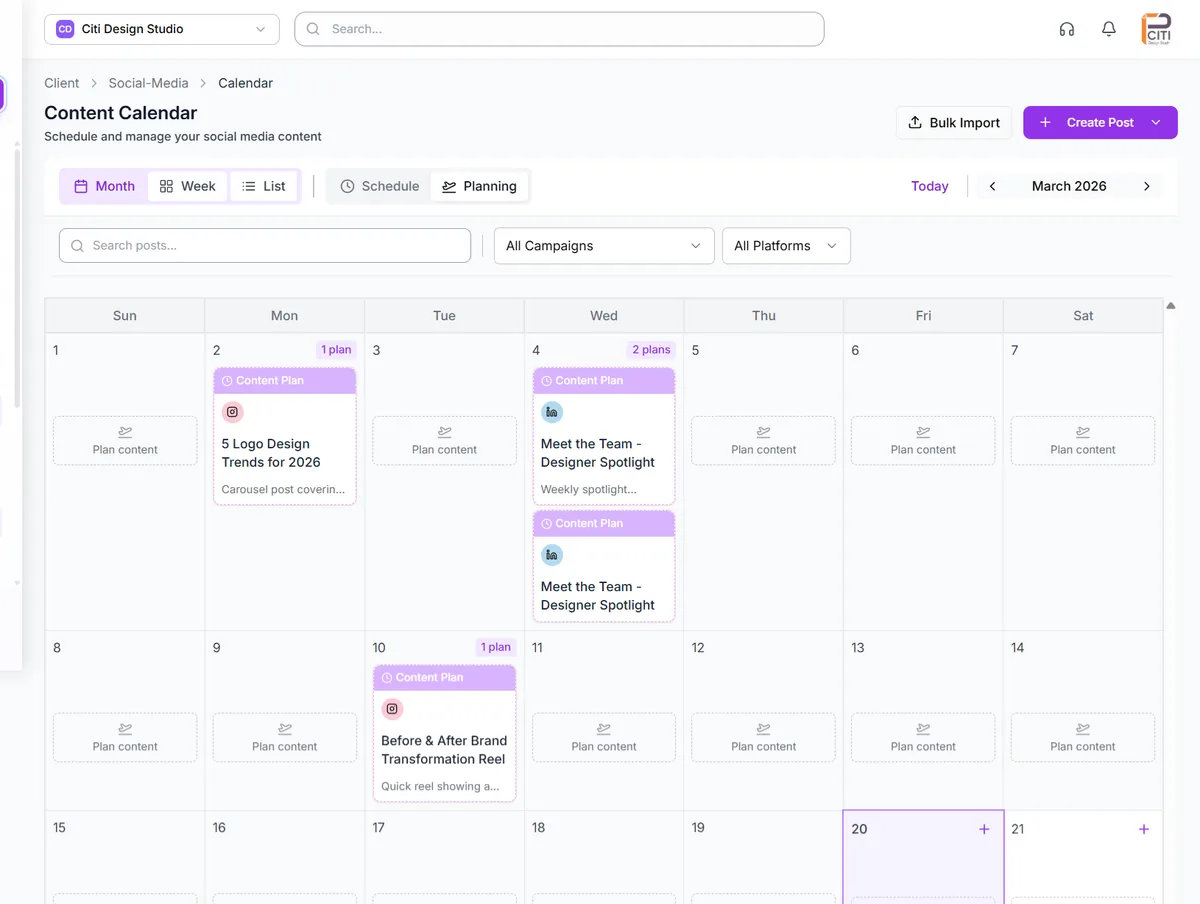
Each client has a content calendar in month, week and list views, with a planning view for ideas that aren't posts yet. Filter by campaign or platform, import posts in bulk, and see at a glance which days still need content.
Plans turn into posts when they are ready, and posts move through review before anything goes out. The editorial calendar page covers planning in more detail.
One post, written for each network
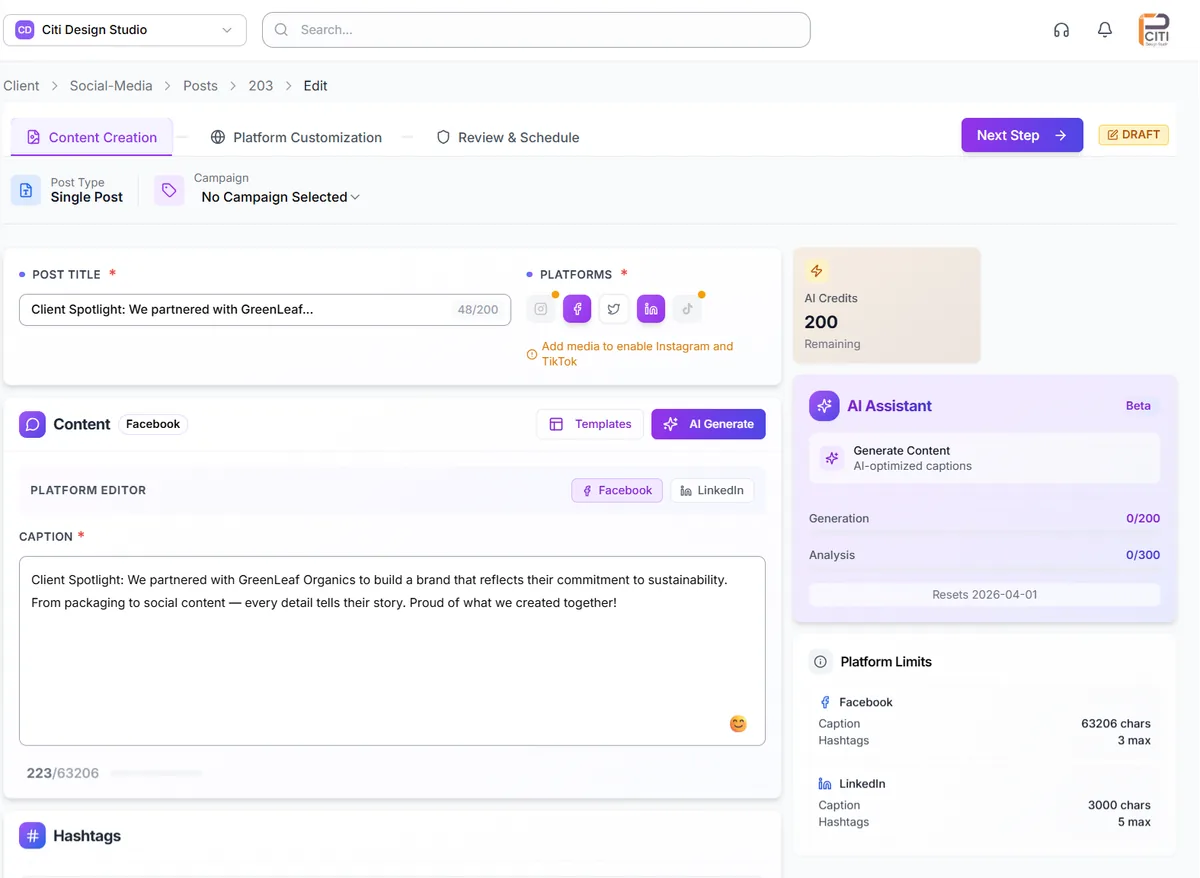
Write a post once, then adjust the caption for each network inside the same editor, with each platform's character and hashtag limits shown as you type. Templates and AI generation are there when you want a first draft, and AI usage is metered against your plan's credits.
From the editor the post goes to review, then to the client by link if it needs their sign-off. More on AI content generation.
AI agents for the busywork around client work
Agents draft, sort and follow up. Nothing reaches a client until a person on your team has checked it, and agent alerts land with the agency owner.
Content Suggestion and Monthly Planner
Ideas grounded in each client's voice and results, and a Monthly Planner that drafts a month of content for your team to review in one pass.
Reporting & Retention
Scores every client's churn risk each week and writes a plain-English account of what your work did for their traffic and conversions.
Owner Digest
One brief for the agency owner with stalled approvals and at-risk clients, sent only when something needs attention. The Owner Digest guide explains what goes in.
Setting up digital marketing agency management software in four steps
It happens once per client, and the workspace setup guide walks through each step.
Add your clients
Import your client list from a CSV or Excel file, or add clients one at a time.
Connect their accounts
Link their social profiles, plus Google Analytics 4 and Search Console for the reports.
Set up review
Decide your internal review steps and which work goes to the client by link.
Schedule reports
Choose each client's report and whether it goes out weekly or monthly.
How digital marketing agencies use CampaignSwift
Three common setups, written as examples rather than customer case studies.
Social-first agency
A scheduler, an inbox tool, a reporting tool and a shared drive, each billed per seat, and approvals in email.
Publishing, approvals, the inbox, reports and brand files run in one workspace per client, priced per plan.
Agency adding SEO and paid
Search results lived in Search Console exports and ad results in each ad manager, so the monthly report took a day.
Social and Google Analytics go out in a scheduled report, and Search Console is added when the report is run before the call. Ads stay in Google Ads and Meta for now, and the report covers the rest.
Small team, big clients
The owner chased approvals, answered status emails and built every report personally.
Approval Shepherd follows up on stalled sign-offs, reports go out on a schedule and the Owner Digest flags what needs the owner.
Choosing software for a digital marketing agency
The best software for a digital marketing agency is the set that removes the most manual work without leaving gaps. Three questions sort the options.
Which jobs take the most time each week?
If it is approvals, reporting and juggling client accounts, a delivery platform pays off fastest. If it is chasing invoices or planning who works on what, start with accounting or a PSA tool.
Does it keep clients separate?
Every client's accounts, posts, approvals and reports should live apart, so nothing goes out under the wrong brand. In CampaignSwift each client has a workspace, and multi-client management explains how switching between them works.
What does it cost as the team grows?
Per-seat pricing grows with every hire. CampaignSwift is priced per plan, from $29 to $397 a month, with a set number of clients and seats on each; the pricing page has the details.
Where CampaignSwift stops
It is not a CRM, an accounting tool or an SEO suite, and managing Meta and Google ad campaigns isn't available in the app at the moment. The inbox covers Facebook, Instagram and X, and white-label covers review pages and, on Scale, reports, not a custom domain. Keep the tools that do those jobs; CampaignSwift runs alongside them.
Common questions from digital marketing agencies
What agencies ask before they move their stack.
Ready to put the busywork on agents?
Start with one client. Connect accounts, send your first approval link, and let the agents take the follow-ups. Plans start at $29/mo.
30-day free trial · No credit card · Cancel anytime
Questions? Book a 15-min demo call
Schedule Demo