Social Media Client Onboarding Questionnaire and Checklist
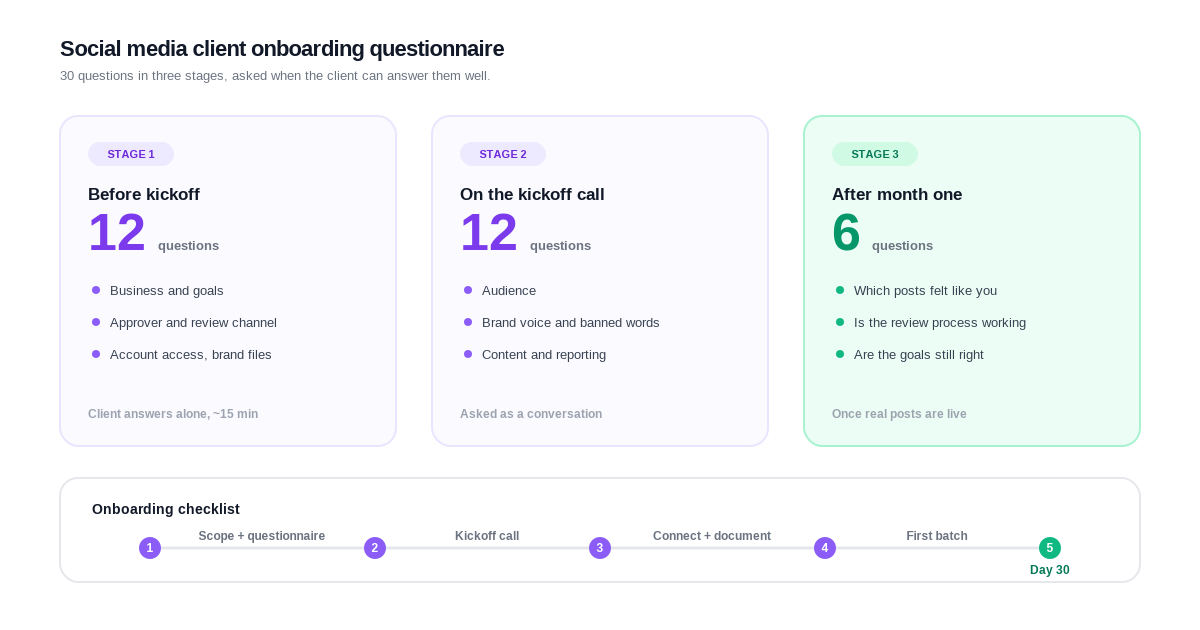
A social media client onboarding questionnaire only helps if the client actually finishes it. This one has 30 questions split into what to send before kickoff, what to cover on the call, and what to ask once the first month of posts is live. It comes with a checklist that takes a new client from signed contract to the 30-day review, and you can copy all of it without signing up for anything.

The Social Media Client Onboarding Questionnaire: 30 Questions
Most onboarding templates send every question at once. The client opens a 50-question form, answers the easy half and leaves the rest for later, and later rarely comes. We split the questions by when they are easiest to answer well. Under each one is a line on why it is worth asking, so you can cut the ones that do not fit your clients.
Copy the list into whatever you already use, whether that is a shared doc, a form builder or an email. If approvals are a sore point with your clients, the approvals block is the one not to trim: it decides most of the normal client approval time you will live with for the rest of the contract.
Send before the kickoff call
Twelve questions the client can answer on their own in about 15 minutes. These are the answers you need before you can plan anything, and the ones that cause the most delay when they turn up late.
Business and goals
- 1
In one or two sentences, what do you sell, and who buys it?
If the client cannot say this simply, the content will not either. It is also the line you will reuse in every brief.
- 2
What would make the next 90 days of social media a success for you?
Ninety days is long enough to show results and short enough to stay concrete. Vague answers here are your first red flag.
- 3
Which one or two numbers will you judge us on?
Followers, reach, engagement, website visits, leads or sales. Getting the client to pick one or two now prevents an argument about what counts later.
- 4
What have you tried on social media before, and what did or did not work?
Saves you repeating an experiment they already paid for, and tells you how the last agency or freelancer relationship ended.
- 5
Is there a launch, sale, event or seasonal peak in the next three months?
Anything time-sensitive shapes the first content plan and needs a longer approval buffer.
Approvals and communication
- 6
Who approves content, and who has the final say if reviewers disagree?
One named final approver is the single biggest factor in how fast work gets signed off, and it is the starting point for any social media approval process you set up later.
- 7
How quickly can you usually review a post: same day, within two days, or in a weekly batch?
Their honest answer tells you how far ahead to plan. A weekly-batch client needs content ready a week early.
- 8
Where should review requests go: email, WhatsApp, Slack or somewhere else?
Send requests to the app the client actually checks. In WhatsApp-first markets that alone can move approvals to the same day.
- 9
Are there topics, claims or kinds of post that legal or compliance must see first?
Regulated clients need an extra review step built in from the start, not discovered after a post goes live.
- 10
Who do we contact if something urgent happens on your accounts, including out of hours?
A negative post going viral at 9pm is not the moment to look for a phone number.
Access and assets
- 11
Which social accounts do you have today, and who controls each one?
Accounts are often tied to a former employee's personal login or a previous agency. Find out now, because it can take days to untangle.
- 12
Can you add us through each platform's partner or admin settings and share your brand files (logos, fonts, colours, photos)?
Role-based access means no passwords change hands, and brand files in week one mean the first posts look right. Keep them in one brand asset library per client so nobody has to ask twice.
Cover on the kickoff call
Twelve questions that work better as a conversation, because the follow-up question is usually more useful than the first answer. Read the stage 1 answers before the call so you can skip what is already clear.
Audience
- 13
Describe your best customer: who are they, where are they, and what do they care about?
Push past demographics. A specific person you can picture is what makes captions sound like they were written for someone.
- 14
What do customers ask most often before they buy?
Those questions are ready-made post ideas, and they show which objections the content needs to answer.
- 15
Which platforms do your customers actually use, as far as you know?
Clients often want to be everywhere. This keeps the plan focused on where the audience already is.
Brand voice
- 16
Give us three words for how the brand should sound, and three it should never sound like.
The never-list is often more useful than the target list. It is how you avoid the post that gets rejected on tone alone.
- 17
Which accounts, brands or posts do you admire, in your industry or outside it?
Examples settle questions that adjectives cannot. 'Friendly but expert' means something different to everyone.
- 18
Are there words, emojis, topics or competitors we must never mention?
Banned words and off-limits subjects belong in writing before the first caption is drafted.
- 19
Can we reply to comments and messages ourselves, and what must be handed back to you?
Complaints, refunds, press and anything legal usually need the client. Agree the hand-back rule before the first awkward comment arrives, especially if your team works from a unified social inbox.
Content and reporting
- 20
What content do you already have, and what can you produce regularly?
Photos, video, testimonials and blog posts. If the client cannot supply anything, shoots or stock need to be part of the plan and the price.
- 21
Who can we feature: staff, customers, the founder?
People-led content usually outperforms product shots, but it needs permission and someone willing to be on camera.
- 22
How often do you expect us to post on each platform, and is there paid social it should support?
Turns expectations into a number you can check against the scope, and tells you whether organic and paid need to share a calendar.
- 23
How would you like results reported, and how often?
A one-page monthly summary, a live report link or a call. Agreeing the format now means the first report is not a surprise. Our guide to agency reporting tools compares the options.
- 24
Who are your three main competitors, and what do they do well on social media?
Gives you a benchmark the client already believes in, and shows what they will compare your work against.
Ask after the first month
Six questions for the 30-day check-in. Clients answer these far better once they have seen real posts, which is why they do not belong in the first form.
First-month review
- 25
Which of this month's posts felt most like you, and which felt off?
Real examples sharpen the brand voice faster than any adjective list from the kickoff call.
- 26
Is the review process working for you, or is it too frequent or too slow?
If approvals are already a strain at month one, fix the process now, before it becomes the reason the client leaves.
- 27
Have you heard anything from customers about the new content?
Anecdotes from the client's side often show up before the numbers do, and they are worth putting in the first report.
- 28
Do the numbers we agreed still feel like the right measure of success?
Goals set before the work started sometimes need adjusting. Better to change them openly than to drift.
- 29
Is anything coming up next month that we should plan around?
Keeps the content calendar ahead of the client's business rather than reacting to it.
- 30
What would you like more of, and less of, next month?
A simple question that gives the client a say without reopening the whole strategy.
Planning a launch for a new client? Our free marketing campaign plan template turns the stage 1 answers on goals and key dates into a dated plan with room for review deadlines.
Reading the Answers: Red Flags Worth Catching Early
A questionnaire is not only a way to collect information. The answers also tell you how the relationship is going to run, and a few of them are worth stopping on before you start work.
Answers that mean the goal is not agreed yet
When the success question comes back as "more followers" or "go viral", the client has not yet connected social media to their business. That is fine at the start, but it has to be settled on the kickoff call, not left for the first report. Watch for these:
- "Everyone" as the audience. Content written for everyone lands with no one. Ask who their last five customers were.
- A success number with no business link. Followers can be the right goal, but only if the client can say why they matter.
- Different answers from different people. If the founder and the marketing manager disagree on the goal, you have found the real first job.
No named approver is the flag that costs the most
Across the agencies we work with, approvals take anywhere from 1 hour to 3 days by email, and content goes through 1 to 9 rounds of revisions. The slow, high-round end almost always involves several reviewers replying separately with nobody holding the final say. One name on the form fixes most of it.
Answers that predict a slow first month
"We'll just send you the logins" means the client does not know how platform roles work, and probably not who controls the accounts either. An empty answer to the content question means the plan needs photography or stock in it. A request to post daily on every platform, with no content to post, means expectations and budget need another conversation. Raise each of these on the call, and write the outcome into the scope.
What to do with a red flag
A red flag is rarely a reason to turn a client away. It is a reason to agree something in writing before the work starts: a goal, an approver, a review window, a limit on revision rounds. If you manage many accounts, keeping those agreements on each client record, next to the client's accounts, approvals and reports, means the next person to work on the account sees them too.
Social Media Client Onboarding Checklist: Contract to Day 30
The questionnaire collects what you need from the client. This checklist is the agency's side of the job, in the order we suggest doing it. It is an order, not a fixed timeline: how long onboarding takes depends mostly on how quickly access and brand files arrive, which is why both are requested before the kickoff call.
If you run onboarding for several clients at once, the same phases work as a repeatable template across your multi-client workspace.
- 1
Before kickoff: lock the scope and send the questionnaire
As soon as the social media contract is signed, confirm the scope from your social media proposal in writing, including posting frequency, platforms, how many revision rounds the fee covers and how long the client has to review. Send the stage 1 questions, request account access through each platform's role settings, and ask for brand files.
- Signed contract and scope, including revision rounds and review window
- Stage 1 questionnaire sent
- Account access requested, no passwords
- Brand files requested
- Kickoff call booked
- 2
Kickoff call: agree goals, approver and cadence
Walk through the stage 1 answers, then cover the stage 2 questions as a conversation. Before the call ends, agree the one or two success numbers, the named final approver, where review requests go and how results will be reported. Send a short written summary the same day.
- Stage 2 questions covered
- Success numbers agreed in writing
- Final approver and review channel named
- Reporting format and frequency agreed
- Summary sent to the client
- 3
Setup: connect, document and test
Connect the client's accounts, write the brand voice down where the whole team can see it, and set up the approval flow. Record baseline numbers for every account before you post anything, so the first report has something honest to compare against. Send one test post through approval to check the process works on the client's side.
- Social accounts connected
- Brand voice and banned words documented
- Brand files filed in one place
- Baseline numbers recorded
- One test post sent through approval
- 4
First content batch: draft, approve, schedule
Draft the first batch of posts against the agreed goals and send them for review with enough buffer for this client's review speed. Schedule approved posts, keep an eye on comments and messages from the first day, and note every round of feedback so you can see where the brief was unclear.
- First batch drafted against the goals
- Sent for review with a buffer
- Approved posts scheduled
- Comments and messages monitored
- Feedback rounds noted
- 5
Day 30: review, adjust and report
Ask the six stage 3 questions, compare results against the baseline and the agreed numbers, and send the first report in the format you agreed. Adjust the brand voice notes, posting mix or approval process based on what you learned, and confirm the plan for month two.
- Stage 3 questions asked
- Results compared to baseline
- First report sent
- Voice notes and process adjusted
- Month two plan confirmed
Two items carry more weight than they look. Recording baseline numbers before the first post is what lets your first report show change rather than a snapshot; our social media analytics report template has the columns for it. And the test post sent through approval in setup catches problems with the client's side of the process before real deadlines depend on it.
Where Onboarding Social Media Clients Usually Goes Wrong
Most problems in month three were set up in week one
Posting Starts Before Success Is Defined
01The client signs, the team is keen to show progress, and posts go out before anyone has agreed what a good result looks like. Three months later the client judges the work on a number nobody discussed. Agreed goals are one of the strongest client retention strategies an agency has, and they cost nothing at kickoff.
Week One Disappears Chasing Access
02The Instagram account belongs to a former intern, the Facebook page sits in a previous agency's business manager, and nobody remembers the LinkedIn admin. Every day spent untangling access is a day nothing gets published. Asking who controls each account in the first form surfaces the problem while there is still time to fix it.
Nobody Knows Who Signs Off
03The marketing manager approves a post, the founder sees it live and wants it changed. Without a named final approver, every piece of content can be reopened by anyone. That is how routine posts end up at the high end of the revision rounds we see in our client approval time benchmarks.
The Brand Voice Gets Guessed
04Without a written voice, the first captions are the team's best guess, and the client's feedback becomes the brief. Each rejected caption is a revision round that a list of three words, three anti-words and a few banned phrases would have saved.
Onboarding Social Media Clients With CampaignSwift
CampaignSwift does not send intake forms, so the questionnaire above goes out however you already send things. Where it helps is in everything the answers feed into once the client is signed.
The Onboarding agent turns the answers into a plan
When you add a client to your workspace, the Onboarding agent proposes two things: a goals and KPI contract, and a setup checklist covering brand voice, account connections and a first content plan. The questionnaire answers are what you check that proposal against. Change what is off, agree it with the client, and only then does it take effect. The Onboarding agent documentation explains why goals are always proposed and never assumed.
Nothing goes live until you agree it
The agent drafts the goals and the checklist. Connecting accounts, approving the content plan and agreeing KPIs with the client stay with you and your team.
Access without passwords, and the voice written down
Each social account is connected through the platform's own sign-in, so you never hold a client's password. Connecting social accounts works the same way for Facebook, Instagram, X, LinkedIn, YouTube, TikTok and Pinterest. The brand voice answers go into a voice profile for each client: tone, audience, do's and don'ts, banned words and preferred phrases. With brand asset management, CampaignSwift can also draft that profile from the client's past captions or website for you to correct, and keeps their logos and photos in the same library. AI-drafted captions and the Monthly Planner both read that profile, so the first batch starts closer to how the client sounds.
Approvals set up the way the client answered
The approvals questions map straight onto how you send work for review. Content goes out on a no-login review link the client can open from email or a WhatsApp chat, and they approve or request changes in one step. Every round is kept in the revision history, and the Approval Shepherd agent follows up when an approval stalls, without ever approving on the client's behalf. You can see the full flow on our social media approval software page.
Approved posts are planned on the same content calendar and published with social media scheduling, and the reporting format you agreed at kickoff becomes a scheduled report in agency reporting. For the bigger picture of running many accounts at once, see our guide to multi-client social media management. The Onboarding agent is included on every plan, and client approval links start on the Professional plan; compare them on the pricing page.
Onboarding Social Media Clients in Practice
Illustrative scenarios built from patterns we see, not individual client results
Freelance Social Media Manager
Taking on a third and fourth retainer client in the same monthEvery client got a different welcome email and a long list of questions sent in one go. Answers came back half complete, account access took most of the first fortnight, and the first posts were written from guesswork.
Stage 1 now goes out the day the contract is signed, with account access and brand files at the top. The kickoff call covers the rest, and a written summary of the agreed goals and approver follows the same day.
Riyadh Social Agency
Onboarding retail clients whose owners run the business from WhatsAppReview requests went by email, where they sat for days. The agency only found out in month two that the owners barely used email for work.
The review-channel question is now asked before kickoff. For WhatsApp-first clients the no-login review link goes straight into the chat, and email is kept for the clients who prefer it.
B2B Content Agency
A software client where marketing, product and legal all want a sayThree reviewers replied separately to every post. Later comments undid earlier ones and nobody could say which version had been agreed.
The approvals questions now establish one final approver and a legal review step for product claims only. The client's marketing lead gathers internal feedback and sends one reply per round.
Social Media Client Onboarding FAQ
Common questions about onboarding new social media clients
It should cover six areas: business and goals, approvals and communication, account access and brand files, audience, brand voice, and content and reporting. The most important answers are the one or two numbers the client will judge you on, who has final approval, how quickly they can review, and who controls each social account. Without those, nothing else in the plan holds.
Fewer than most templates suggest. Long forms with 40 or 50 questions tend to come back half finished. We recommend about 12 questions the client answers before kickoff, another 12 covered in conversation on the kickoff call, and 6 saved for the end of the first month, when the client has seen real posts and can give better answers.
Confirm the scope in writing as soon as the contract is signed, send a short questionnaire, and request account access through each platform's partner or admin settings. Run a kickoff call to agree goals, the final approver and reporting. Then connect the accounts, document the brand voice, record baseline numbers, send a first batch for approval, and review everything with the client at day 30.
It depends mostly on two things the agency does not fully control: how quickly the client grants account access and how quickly they send brand files. Asking for both in the first message, before the kickoff call, is the most reliable way to shorten it. Plan the first content batch only once access is confirmed, and leave a review buffer that matches how fast this client says they can approve.
No. The major platforms let a business add an agency or team member through their own partner, admin or role settings, so passwords never change hands. It is safer for the client, it survives password changes, and access can be removed cleanly if the relationship ends. Scheduling tools also connect through the platform's own sign-in rather than a shared password.
The questionnaire collects information from the client: their goals, audience, voice, approvers and assets. The checklist is the agency's own list of tasks: contract and scope, access, account connections, brand documentation, the first content batch and the 30-day review. You need both, and the questionnaire answers feed most of the checklist.
No. CampaignSwift does not have intake forms, so send the questionnaire as a document or form you already use. When you add the client, the Onboarding agent proposes a goals and KPI plan and a setup checklist covering brand voice, account connections and a first content plan. You review and agree it before anything goes live, and the questionnaire answers are what you check it against.
Still have questions?
Our team is here to help. Book a 15-minute call to get all your questions answered.
Ready to put the busywork on agents?
Start with one client. Connect accounts, send your first approval link, and let the agents take the follow-ups. Plans start at $29/mo.
30-day free trial · No credit card · Cancel anytime
Questions? Book a 15-min demo call
Schedule Demo