Best Social Media Inbox Tools for Agencies: Why You Need One
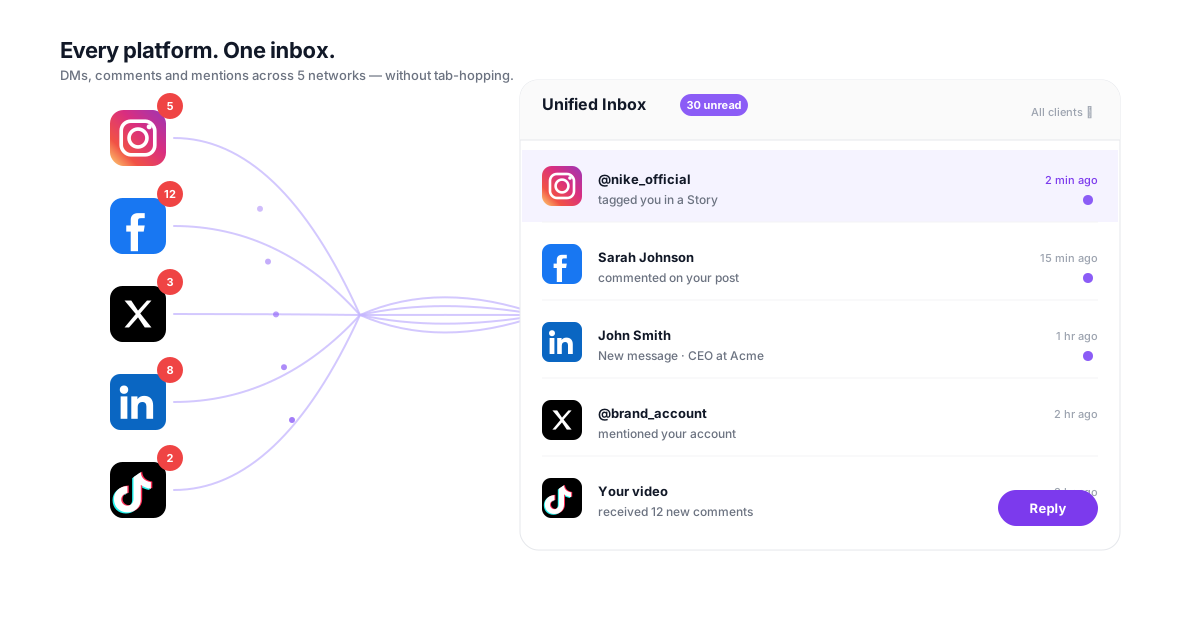
Your team checks Instagram DMs, Facebook comments, X mentions, LinkedIn messages, and TikTok replies across every client account, every single day. That's 6+ platform inboxes, dozens of logins, and hundreds of context switches. Missed messages become missed revenue. The best social media inbox tools eliminate the chaos by unifying every conversation in one AI-assisted queue, and can hand your agency back hours every week.

The Real Cost of Fragmented Inbox Management
What jumping between platform inboxes is costing your agency every day
Context Switching Destroys Productivity
01Every time a team member switches from Instagram DMs to Facebook Messenger to X replies, they lose focus. Research shows each platform switch costs 2-5 minutes of refocusing time. Across a team managing 10+ client accounts on 6 platforms, that's over 5 hours per week spent just re-orienting, not actually responding to messages. Those hours are invisible on timesheets but devastating to your margins.
Missed Messages Mean Lost Revenue
02A prospect DMs your client's Instagram at 2 PM. Your social manager is in Facebook Business Suite handling another client's comments. By the time they circle back to Instagram at 4 PM, the prospect has already messaged a competitor. Surveys of social media users consistently find that most people expect a response within an hour. Every message that slips through the cracks is potential revenue your client will never see, and they'll blame your agency.
No Visibility Into Team Response Activity
03Who responded to that complaint on Facebook? Did anyone follow up on the TikTok comment from yesterday? When messages live across 6 different native platforms, there's no unified view of what's been handled and what hasn't. Team members duplicate efforts by responding to the same message, or worse, nobody responds because everyone assumed someone else did. Managers have zero visibility without logging into every platform individually.
Client Reporting on Engagement Is a Nightmare
04Clients want to know their response rates, average response times, and engagement metrics. When your team manages inboxes natively on each platform, compiling that data means exporting from 6 different dashboards, manually reconciling formats, and hoping nothing was missed. A task that should take 5 minutes takes 45, per client, per month. Multiply that across your roster and reporting alone consumes entire workdays.
What the Best Social Media Inbox Tools Should Include
The six capabilities that separate a useful unified inbox from a glorified notification feed
Cross-Platform Message Aggregation
A true unified inbox pulls DMs, comments, mentions, and replies from every platform you manage (Instagram, Facebook, X, LinkedIn, YouTube, TikTok, and in some tools Google Business Profile) into a single chronological stream. Each message shows the source platform, client account, and full conversation history so your team never needs to open a native app to get context.
- All platforms in one view
- Full conversation threading
- Client account filtering
- Real-time message sync
AI-Powered Response Suggestions
AI analyzes incoming messages and drafts contextually appropriate responses based on your client's brand voice, past interactions, and the type of inquiry. A product question gets a helpful, informative draft. A complaint gets an empathetic, de-escalation response. Your team reviews, edits if needed, and sends, cutting response drafting time dramatically while maintaining quality and brand consistency.
- Brand voice matching
- Context-aware drafts
- One-click send or edit
- Learning from corrections
Sentiment Analysis and Priority Routing
Not all messages deserve equal urgency. Sentiment analysis automatically flags negative messages (complaints, frustrations, escalations) and routes them to the top of the queue. A glowing review can wait 2 hours. An angry customer threatening to leave cannot. Priority routing ensures your team handles the messages that matter most, first, without manually scanning every incoming notification.
- Automatic sentiment scoring
- Negative message escalation
- Priority queue ranking
- SLA-based routing
Team Assignment and Collaboration
Assign specific messages or entire client accounts to team members. When a message requires input from a strategist, tag them directly in the thread without leaving the inbox. See who's handling what in real time, with no more duplicate responses or orphaned messages. Workload balancing ensures no single team member is buried while others sit idle.
- One-click message assignment
- Internal notes and mentions
- Workload visibility
- Collision detection
Response Templates and Saved Replies
Agencies handle the same types of messages hundreds of times: business hours inquiries, pricing questions, shipping updates, appointment confirmations. Response templates let your team send pre-approved, on-brand replies in seconds instead of typing the same answer from scratch every time. Templates can include dynamic variables like customer name, order number, or client-specific details.
- Pre-approved brand templates
- Dynamic variable insertion
- Category-based organization
- Usage analytics
Response Time Analytics and SLA Tracking
Track average response time, first response time, resolution time, and response rate across every platform and every client account. Set SLA targets (respond within 30 minutes during business hours, within 2 hours outside) and get alerts when messages approach their deadline. Generate client-facing reports that prove your agency's responsiveness with hard data, not anecdotes.
- Per-client response metrics
- SLA countdown alerts
- Automated performance reports
- Historical trend tracking
How the Best Inbox Tools Handle Triage, Routing, and Escalation
Four capabilities worth testing with real message volume before you commit
Triage: Does the Tool Sort the Queue, or Just Stack It?
The difference between a unified inbox and a merged notification feed shows up here. Weak tools give you one long chronological stream, which is six inboxes' worth of noise in a single window. Strong ones categorize on arrival (inquiry, complaint, compliment, spam, sales opportunity) and rank by urgency, so the queue opens sorted. When you trial a tool, check whether sentiment analysis flags urgent items automatically or expects your team to spot them by reading everything.
Assign: Can Messages Route Without a Manual Handoff?
Ask whether routing rules can key off client account, platform, message type, and sentiment score together, or only one at a time. Single-condition routing breaks the moment a client needs complaints handled by a senior manager while routine engagement goes to a community manager. The test that matters: can a new message reach the right person with no human triage step, and does every message have a clear owner visible to the whole team?
Respond: How Good Are the AI Drafts, Really?
Every vendor demos AI replies. Judge them on your clients' actual messages, not the demo's. Look for whether the draft picks up brand voice, whether it reads conversation history before answering, and critically, whether drafting is the default rather than auto-sending. In CampaignSwift, AI replies are drafts a human reviews and sends, with auto-send opt-in for high-confidence replies only. A tool that sends on your behalf by default is a liability on a client account.
Escalate: Does Context Survive the Handoff?
Escalation is where most inbox tools quietly fail. Send a message up to the account director during your trial and see what arrives with it. The original message, full conversation history, internal notes and sentiment score should travel together. If the receiving person has to ask 'what happened?', the tool has cost you the time it claimed to save, on precisely the messages where speed matters most.
How Agencies Use Unified Inbox Tools at Scale
Illustrative scenarios of agencies eliminating inbox chaos with a unified approach
Multi-Client Social Media Agency (12 Clients)
Team of 6 managing social inboxes across Instagram, Facebook, X, and TikTok for 12 clientsEach community manager logged into 4 platforms per client, cycling through 48 separate inbox views daily. Messages were missed during handoffs. Two team members responded to the same Facebook comment three times in one week. Average response time was 3.5 hours. One client churned after a negative review went unanswered for 18 hours.
All 12 client accounts across all platforms flow into one unified inbox. Auto-assignment routes messages by client account to the designated community manager. AI drafts reduced response time for routine messages by 65%. Sentiment alerts caught a negative review within 8 minutes. Clear per-message ownership eliminated duplicate responses entirely.
E-commerce Focused Agency (High-Volume DMs)
Agency handling social for 5 e-commerce brands receiving 200+ DMs daily across platformsThe volume was unmanageable across native inboxes. Two full-time community managers couldn't keep up. Product questions went unanswered, purchase-intent messages were lost in the flood, and the agency hired a third person just to handle overflow. Response templates existed in a shared Google Doc that nobody updated.
Unified inbox with AI response suggestions handled 40% of routine messages (sizing, shipping, store hours) with one-click sends. Smart templates with dynamic product variables replaced the Google Doc. Priority routing surfaced purchase-intent messages first. The two community managers now handle the same volume without the third hire.
B2B Marketing Agency (LinkedIn-Heavy Clients)
Agency managing LinkedIn thought leadership and engagement for 8 B2B clientsLinkedIn doesn't natively support multi-account inbox management well. The team used browser profiles and manual switching between 8 client LinkedIn accounts. Comment responses were inconsistent in tone. One team member accidentally posted a response from the wrong client account. There was no way to track engagement metrics across all client accounts without manual spreadsheet work.
Unified inbox aggregated all LinkedIn comments, messages, and mentions across 8 client accounts. Brand voice templates ensured consistent tone per client. Account-level filtering prevented cross-client mistakes. Automated weekly engagement reports replaced 3 hours of manual spreadsheet compilation per client.
Platform-by-Platform Inbox Comparison: Native vs. Unified
Every social platform has its own inbox interface with different layouts, notification systems, and limitations. Here's what your team deals with daily when managing client accounts natively, and how a unified inbox changes the equation.
| Platform | Native Inbox Limitation | Daily Time per Client | Unified Inbox Time |
|---|---|---|---|
| No multi-account inbox; must switch between profiles manually. DMs, comments, and story replies in separate views. | 12-18 min | 3-5 min | |
| Business Suite handles one page at a time. Messenger, comments, and reviews are separate tabs. Slow interface for high-volume pages. | 10-15 min | 3-5 min | |
| X (Twitter) | No native multi-account management. Mentions, DMs, and quote tweets scattered. TweetDeck helps but adds another tool. | 8-12 min | 2-4 min |
| Company page messages and personal messages are completely separate. No API support for bulk management. Extremely manual. | 8-12 min | 2-4 min | |
| TikTok | Comments only accessible through the app or Creator Portal. No multi-account inbox. Limited filtering and search. | 6-10 min | 2-3 min |
| YouTube | Comments managed per channel in YouTube Studio. No cross-account view, limited filtering, and threads on older videos are easy to miss. | 5-8 min | 1-3 min |
| Total per Client | 49-75 min | 13-24 min |
The Multiplier Effect: Scale This Across Your Client Roster
The table above shows time per client. Now multiply by your client count. An agency managing 10 clients spends 8-12.5 hours daily on inbox management using native platforms, or 2-4 hours daily with a unified inbox. That's 5+ hours saved every single day. Over a week, that's 25+ reclaimed hours your team can redirect to strategy, content creation, and client growth. See how this translates to dollar savings on our pricing page.
Weekly Time Savings Breakdown by Activity
Here's where the 5+ hours per week of savings actually come from when switching from native platform inboxes to a unified inbox with AI:
- 2.5 hrs Eliminated platform switching and login cycling. No more opening 6 browser tabs, switching between client profiles, and waiting for platform dashboards to load. Every message from every platform and every client is already in one place.
- 1.5 hrs AI-assisted response drafting. AI suggests responses for routine messages: business hours, shipping status, pricing questions, thank-you replies. Your team reviews and sends instead of typing from scratch. Average per-message handling drops from 3 minutes to 45 seconds for templatable messages.
- 0.5 hrs Automatic message categorization and routing. Instead of manually scanning every message to decide who should handle it, AI categorizes and routes automatically. Complaints go to senior managers. Sales inquiries go to the account lead. Routine engagement goes to community managers.
- 1.0 hr Automated reporting and SLA tracking. Response time metrics, resolution rates, and engagement data compile automatically. No more exporting CSVs from 6 platforms and building spreadsheets manually. Client reports generate with one click.
Total: 5.5 hours saved per team member per week. For a team of 4, that's 22 hours, more than half a full-time employee's workweek.
Response Time SLAs: Why Speed Matters
Response time directly impacts client satisfaction, brand perception, and revenue. Here's what the data shows:
Without SLA Tracking
- Average response time: 3-5 hours
- Messages missed daily: 5-10
- No visibility into team performance
- Client complaints about responsiveness
- Negative reviews go unaddressed for hours
- No data for client reporting
Result: Reactive, inconsistent service
With Unified Inbox + SLAs
- Average response time: under 45 minutes
- Messages missed daily: 0
- Real-time team performance dashboard
- Clients see measurable improvement
- Negative sentiment flagged in under 5 min
- Automated monthly performance reports
Result: Proactive, data-driven engagement
Agencies that consistently keep response times under an hour report noticeably higher client satisfaction and stronger retention. A unified inbox doesn't just make your team faster. It makes your agency's service measurably better, and gives you the data to prove it in every client meeting.
Social Media Inbox Tools Compared
Feature checklists rarely settle an agency decision, because the thing that breaks at scale is structure, not capability. The comparison below is built on the four axes that actually decide whether a tool survives your fifteenth client: which message types sync, whether clients are a first-class object, how work gets assigned, and how the bill grows.
| Tool | Message types | Per-client separation | Pricing model | Best fit |
|---|---|---|---|---|
| CampaignSwift | DMs, comments, mentions across 7 platforms | Client is the primary unit | Flat per plan | Multi-client agencies |
| Sprout Social | DMs, comments, mentions, reviews | Strong, via tagging and profiles | Per seat | Teams with enterprise budgets |
| Hootsuite | DMs, comments, mentions via streams | Account-level, not client-level | Per seat, tiered | Larger in-house teams |
| Agorapulse | DMs, comments, mentions, reviews | Good, profile-group based | Per user, tiered | Small to mid agencies |
| Buffer | Comments, limited DM support | No real client layer | Per channel | Solo operators and creators |
Compiled from vendors' publicly documented capabilities as of this article's update date, not from a scored hands-on test. Packaging and tier gating change often, so confirm channel coverage and pricing directly before committing. Where you want our detailed take, see our Hootsuite alternative, Sprout Social alternative and Agorapulse alternative breakdowns.
Free and Affordable Social Media Inbox Tools
Budget is a legitimate filter, and it is worth being honest about where the free end of the market actually helps. A free social media inbox will connect a handful of accounts and give one person a merged view. That is genuinely useful for a single brand. It stops working for agencies at the point where the free tier's cap counts accounts rather than clients, which for most agencies is somewhere around client three.
The free comment management and inbox tools worth a look are usually the entry tiers of paid platforms rather than standalone products, which matters because your data and workflows stay portable when you upgrade. What you give up on those tiers is consistent: team assignment, response-time reporting, and per-client permissioning — precisely the three things that make inbox work billable rather than invisible.
Affordable social media inbox management solutions tend to separate on pricing model rather than headline price. A $99 per-seat plan is cheaper than a $199 flat plan until your fourth user, and considerably more expensive by your eighth. Because agency inbox work is spread across community managers, account leads and the occasional freelancer, per-seat pricing quietly taxes exactly the behaviour you want. Our pricing is flat per plan for that reason. Whatever you choose, model the cost at the team size you expect in eighteen months, not the one you have now.
Unified Inbox Tools With Mentions and Alerts
"Unified" is doing a lot of unexamined work in most product marketing. Search for platforms with unified inbox for social media and you will get dozens of results, but plenty of them sync direct messages only, which leaves comments and mentions on the native apps and hands your team back the switching problem you bought the tool to solve. The distinction is not pedantic: for most client accounts, comments and mentions carry more volume than DMs.
So when you evaluate social media management tools with unified inbox for mentions, or social media management tools with unified inbox and mention alerts, get specific about message types per network. DMs, post comments, mentions and replies each connect through different platform permissions, and coverage varies network by network even inside a single product. A tool can honestly claim mention support and still not surface mentions on the one platform your biggest client cares about.
Alerting is the second half. An unanswered mention on a key account is a different problem from an unanswered mention on a small one, so routing alerts by client account matters more than raw notification volume. Pair that with sentiment scoring and the queue starts to reflect actual risk rather than arrival order. A threaded comments view helps here too — reading a complaint in the context of the thread it came from prevents the tone-deaf reply that turns one annoyed customer into a screenshot.
Shared Inbox Tools, Tagging, and Team Collaboration
The best shared inbox tools for social media collaboration solve a coordination problem rather than a volume one. Two people answering the same comment is worse than nobody answering it for an hour, because the client sees the duplicate and draws conclusions about your process. Ownership is what prevents it: every conversation assigned to exactly one person, visible to everyone.
Automated tagging is what makes that ownership scale. Social media tools with unified inbox and automated tagging can classify on arrival by client, message type and sentiment, then route on those tags without a human triage step. The practical test during a trial is whether tagging rules can combine conditions. Single-condition routing collapses the first time a client wants complaints escalated to a senior manager while routine engagement stays with the community team.
One caution worth stating plainly, because it is where the "shared inbox" category gets muddled: a shared social inbox is not an omnichannel support desk. If your clients need email tickets, live chat and SMS in the same queue, that is a helpdesk product and you should shop in that category. CampaignSwift's unified inbox covers social DMs, comments and mentions. For agencies running social engagement across a client roster, that boundary is a feature — see how it works alongside multi-client account structure.
AI-Powered Social Media Inbox Tools
Every vendor now ships AI in the inbox, so its presence tells you nothing. The useful questions are narrower. Does the AI read conversation history before drafting, or answer the latest message in isolation? Does it carry a client's brand voice, or produce the same neutral corporate register for a skate brand and a wealth manager? And most importantly: does it draft, or does it send?
That last one is the difference between a tool that saves time and one that creates client incidents. The top AI-powered social media inbox tools default to drafting and keep a human in the loop, with auto-send available as an explicit opt-in for narrow, high-confidence cases. CampaignSwift works this way by design: every agent action is proposed and human-confirmed, including inbox triage. Reversing that default is how brands end up apologising for something no person approved.
Judge AI draft quality on your own clients' messages during the trial, not on the vendor's demo data. Demo inboxes are curated; real ones contain sarcasm, half-sentences, three languages and the occasional genuine crisis. A tool that handles routine sizing and shipping questions well but mangles a complaint has not saved you anything, because complaints are where the minutes actually matter.
What Changed for Inbox Tools in 2026
If you last evaluated this category two years ago, three things have moved enough to invalidate old shortlists. First, AI drafting went from premium add-on to table stakes, which shifts the question from whether a tool has AI to whether its drafts are good and whether a human stays in control of sending.
Second, platform API access kept tightening. Channel coverage claims published in 2024 are not reliable in 2026, and this is the single most common way agencies get caught out: a tool lists a network it can no longer fully serve. Re-verify coverage at trial for every network your clients actually use, rather than trusting the comparison grid — including ours.
Third, pricing model overtook price as the deciding factor. As agency teams grew and inbox work spread across more people, per-seat billing became the dominant hidden cost in the category. The best unified social media inbox tools for 2026 are, for most agencies, simply the ones whose cost does not scale with the number of people who need to answer a message. If you are also consolidating scheduling and reporting, weigh whether one agency platform covering inbox, publishing and client reporting beats three specialist tools on both cost and context-switching.
HubSpot, Pardot, and Hootsuite: Common Inbox Questions
Three product-specific questions come up often enough in agency evaluations to be worth answering directly. The HubSpot social media inbox and the Pardot social media inbox are features inside marketing automation platforms, not dedicated social inbox tools, and that shapes what they are good at. Both are strong on tying a conversation to a CRM record and attributing pipeline. Both are comparatively shallow on high-volume comment and mention moderation, which is where agency inbox time is actually spent.
The practical way to decide is to ask what you need in the CRM: the conversation itself, or its outcome. If it is the outcome, a dedicated inbox with clean per-client response-time reporting usually serves agencies better, and you avoid paying enterprise automation prices for moderation work. If your client genuinely needs every social conversation inside HubSpot, accept the moderation trade-off knowingly rather than discovering it in month two.
The Hootsuite unified inbox question is different: it is a genuine social inbox, and the real considerations are which tier unlocks assignment and how the account structure maps to your client roster. Streams organise by account, agencies think in clients, and that mismatch is what most often drives the switch. We cover the specifics in our Hootsuite alternative comparison, and the per-client permissioning angle matters more than the feature count for agencies handling sensitive accounts.
How to Choose Among the Best Social Media Inbox Tools
Most "best of" lists rank tools the same way: feature checklists, pricing tiers, screenshots. That is fine if you are a single brand picking one, but agencies have a different decision to make. The best social media inbox tools for an agency are the ones that scale with the client roster, not the ones with the longest feature page. We have seen plenty of agencies pick a tool with a beautiful demo and then quietly migrate off it six months later because it could not handle their fifteenth client without breaking workflows.
When we evaluate inbox platforms with agency owners, three questions matter more than features. First, how does the pricing change as the team grows? Per-seat models look reasonable at five users and ruin you at fifteen. Second, does the inbox support per-client permissioning, or do all team members see all messages by default? Junior account managers should not be reading messages from the agency's largest enterprise client. Third, what happens when a platform changes its API? The tools that survive are the ones that ship integration updates within days, not quarters.
There is also a quieter consideration that does not show up on comparison charts. The strongest inbox platforms have a workflow opinion built in. Some treat the inbox as a customer support queue with tickets and resolutions. Others treat it as a community management feed with assignments and reactions. Neither is wrong, but agencies should pick the one that matches how their clients actually want to be represented. A tool optimized for support tickets will feel awkward for a fashion brand that wants conversational replies. A community-first tool will feel loose for a fintech client that needs audit trails on every response.
Whichever tool you end up with, the win is not the software. It is the operational discipline of keeping every client's messages in one place where the team can actually see them. The best social media inbox tools just make that discipline easier to maintain at scale.
Ready to Unify Your Agency's Inbox?
CampaignSwift's unified social media inbox tool brings every DM, comment, and mention from Facebook, Instagram, X, LinkedIn, YouTube, TikTok, and Pinterest into one AI-assisted dashboard. It's social media inbox management built for agencies: assign and track every conversation, monitor response times per client, and give your team hours back every week. Flat-rate pricing means your entire team gets access, with no per-seat surprises.
Choosing an Inbox Tool: Common Questions
Common questions about implementing a unified social media inbox
The best social media inbox tools for agencies share four traits: cross-platform aggregation (Instagram, Facebook, LinkedIn, TikTok, X, Google Business in one place), per-client workspaces with proper permissions, AI-assisted response drafting that respects each client's brand voice, and native publishing or assignment without leaving the inbox. Tools to evaluate include CampaignSwift, Sprout Social, Hootsuite Inbox, and Agorapulse, but be wary of per-seat pricing models that punish you as your team grows.
A unified inbox aggregates all incoming messages (DMs, comments, mentions, reviews, and replies) from every social media platform into a single interface. Instead of logging into Instagram, Facebook, X, LinkedIn, and TikTok separately, your team manages all conversations from one dashboard. Each message shows its source platform, the associated client account, and the full conversation history, so your team responds faster without losing context.
Based on what we see across agencies using CampaignSwift, a unified inbox typically saves 5-7 hours per week per team member. The savings come from three areas: eliminating platform switching (2-3 hours), reducing response drafting time with AI suggestions (1-2 hours), and cutting reporting and metric compilation time (1-2 hours). For a team of 5 community managers, that's 25-35 hours per week, equivalent to a part-time hire.
CampaignSwift's unified inbox covers the seven platforms the product supports: Facebook, Instagram, X, LinkedIn, YouTube, TikTok, and Pinterest. It pulls mentions, comments, and conversations across your clients' connected accounts, with automatic sentiment and team assignment. If Google Business Profile reviews are critical to your clients, check coverage carefully before committing to any tool, because review support varies widely between platforms.
When a message arrives, AI analyzes the content, sentiment, and context (including conversation history and client brand guidelines) to generate a draft response. The AI adapts its tone based on the client's brand voice profile: formal for a law firm, casual for a lifestyle brand. Your team member reviews the draft, makes edits if needed, and sends. Nothing goes out without human confirmation unless you explicitly opt in to auto-send for safe, high-confidence replies. It handles routine messages like business hours, pricing inquiries, and thank-you replies well.
You can manage to different targets per client. CampaignSwift tracks response-time and response-rate metrics across your clients' accounts, so you can set internal targets for each account (say, 30 minutes for a high-value retainer and 2 hours for a smaller one) and monitor performance against them in reports. If you need hard SLA countdown timers with automated escalation alerts, verify that specific capability during your trial; implementations differ significantly between tools.
The reliable fix is ownership: assign every message or client account to a specific team member so each conversation has exactly one owner. CampaignSwift's unified inbox supports team assignment and tracking so every message gets owned and nothing is double-handled. Some tools layer real-time collision indicators on top of assignment. If your team has been burned by duplicate replies before, test that workflow with real volume during your trial.
Yes. In CampaignSwift, AI-generated replies are drafts by default: a team member reviews, edits, and sends each one, and auto-send is opt-in for safe, high-confidence replies only. This mirrors how our client approval workflow handles scheduled content. For sensitive client accounts, simply keep everything on manual review so nothing is sent without a human sign-off. This is especially useful for regulated industries, high-profile brands, or new team members still learning a client's voice.
Sentiment analysis scans every incoming message and assigns a score: positive, neutral, or negative. Negative messages (complaints, frustrated customers, potential PR issues) are automatically escalated to the top of the queue and can trigger instant notifications to senior team members. This ensures your team addresses problems before they escalate publicly, rather than discovering a negative comment 6 hours later buried under routine engagement.
Free tiers exist, but read the limits before you build a workflow on one. A free social media inbox almost always caps connected accounts (often three to five), restricts you to a single user, and drops the features agencies actually need: team assignment, response-time reporting, and per-client separation. That is workable for one brand and breaks immediately at agency scale, because the cap is usually on accounts rather than clients. If budget is the constraint, a free trial on a paid plan will tell you more than a permanently free tier, since you can test real volume across real client accounts before committing. Our pricing is flat per plan rather than per seat, so the whole team can work the inbox on any tier.
This is a real dividing line. Some tools pull only direct messages, which means comments and mentions still live on the native platforms and your team is back to switching. When you evaluate, ask specifically which message types sync: DMs, post comments, mentions, and replies each connect through different platform permissions, and coverage varies by network even within one tool. CampaignSwift's unified inbox covers DMs, comments and mentions across the seven supported platforms, with alerts you can route by client account so an unanswered mention on a key client does not sit overnight.
For customer care specifically, prioritise three things over feature count: sentiment-based prioritisation so complaints surface first, response-time tracking you can report on per client, and clean ownership so no message is answered twice or missed entirely. One caveat worth being direct about: a social media inbox handles social conversations. If your clients also need email tickets, live chat or SMS in the same queue, that is an omnichannel helpdesk, a different category of product. CampaignSwift covers social DMs, comments and mentions, not email or chat support.
This comes up constantly, and the honest answer is that a HubSpot or Pardot social inbox is a different thing from a dedicated social media inbox tool. Both are marketing automation platforms with some social functionality attached, so the inbox tends to be shallower on comment and mention handling than a purpose-built tool, while being far stronger on CRM and lead attribution. If your clients live in HubSpot, check whether you need the conversation itself in the CRM or only the outcome. If it is the outcome, a dedicated inbox with clean reporting usually serves agencies better. Verify current integration coverage directly with each vendor, since these connectors change often.
Three shifts matter for agency buyers. AI drafting moved from a premium add-on to a baseline expectation, so the useful question is now draft quality and whether a human stays in the loop, not whether AI exists. Platform API access kept tightening, which means channel coverage claims made two years ago are not reliable today and need re-verifying at trial. And per-seat pricing became the main cost trap as agency teams grew, which is why flat per-plan pricing has become a genuine differentiator rather than a footnote. Our Hootsuite alternative and Sprout Social alternative comparisons go into how each vendor's packaging has shifted.
Still have questions?
Our team is here to help. Book a 15-minute call to get all your questions answered.
Ready to put the busywork on agents?
Start with one client. Connect accounts, send your first approval link, and let the agents take the follow-ups. Plans start at $29/mo.
30-day free trial · No credit card · Cancel anytime
Questions? Book a 15-min demo call
Schedule Demo