Best AI Social Media Tools for Agencies 2026 Guide
Looking for the best AI tools for social media? AI has moved from novelty to necessity for agencies. The right tools draft captions, suggest the best time to post, surface audience sentiment, and turn a week of analysis into an afternoon. We break down the best AI social media management tools for agencies by what they actually do, so you can build a stack that scales content without scaling headcount.

Why AI Has Become Non-Negotiable for Social Teams
The pressures pushing agencies to adopt AI social media tools
Content Volume Outpaces the Team
01Every client wants more posts, more formats, more platforms. Producing daily content for 15 clients by hand isn't sustainable. AI content tools take the blank-page problem off your team so they spend time editing and strategizing instead of starting from scratch.
Too Much Data, Not Enough Insight
02Native dashboards bury the signal. AI analytics tools surface what changed and why (which posts drove growth, when sentiment shifted) so you walk into client calls with answers, not just charts.
Generic AI Output That Sounds Robotic
03The first wave of AI writing produced bland, off-brand copy. The tools worth using now learn a brand's voice and adapt tone per platform, so captions read like the client wrote them, not like a generic chatbot.
AI Tool Sprawl
04It's easy to end up paying for five separate AI point-tools: one for captions, one for images, one for analytics, one for replies. The cost and context-switching add up. Consolidated platforms increasingly bundle these into one workflow.
The Categories of AI Social Media Tools
What each type of AI tool does, and what to look for when choosing
AI Content & Caption Generation
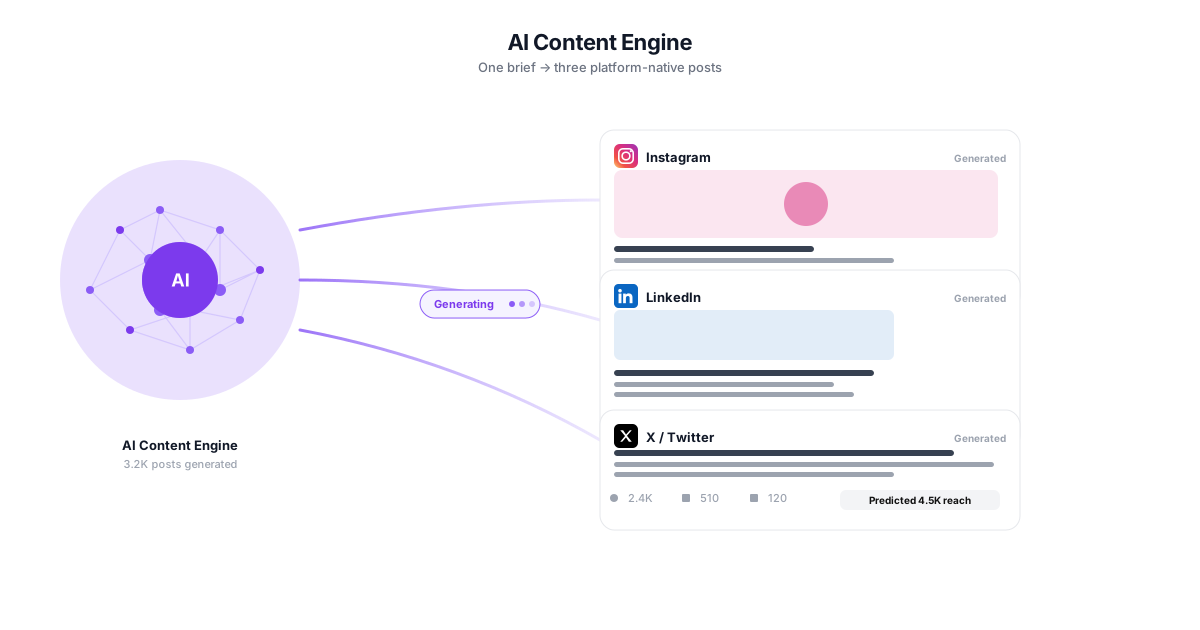
The most mature category. These tools draft captions, hooks, hashtags, and full post variations from a prompt or a brief. The differentiator in 2026 isn't whether a tool has AI. It's whether the tool learns your brand voice and respects each platform's tone and character limits, instead of dropping generic output into the caption field.
- Brand-voice learning
- Per-platform tone & length
- Hashtag and hook variations
- Bulk caption drafting
AI Scheduling & Best-Time Optimization
AI analyzes each account's historical engagement to recommend optimal posting times and flag gaps in the queue. For agencies juggling dozens of calendars, this removes the guesswork of 'when should this client post' and keeps every queue full.
- Best-time-to-post per account
- Queue gap detection
- Engagement-based scheduling
- Cross-client calendar view
AI Analytics, Insights & Sentiment
Instead of reading raw numbers, AI analytics tools explain them, spotting trends, anomalies, and the content patterns driving results. Sentiment and mood analysis layer natural-language processing on mentions and comments to tell you whether a spike is a win or a warning.
- Automated trend detection
- Sentiment & mood analysis
- Plain-language insight summaries
- Anomaly and drop alerts
AI Image & Video Creative
Generative tools create and edit visuals: backgrounds, resizing for every format, short-form video clips, and on-brand graphics. These speed up production but still need a human eye for brand consistency, so treat them as an assistant, not autopilot.
- On-brand graphic generation
- Auto-resize for formats
- Short-form video assist
- Background and object editing
AI Inbox & Reply Assistance
AI drafts replies to comments and DMs, suggests responses based on context, and routes messages by intent. For agencies managing high-volume inboxes across clients, this keeps response times fast without a reply feeling copy-pasted.
- Context-aware reply suggestions
- Smart message routing
- Faster response times
- Tone matched to the brand
What to Look For (Across Every Category)
Three things separate an AI tool that sticks from one you abandon: it learns and holds your brand voice, it handles multiple clients without re-setup each time, and it's clear about data privacy. For agencies specifically, multi-client architecture matters more than any single clever feature.
- Brand-voice consistency
- Multi-client support
- Transparent data handling
- Human-in-the-loop control
How to Build an AI Social Media Stack
A practical sequence instead of buying every AI tool at once
Audit Your Biggest Time Sinks
Before buying anything, track where your team actually loses hours: usually content drafting, manual scheduling, and monthly reporting. Buy AI for the bottleneck, not the buzzword. The highest-ROI AI tool is the one that removes your most repetitive task.
Start With Content and Scheduling
These two categories have the most mature AI and the clearest payback. An AI content tool that learns brand voice plus best-time scheduling typically saves the most hours in the first month, and they're the easiest for a team to adopt.
Layer In Analytics and Sentiment
Once production is faster, add AI analytics so you can prove results and catch problems early. Sentiment analysis is the highest-value layer for brand-led work, turning 'reach is up' into 'reach is up and sentiment is positive, so lean in.'
Consolidate Where You Can
Five AI subscriptions that don't talk to each other create their own overhead. Where a single platform covers content, scheduling, inbox, and analytics well, consolidating reduces cost and context-switching, and keeps your data and brand voice in one place.
How Agencies Actually Use AI Social Media Tools
Illustrative scenarios where AI moves the needle
Scaling Content From 5 to 20 Clients
A boutique agency landed three new retainers in a quarter and couldn't keep up with content production without hiring.Two content managers drafted every caption from scratch, spending most of their week writing instead of strategizing. New clients meant the math broke: they were one signed contract away from missed deadlines.
They adopted an AI content tool that learned each client's brand voice, drafting first-pass captions the team then edited. Production time per post dropped sharply, and the same two-person team absorbed the new clients without a hire.
Turning Reporting Day Into Reporting Hour
An agency's account lead lost a full day each month pulling numbers and writing the 'what happened' narrative for client reports.Every metric was exported by hand, pasted into a deck, and interpreted manually. The insight section was rushed because the data gathering ate all the time.
AI analytics surfaced the trends and anomalies automatically, and sentiment analysis flagged how audiences felt about each campaign. The account lead spent the time on recommendations instead of data entry.
Catching a Sentiment Problem Early
A consumer brand's campaign got high engagement, but the agency wasn't sure the attention was positive.The team saw a spike in comments and assumed success. Without sentiment analysis, they couldn't tell that a chunk of the conversation was critical until it had spread.
AI sentiment and mood analysis flagged the negative shift within hours. The agency adjusted messaging and responded in the inbox before it became a bigger issue.
AI Social Media Tool Categories Compared
The five categories above at a glance, and what separates a useful tool from a wrapper in each.
| Category | What the AI does | What separates the good ones | Human still needed for |
|---|---|---|---|
| Content & caption generation | Drafts captions, hooks, hashtags and post variations from a brief | Whether it learns your brand voice rather than producing generic copy | Final voice and factual accuracy |
| Scheduling & timing | Recommends posting times from each account's engagement history, flags queue gaps | Per-account history, not one global "best time" | Campaign timing and client constraints |
| Analytics, insights & sentiment | Explains the numbers, spots trends, anomalies and content patterns | Explanation over dashboards; sentiment that handles context | Deciding what to do about it |
| Image & video creative | Generates and edits visuals, resizes per format, cuts short-form clips | Speed of production without drifting off-brand | Brand consistency — treat as assistant, not autopilot |
| Inbox & reply assistance | Drafts replies to comments and DMs, routes messages by intent | Replies that read specific, not copy-pasted | Approving anything that goes out |
Categories rather than a vendor ranking: the useful comparison in this space is what each type of AI actually does, since most tools now claim all five.
The Best AI Tools for Social Media, by Category
"What are the best AI tools for social media" is really five questions, because no single tool is best at everything. The smart move for an agency is to match each AI category to a specific job, then consolidate where one platform does several jobs well. Here is how the categories stack up in 2026.
Best AI tools for creating social media posts
This is the most crowded and most useful category. The best AI tools for creating social media posts go beyond a generic prompt box: they learn a brand's voice from its past content and adapt tone, length, and hashtags to each platform. Standalone AI writers are fine for a single brand, but agencies usually need brand-voice profiles per client so the output for a law firm doesn't read like the output for a streetwear label. CampaignSwift's AI content generator is built around that multi-client, brand-voice approach, with a human editing step before anything publishes. For a deeper look at this category specifically, see our guide to the best AI caption generators.
Best AI tool for scalable social media (agents + workflow)
When people search for the best AI-driven tool for scalable social media, what they usually need isn't a cleverer caption. It's a system that lets a small team run many accounts. This is where AI agents change the math. CampaignSwift pairs an AI Copilot (a conversational assistant that reads your live data and can draft posts, build campaigns, and generate reports on request) with a team of AI agents that handle the work you'd rather not: an Approval Shepherd that chases client sign-off and applies minor edits, Inbox Triage that classifies and drafts replies to every DM and comment, Content Suggestion that keeps the calendar full of on-brand ideas, Publish Recovery that retries failed posts, and a weekly Reporting & Retention agent that flags clients at risk of churn before renewal.
The reason that's safe to run across dozens of client accounts is the control model: every action that changes a client's account is proposed and confirmed by a human before it runs, every action is logged in an audit ledger, and AI cost is shown as transparent, capped Credits. That human-in-control design, powerful AI on a leash you hold, is the real scaling unlock: adding the next client doesn't add a new tool, and it doesn't add new risk.
Best AI tools for analytics and sentiment
AI analytics tools earn their place by explaining the numbers, not just displaying them: surfacing which content drove growth and flagging anomalies before a client asks. The highest-value layer here is sentiment and mood analysis, which tells you whether engagement is positive or a brewing problem. For a broader comparison of the analytics platforms agencies rely on, see our roundup of the best social media analytics tools.
Best AI tools for creative and inbox
Generative image and video tools speed up production, auto-resizing for every format and drafting short-form clips, but they still need a human eye for brand consistency. On the engagement side, AI reply assistance drafts context-aware responses to comments and DMs so high-volume inboxes stay fast without sounding canned. Both are best treated as assistants with a person in the loop, not autopilot.
How to choose without overspending
Don't buy every category at once. Start with the bottleneck (for most agencies that's content drafting and reporting) and prove the time savings before expanding. Keep a human reviewing AI output for brand voice and accuracy, and watch for tool sprawl: five AI subscriptions that don't share data create their own overhead. Where one platform covers content, scheduling, inbox, and analytics well, consolidating onto it usually beats assembling a stack of disconnected point-tools. To see how the AI pieces fit into one agency workflow, take a look at the AI copilot and our deeper guide to AI social media marketing.
Best AI Tools for Social Media: FAQs
Common questions about choosing AI social media tools
For agencies in 2026, the best AI social media management tools consolidate the work instead of adding another point tool: AI content drafting in the client's voice, scheduling, a unified inbox, and reporting in one place, with a human approving anything client-facing. Agencies running many clients increasingly favor agentic platforms, where AI agents handle the recurring follow-through (chasing approvals, triaging the inbox, recovering failed posts) and propose each action for sign-off, rather than tools that only generate captions.
There's no single best tool; it depends on your bottleneck. For content, look for an AI caption and post generator that learns brand voice. For efficiency, AI best-time scheduling. For proving results, AI analytics with sentiment analysis. For agencies, the best AI tool for scalable social media is usually a consolidated platform that covers content, scheduling, inbox, and analytics in one place rather than five disconnected point-tools.
The best AI tools for creating social media posts draft captions, hooks, and hashtags while matching your brand voice and each platform's tone. Generic output is the main risk, so choose a tool that you can train on a brand's past posts and that lets a human edit before publishing, so the content stays on-brand rather than sounding like a chatbot.
For most agencies, yes. The return is clearest in content drafting and reporting, where AI removes the most repetitive hours. The key is to adopt AI for a specific time sink and keep a human in the loop for brand voice and final approval, rather than expecting fully hands-off automation.
Platforms don't penalize content simply for being AI-assisted. They penalize low-quality, spammy, or misleading content regardless of how it's made. AI-drafted posts that are edited, accurate, and useful are fine. The risk is publishing unedited, generic AI output at scale, which audiences and algorithms both tend to ignore.
Many platforms offer free tiers or trials for AI captioning and basic scheduling, which are enough to test the workflow on one brand. Free tools usually cap usage, brand-voice training, and multi-client features, so agencies managing several clients typically outgrow them quickly and move to a paid plan that supports their full roster.
Increasingly, yes. Consolidated platforms now bundle AI content generation, scheduling, a unified inbox with reply assistance, and analytics with sentiment. Consolidating reduces cost and context-switching and keeps your brand voice and data in one system, which is why many agencies move from a stack of point-tools to a single platform like CampaignSwift.
Still have questions?
Our team is here to help. Book a 15-minute call to get all your questions answered.
Ready to put the busywork on agents?
Start with one client. Connect accounts, send your first approval link, and let the agents take the follow-ups. Plans start at $29/mo.
30-day free trial · No credit card · Cancel anytime
Questions? Book a 15-min demo call
Schedule Demo