Best Client Portal Software for Agencies in 2026
Your clients expect transparency, self-service access, and a professional experience. We compared the leading options to find the best client portal software for agencies: what each one does well, where it falls short, and what you actually pay, so you can choose on evidence rather than on a feature grid.

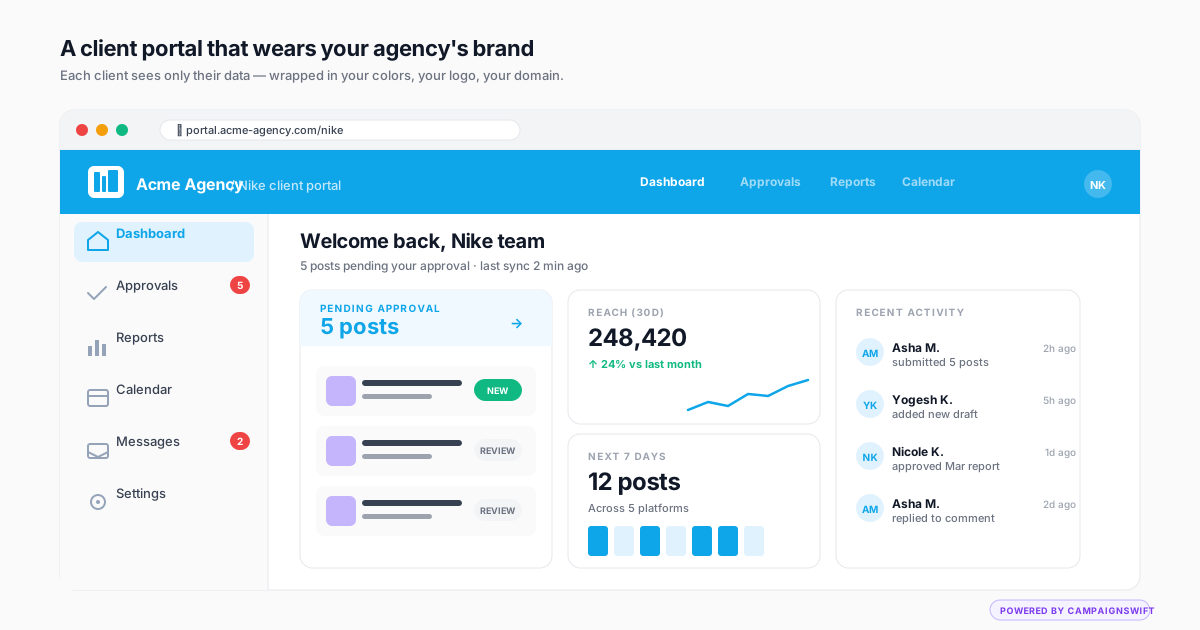
Why Client Portal Software Matters for Agencies
The business impact of giving clients structured self-service access
Status Update Emails Consume Your Week
01Every client wants to know what is happening with their campaigns. Without a portal, your team answers the same questions via email dozens of times per week. That time comes directly out of billable work.
Approval Delays Kill Campaign Timelines
02Content sits waiting for approval because clients cannot easily find it. Email-based approvals get buried. A portal puts pending items front and center so clients can act quickly.
Manual Reporting Is Not Scalable
03Building PDF reports manually for every client every month does not scale past 10 clients. Portal-based reporting delivers live dashboards and automated reports without your team touching a spreadsheet.
Generic Tools Undermine Your Brand
04Sending clients to a tool with another company's logo erodes your professional image. The best client portal software includes white-label options so the experience feels proprietary to your agency.
What to Look for in Client Portal Software
Key features that separate great portals from basic ones
Content Approval Workflows
Clients should be able to review and approve content directly in the portal. Look for multi-stage approval chains, visual previews, inline commenting, and one-click sign-off, the same capabilities you'd want from dedicated creative review and approval software. The best options include approval without requiring a client login.
- Multi-stage approvals
- Visual content preview
- Inline commenting
- No-login approval
White Label Branding
Your agency brand should be on every screen, report, and email. Look for custom logo, color themes, custom domain support, and branded email notifications. The portal should feel like your proprietary platform, not a third-party tool.
- Custom logo and colors
- Custom domain
- Branded emails
- Full brand control
Automated Reporting
Reports should generate and deliver automatically with fresh data. Look for scheduled delivery, white-label formatting, live dashboards, and the ability to pull data from all connected platforms. Manual reporting should be eliminated, not just reduced.
- Auto-generated reports
- Scheduled delivery
- Live dashboards
- Multi-platform data
Multi-Client Architecture
Each client should have their own isolated workspace with separate data, permissions, and settings. Look for easy switching between clients, portfolio-level views, and role-based access control so clients see only their own information.
- Isolated workspaces
- Role-based access
- Easy client switching
- Portfolio views
Integration Depth
The portal should connect to the platforms you actually use: social media channels, analytics tools, ad platforms. Deeper integration means richer data in dashboards and less manual work for your team.
- Social platform APIs
- Analytics integration
- Ad platform data
- Real-time sync
Client Self-Service
Clients should find answers without emailing your team. Campaign status, performance data, pending approvals, and asset access should all be available on demand. The best portals cut inbound client questions dramatically, often by half for a typical agency.
- Campaign status views
- On-demand reports
- Asset access
- Approval tracking
How to Choose the Right Portal Software
A practical evaluation process for agencies
List Your Must-Have Features
Start with what you need most. Content approvals? Automated reporting? White-labeling? Client self-service? Rank your priorities so you can eliminate options that miss critical requirements.
Test with Real Client Workflows
Sign up for free trials and run actual client workflows: submit content for approval, generate a report, invite a test client. Generic demos do not reveal usability issues that real work does.
Check Pricing at Scale
Many portals price per client or per user. Calculate the real cost at your current client count and at 2x. A tool that costs $50/month for 5 clients might cost $500/month for 50. Make sure it scales with your growth.
Evaluate the Client Experience
Log in as a client would. Is it intuitive? Can they find pending approvals? Can they access reports without help? If the client experience is confusing, you will spend time supporting the tool instead of doing client work.
How the Top Tools Compare
Real trade-offs agencies face when choosing portal software
Integrated Platform vs. Standalone Portal
Choosing between a platform that includes a portal (like CampaignSwift) vs. a standalone portal tool (like Clinked or Client Portal)Standalone portals require integrations with your scheduling, analytics, and reporting tools. Data sync issues, multiple subscriptions, and fragmented workflows create more problems than they solve.
An integrated platform connects the portal to your actual workflow. Content approved in the portal flows straight into publishing. Reports pull data from connected channels automatically. One subscription, one login, one source of truth.
White Label vs. Co-Branded
Deciding how much brand customization you needSome portals show their own branding alongside yours (co-branded), which confuses clients and commoditizes your service. Budget tools rarely offer deep customization.
Full white-label portals remove all vendor branding. Your domain, your logo, your emails. Clients perceive the portal as your proprietary technology, which supports higher pricing and stronger retention.
Per-Seat vs. Per-Client Pricing
Understanding long-term cost as you growPer-seat pricing penalizes collaboration. Adding team members or giving clients access increases cost, so agencies avoid adding seats to save money, which defeats the purpose of the portal.
Flat per-plan pricing removes per-seat fees, so costs stay predictable as you grow. CampaignSwift uses this model: 10 seats on the $197 Agency plan, unlimited seats and clients on Scale.
Client Portal Software Compared for Agencies
Most client portal tools brand a portal well but stop there. For a social media agency, what matters is whether the portal connects to the work: publishing, approvals, and reporting. Here is how CampaignSwift compares to popular standalone portals on the criteria that matter for multi-client management and white-label reporting.
| Capability | CampaignSwift | Clinked | SuiteDash | Copilot |
|---|---|---|---|---|
| White-label branding (logo, colors, domain) | Yes | Yes | Yes | Yes |
| No-login client approvals | Yes | Login required | Login required | Login required |
| Social publishing & scheduling built in | Yes | No | No | No |
| Automated social media reporting | Yes | No | No | No |
| Multi-client workspaces | Yes | Yes | Yes | Yes |
| Purpose-built for social media agencies | Yes | File-sharing portal | Unified biz ops | General portal |
| Pricing model | Flat per-plan ($29–$397) | Tiered | Flat, unified | Per-seat tiers |
Standalone portals like Clinked, SuiteDash, and Copilot are excellent at branded file sharing and client communication. The gap for social media agencies is integration: CampaignSwift builds the portal into the same platform that schedules posts, routes approvals, and generates reports, so nothing has to sync between tools. If you run social for clients, see agency software built for that workflow or compare plans and pricing.
What the Best Client Portal Software Actually Delivers
Before comparing pricing tiers, it helps to understand what a real agency client portal actually does under the hood. The strongest options all surface the same core capabilities, just at different depths and with different agency-specific layers on top.
Branded Client Dashboard and White-Label Customization
The first thing a client sees when they log into your portal sets the tone for the entire engagement. Generic SaaS chrome with another vendor's logo signals "we use a third-party tool." A fully white-label client portal with your agency's colors, logo, and custom domain signals "this is our proprietary platform." The client dashboard is where this matters most. Landing page, navigation, and email notifications should all reinforce your brand, not the software vendor's. For agencies pitching premium retainers, this customization is the difference between feeling like a vendor and feeling like a strategic partner.
Secure File Sharing and Asset Management
Secure file sharing is table stakes for any agency client portal, but the implementation varies wildly. The minimum bar: encrypted storage, role-based access, version history, and audit trail of who downloaded what and when. Better tools layer in expiring share links for one-off external review, watermarking for unreleased assets, and direct integration with your content approval workflow so files don't get re-uploaded across multiple systems. Agencies handling brand-sensitive work in regulated industries (finance, healthcare, legal) treat this audit trail as a compliance artifact, not just a workflow record.
Client Onboarding Portal Flow
The client onboarding portal experience determines whether new clients feel confident or confused in the first 72 hours. The better ones include a guided onboarding flow: brand asset upload, contact and approver mapping, communication preferences, KPI selection, and the first deliverable preview. Done well, this collapses what used to be 3-5 onboarding calls into one structured async flow plus one alignment call. Done badly, the client gets generic login credentials and zero context, and you spend the next two weeks explaining how the portal works instead of producing the work they hired you for.
Content Approval Without Client Login
Here is what trips up client portal adoption: most clients refuse to log in regularly. They will check email and WhatsApp, but they will not remember a portal password 14 days into the engagement. The fix is no-login client review: secure token-based links that surface the specific item needing approval, let the client comment and sign off in one click, and route the result back into the portal as a source of truth. This is the difference between a portal clients actually use and a portal you have to manually update on their behalf.
Why Generic Tools Like Basecamp, Notion, and Asana Fall Short
Many agencies try to use Basecamp, Notion, ClickUp, or a custom-built shared Asana workspace as their client portal. It works for the first two or three clients. The cracks show at five-plus: no white-label customization, generic dashboards, no built-in approval workflows, no audit trail for sign-offs, and a UI clearly built for internal project teams rather than external clients. Each one is a great tool for its actual purpose, but a true agency client portal is a different product category, designed around the asymmetric trust relationship between agency and client. Trying to retrofit project management tools into a client-facing portal usually means rebuilding most of the portal manually inside the project tool.
Integrated Reporting and Real-Time Status
A client portal without integrated reporting forces your team to keep updating it manually, which means it goes stale, which means clients stop checking it, which means it becomes a glorified file-sharing folder. A good portal pulls live data from your social, ads, and analytics layers directly into the portal so clients see the same numbers your team sees, refreshed automatically. Combined with a clean status view of pending approvals, in-progress work, and recently published content, the portal becomes the answer to "what is my agency doing this week?", and the client stops needing to ask.
When you evaluate the best client portal software against your own use case, especially when managing multiple clients at once, work backward from the moments that currently waste your team's time: status update emails, "where's the file?" questions, approval delays, and report-distribution overhead. The right portal eliminates those moments without adding new ones. The wrong portal becomes another tool your team has to keep in sync manually.
Why Agencies Need Dedicated Client Portal Software
There is a pattern that plays out at every growing agency. You start with email for client communication. Then you add a shared Dropbox folder for assets. Then a spreadsheet for tracking approvals through your social media approval software. Then a separate reporting tool. Before long, your clients interact with your agency through five different channels, none of which feel connected or professional.
Client portal software solves this by creating one place where clients go for everything: approvals, reports, campaign status, and assets. The best tools make this portal feel like your own proprietary platform through white-label branding.
What changes when you implement a client portal:
- Status update emails drop sharply, since clients check the portal instead of emailing
- Approval turnaround drops from days to hours, because pending items are visible and actionable
- Monthly reporting time drops to near-zero, with reports that auto-generate and deliver themselves
- Client retention improves, since the portal creates switching costs and perceived value
The agencies that invest in client portal software early gain a structural advantage. They can serve more clients with the same team because self-service access eliminates repetitive communication. They retain clients longer because the portal becomes part of the working relationship, and we cover the broader retention pattern in our piece on client retention strategies that keep agency clients longer. And they win more pitches because a branded portal differentiates them from competitors still using email and spreadsheets.
Ready to see how a portal transforms your client relationships? Explore CampaignSwift's client portal features or book a demo to see it in action.
Client Portal Software FAQ
Common questions about choosing portal software for your agency
The best client portal software for agencies combines content approval workflows, automated reporting, white-label branding, and multi-client management in one platform. CampaignSwift is built specifically for agency workflows. Other options like Clinked, SuiteDash, and Copilot offer portals but lack the social media management and campaign tools that agencies need alongside client access.
Pricing ranges from $20-30/month for basic portals to $200-500/month for full-featured agency platforms. Watch for per-seat or per-client pricing that scales poorly. CampaignSwift uses flat per-plan pricing with no per-user fees. The $197 Agency plan includes 10 seats and 25 clients, and the Scale plan removes seat and client limits.
Not all portals support white-labeling. Basic tools may let you add a logo but show their own branding elsewhere. Full white-label solutions like CampaignSwift let you put your own branding across the portal, reports, and client notifications so clients never see the underlying vendor.
These portals are web-based, with no download required. Clients access everything through a browser link. CampaignSwift's portal is fully web-based and mobile-responsive. Clients can review and approve content from their phone without installing anything.
Yes, this is a core feature of the best solutions. CampaignSwift includes content approval workflows where clients review visual previews, leave feedback, and approve with one click, no login required. Some portals only show information but do not include approval workflows.
If you have more than 5 clients and spend significant time on status emails, manual reporting, or chasing approvals, a portal pays for itself through time savings. The ROI tends to show up fast. Even a typical 5-client agency might get back 5-10 hours per week on status emails, report assembly, and approval chasing.
Still have questions?
Our team is here to help. Book a 15-minute call to get all your questions answered.
Ready to put the busywork on agents?
Start with one client. Connect accounts, send your first approval link, and let the agents take the follow-ups. Plans start at $29/mo.
30-day free trial · No credit card · Cancel anytime
Questions? Book a 15-min demo call
Schedule Demo