Social Media Campaign Management Software That Scales
Stop managing social media campaigns across native platforms and disconnected tools. CampaignSwift brings content planning, scheduling, approvals, and analytics into one unified system. Brand awareness campaigns, product launches, always-on content: manage everything for every client from a single dashboard.
Is Social Media Campaign Management Your Bottleneck?
The operational chaos holding back your social media success
Social Content Scattered Everywhere
01Campaign briefs in Google Docs, images in Dropbox, copy variations in spreadsheets, scheduled posts in native platforms. Your workflow is fragmented across 8+ tools. Every campaign requires manual coordination, file hunting, and status checking across systems. You're spending more time managing tools than creating great social content.
Approval Chaos Delays Every Campaign
02Getting social media content approved takes longer than creating it. Feedback lost in email threads, unclear sign-offs, and last-minute revision requests that throw off your schedule. The approval process is the biggest bottleneck. Content misses optimal posting windows because you're still chasing sign-offs.
No Visibility Across Social Campaigns
03When someone asks 'what social campaigns are running this week?' you need 15 minutes to piece together the answer. There's no central view showing all scheduled content across all clients and platforms. Campaigns overlap, messaging gets inconsistent, and strategic coordination is impossible.
Social Reporting Is Manual Drudgery
04Every month you're logging into each platform, exporting data, copying into spreadsheets, and building reports manually. There's no streamlined analytics pipeline. By the time reports are done, you've spent hours on data compilation that could have gone into campaign optimization.
Social Media Campaign Management Software Features
Everything you need to run successful social media campaigns
Social Campaign Calendar
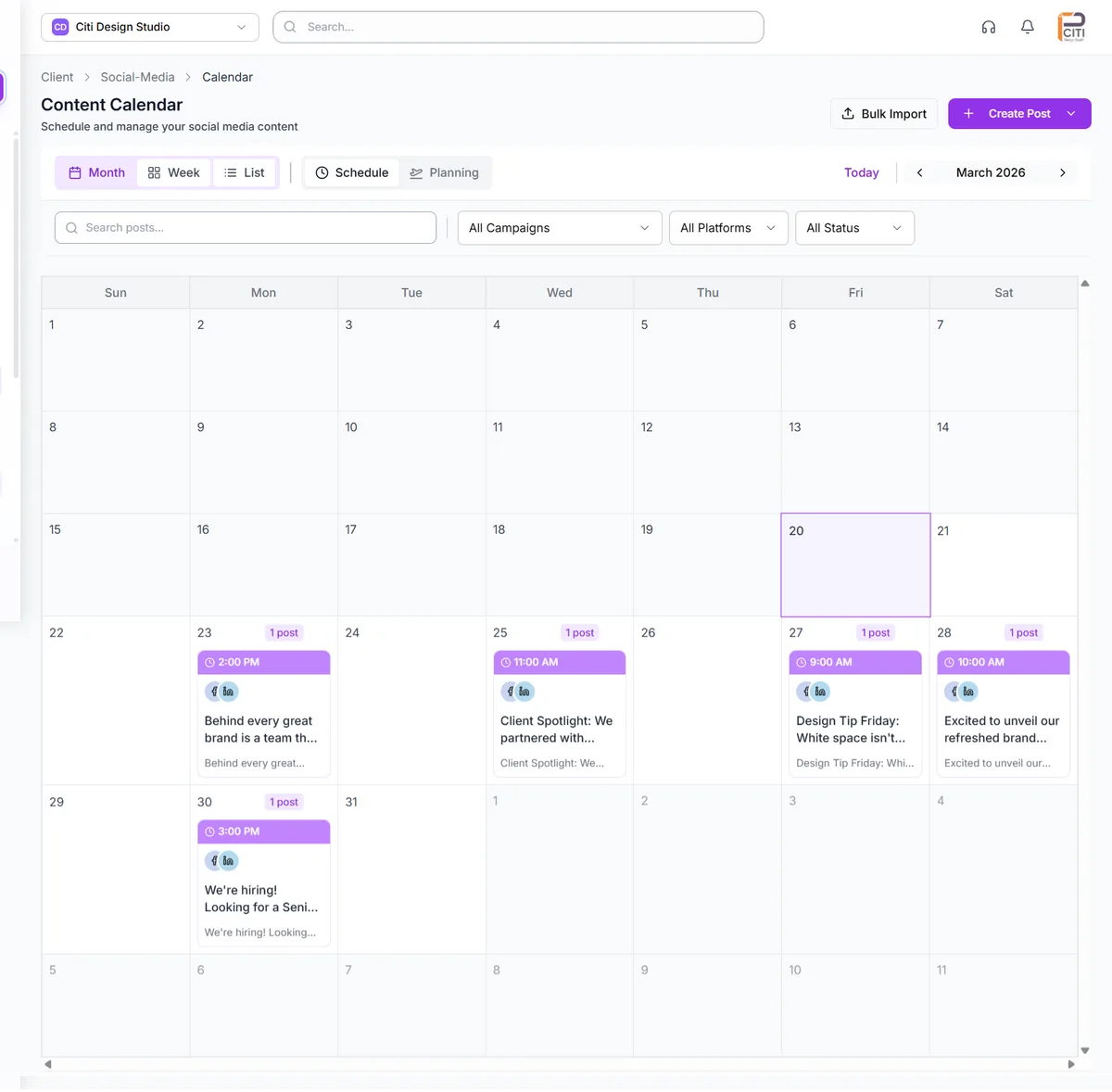
See all your social campaigns across every client and platform in one visual calendar. View scheduled posts, campaign timelines, and your content pipeline at a glance. Plan product launches, seasonal campaigns, and always-on content without overlap. Drag-and-drop scheduling makes adjustments instant.
- Visual campaign calendar
- Multi-platform view
- Multi-client visibility
- Drag-and-drop scheduling
Content Creation Workflows
Manage social content creation from brief to publish with structured workflows. Track copy development, creative production, and final assets in one place. Writers and designers collaborate in a coordinated system. Version control ensures everyone works from the latest approved content.
- Content workflows
- Version tracking
- Team collaboration
- Asset management
Social Approval System
Get social content approved without email chaos. Posts route through defined approval stages automatically. Clients review directly in the platform with visual markup tools. Track approval status across all content, collect feedback efficiently, and maintain audit trails for everything.
- Multi-stage approvals
- Client review portal
- Visual markup
- Audit trails
Cross-Platform Publishing
Schedule and publish across Facebook, Instagram, LinkedIn, Twitter/X, TikTok, and Pinterest from one platform. Multi-platform posting means you never log into each native tool again. Queue content, set optimal posting times, and publish consistently across channels.
- Multi-platform scheduling
- Optimal timing
- Queue management
- Consistent publishing
Social Campaign Analytics
Track campaign performance with unified analytics that pull data from all platforms. See engagement, reach, impressions, and conversions together in one view. Compare performance across campaigns, platforms, and clients. See what's working without logging into 6 different analytics dashboards.
- Cross-platform analytics
- Campaign comparison
- Engagement tracking
- Performance trends
Automated Social Reporting
Generate professional campaign reports automatically. Beautiful, branded reports pull metrics from all connected platforms with zero manual work. Customize templates, schedule recurring delivery, and white-label everything for client presentation. Turn social reporting from hours to minutes.
- Auto-generated reports
- Multi-platform data
- White-label branding
- Scheduled delivery
How Social Media Campaign Management Software Works
From social chaos to streamlined campaign execution
Connect Your Social Accounts
Link all client social accounts to CampaignSwift. Facebook, Instagram, LinkedIn, Twitter/X, TikTok, Pinterest. Connect once and manage forever. Secure OAuth connections keep credentials safe while enabling full platform functionality.
Set Up Campaign Workflows
Configure workflows that match how your team creates social content. Define stages from ideation through publishing, set approval requirements, and establish team responsibilities. The platform adapts to your process, not the other way around.
Plan and Create Social Campaigns
Use the visual calendar to plan your social schedule across all clients. Create content with structured briefs, manage creative assets, and collaborate in one place. Everything from ideation to publishing happens in a single system.
Approve, Publish, and Analyze
Route content through client approvals, publish across platforms, and track performance with unified analytics. CampaignSwift handles the coordination so you can focus on creating content that drives engagement.
Social Media Campaign Management Scenarios
Illustrative scenarios of how social media teams transform their operations
Social Media Agency
Managing social media campaigns for 40 clientsEach account manager had their own way of tracking social campaigns. Content lived in different folders, approvals happened via email, and reporting took days. Nothing was standardized. Pure chaos.
Unified platform for all clients. Standard workflows with client-specific customization. In-platform approvals with audit trails. Reports generate automatically.
Brand Marketing Team
Running social media campaigns across 5 brandsNo visibility into what was posting across brands. Managing campaigns meant constant status meetings. Content accidentally competed for attention. Leadership couldn't see the full picture of social activity.
Central calendar shows all brand social activity. Coordinated scheduling prevents overlap. Leadership has real-time visibility into every campaign. Strategic planning replaces reactive coordination.
E-commerce Social Team
Fast-paced social media campaigns for product launchesSocial content moved too slowly through approvals. By the time campaigns launched, the product moment had passed. The approval process was the bottleneck on revenue opportunities. Reactive instead of strategic.
Streamlined multi-step approval workflows with auto-advance. Content approved in hours, not days. Rapid deployment for flash sales and trending moments.
What We Have Learned Running Social Campaigns Across Dozens of Client Accounts
When you are managing social media for three or four clients, scheduling posts and tracking results per account is manageable. Most agencies hit a wall somewhere around ten to fifteen clients. That is the point where the same approach that worked before starts producing missed posts, mixed-up assets, and campaigns that feel rushed rather than strategic. The issue is rarely about effort. It is about the system underneath.
After working with agencies at this inflection point, we have seen a pattern in what separates teams that scale smoothly from those that burn out. It comes down to building campaigns in layers rather than treating every post as an isolated task, a pattern we cover in our piece on how growing agencies scale without burnout. Pair it with campaign orchestration and proper multi-client management and the layered approach becomes operational.
The 4-Layer Campaign Stack
- Strategy layer. This is the quarterly planning cadence where you align each client's social goals with their business objectives. Most agencies skip this and jump straight to content creation, which is why campaigns feel scattered. Even a 30-minute quarterly planning session per client transforms the quality of everything downstream.
- Calendar layer. Weekly content visibility across all clients in one view. Not per-client calendars in different tools, but a single view where your team can spot gaps, conflicts, and opportunities. When a trending moment hits, you need to know instantly which clients it applies to and which already have content scheduled.
- Execution layer. This is where approval workflows matter most. The difference between a campaign that launches on time and one that stalls for three days is usually a bottleneck in client approvals. Structured workflows with clear deadlines and one-click approvals eliminate the back-and-forth that kills momentum.
- Measurement layer. Reporting that ties back to the strategy goals you set in layer one. If you planned for brand awareness, report on reach and impressions. If you planned for engagement, report on conversation metrics. This closes the loop and makes the next quarter's planning smarter.
A common mistake we see: Agencies try to fix execution-layer problems like missed posts and wrong-account publishing with more checklists. But the real issue is usually upstream in the strategy layer. When campaigns lack clear objectives from the start, no amount of process at the execution level will make them feel organized.
The shift from managing individual posts to managing layered campaigns is what separates agencies that plateau at fifteen clients from those that grow past fifty. If you are currently using a scheduling-only tool (Hootsuite, or a visual planner like Later) and wondering what changes with a campaign management approach, our Hootsuite comparison breaks down the differences, or browse the full set of social media tool alternatives to see how every major platform stacks up for agency work. And for the broader picture of managing campaigns beyond social, take a look at campaign management software for a platform-level view.
Social Media Campaign Management Software FAQs
Everything you need to know about social media campaign management software
Social media campaign management software is a platform that helps marketing teams and agencies plan, create, approve, schedule, and analyze campaigns across multiple platforms. It provides marketing calendar software, workflow management, approval systems, cross-platform scheduling, and unified analytics. A good solution replaces the chaos of managing campaigns through native platform tools and disconnected systems with a unified operational layer.
CampaignSwift supports all major social platforms including Facebook, Instagram, LinkedIn, Twitter/X, TikTok, YouTube, and Pinterest. You can plan content, schedule posts, and track analytics across all platforms from one unified dashboard. Integrations pull data automatically so you have complete visibility into cross-platform campaign performance.
Scheduling tools focus primarily on queuing and publishing posts. Our platform is a complete operational solution that includes campaign planning, content workflows, team collaboration, client approval systems, asset management, and comprehensive reporting, in addition to scheduling. It handles the full lifecycle of social campaigns, not just the posting step.
Yes! Client approval portals are a core feature of CampaignSwift. Clients review scheduled content directly in the platform, leave feedback with visual markup tools, and approve or request revisions without email chaos. You control exactly what clients see, and all approvals are documented with complete audit trails.
The campaign calendar provides visibility into all scheduled content across all clients and platforms. See what's posting and when at a glance. Coordinate campaign launches, prevent content overlap, and plan your content pipeline strategically. It transforms your workflow from reactive posting to proactive planning.
Absolutely! CampaignSwift is built specifically for agencies managing social media for multiple clients. You get separate workspaces for each client, unified visibility across all social activity, standardized workflows with client-specific customization, and white-labeled reporting. Scale from 5 to 100+ clients on the same platform.
Yes, comprehensive analytics and reporting are essential features. Our platform pulls data from all connected social accounts to provide unified dashboards showing engagement, reach, impressions, and conversions. Compare performance across campaigns, platforms, and clients. Generate automated reports that combine data from every platform into beautiful, branded presentations.
The platform delivers ROI through time savings (teams report 15-25 hours saved weekly on coordination, approvals, and reporting), increased capacity (manage 50-100% more accounts with the same team), and faster execution (campaigns launch 50-75% faster with streamlined approvals). Most agencies see positive ROI within the first month through efficiency gains alone.
Still have questions?
Our team is here to help. Book a 15-minute call to get all your questions answered.
Ready to put the busywork on agents?
Start with one client. Connect accounts, send your first approval link, and let the agents take the follow-ups. Plans start at $29/mo.
30-day free trial · No credit card · Cancel anytime
Questions? Book a 15-min demo call
Schedule Demo