Social media approval tool.
Built for agencies.
Internal team reviews. Client approval via link — no login required. Approved content auto-publishes. Every action tracked with full revision history.
30-day free trial · No credit card · No app for clients to install
How the Social Media Post Approval Tool Works
Six steps. One platform. Zero WhatsApp threads.
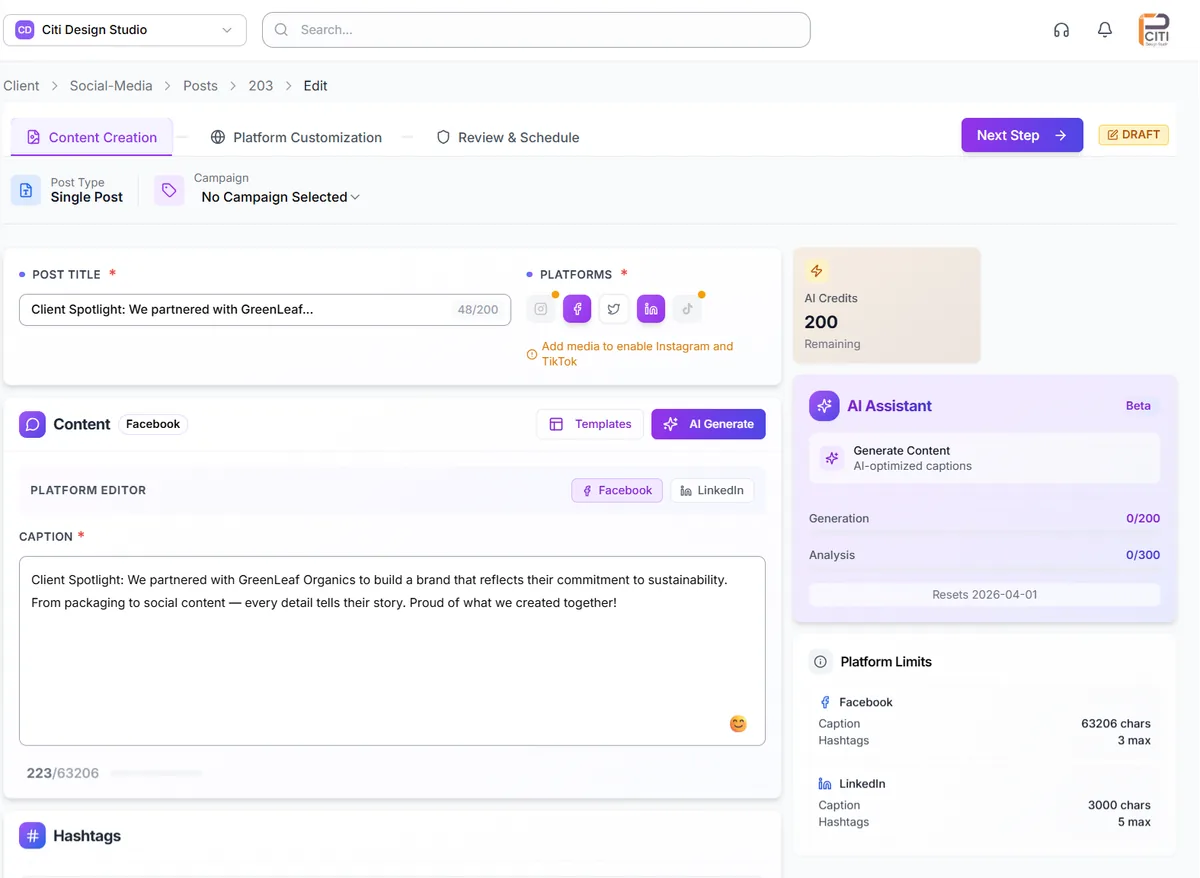
Create content for any platform
Multi-platform editor with live preview. Generate captions with AI. Pull media from Drive, Dropbox, or Canva. Every post is ready before it enters review.
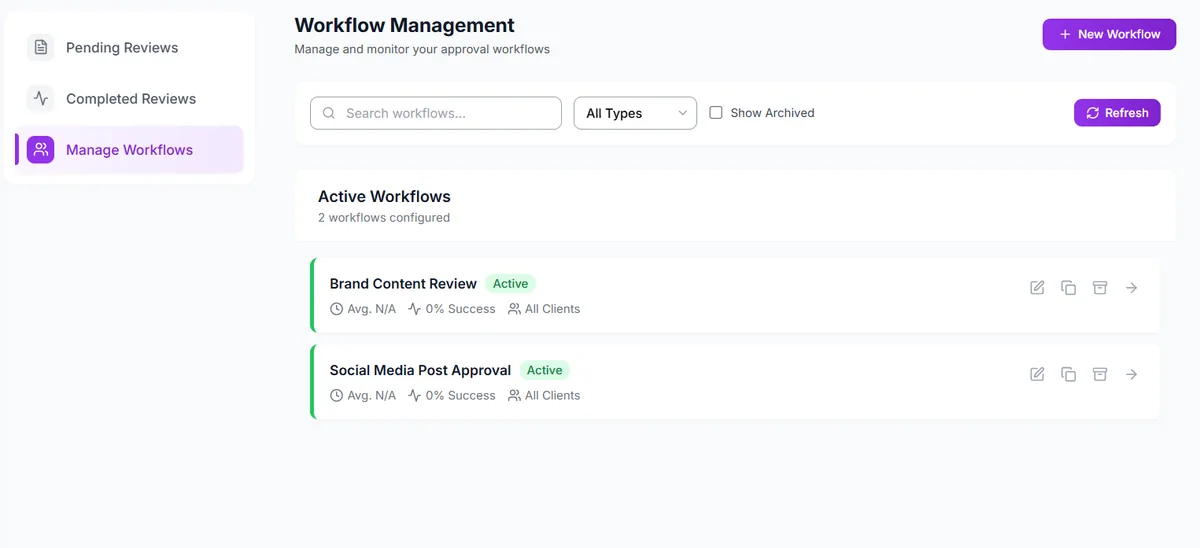
Submit for internal team review
Choose a workflow — Brand Content Review, Social Media Post Approval, or your own custom flow. Multi-step review chains. Comment threads on each item. Your team catches issues before the client sees them.
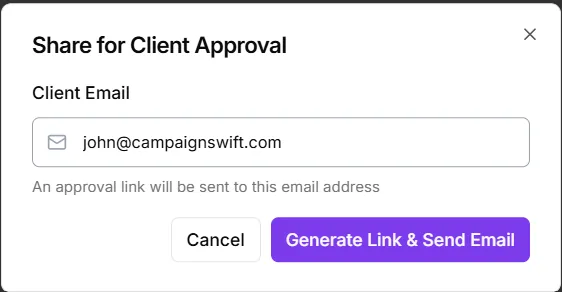
Send to client via a link
Generate a token-based review link. Email it to your client. They click — no signup, no password, no installs. They review, approve, request changes, or reject. Every action is timestamped and tracked.
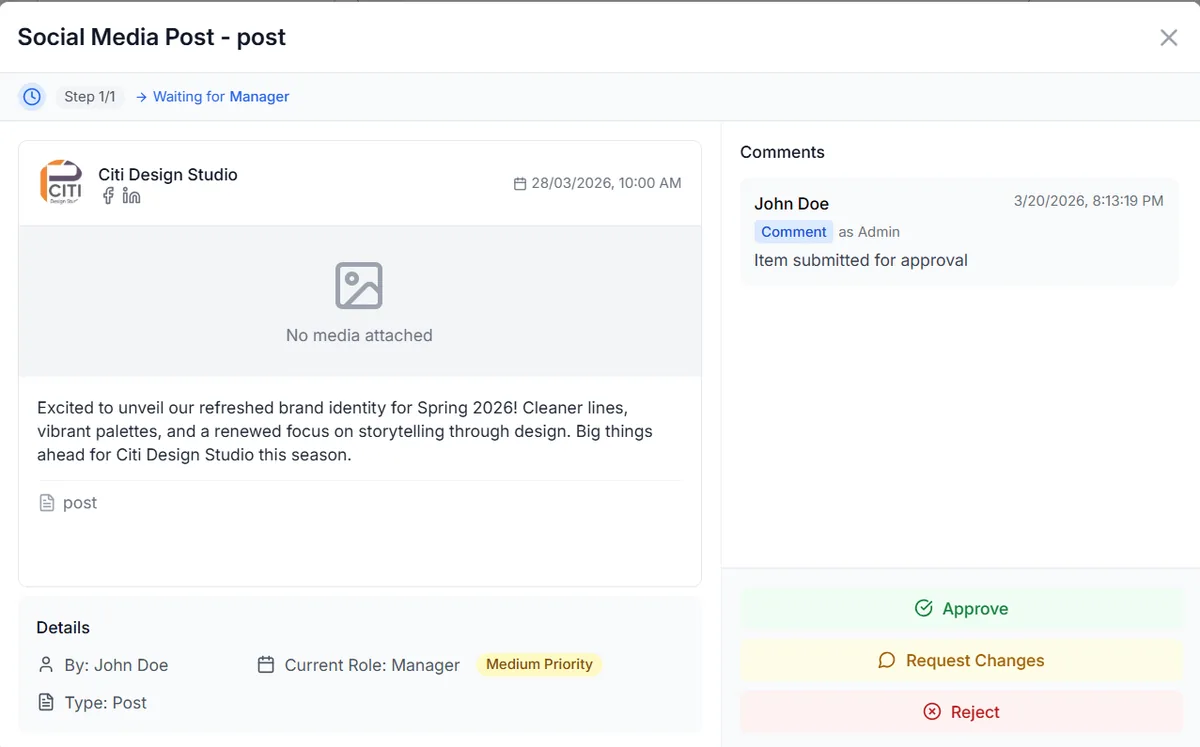
Client reviews and responds
Clients see the post exactly as it will appear. They can approve, request changes with specific comments, or reject. No back-and-forth in email. No "which version?" confusion. Full revision history in one place.
Approved content auto-publishes
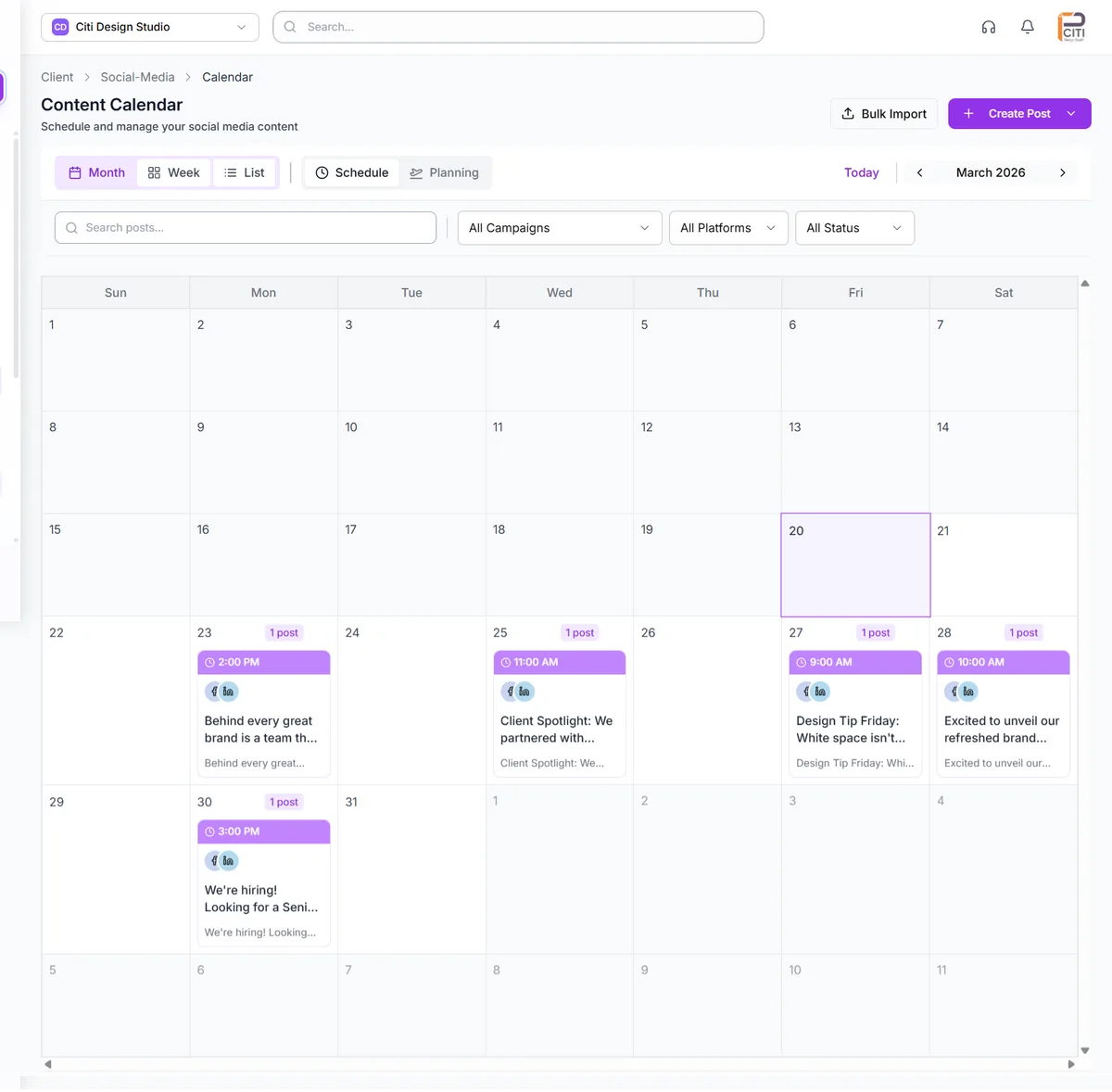
Once approved, content schedules and publishes automatically. Calendar shows approval status on every card — draft, pending, approved, live. You never re-check what needs to ship next.
Track performance of approved content
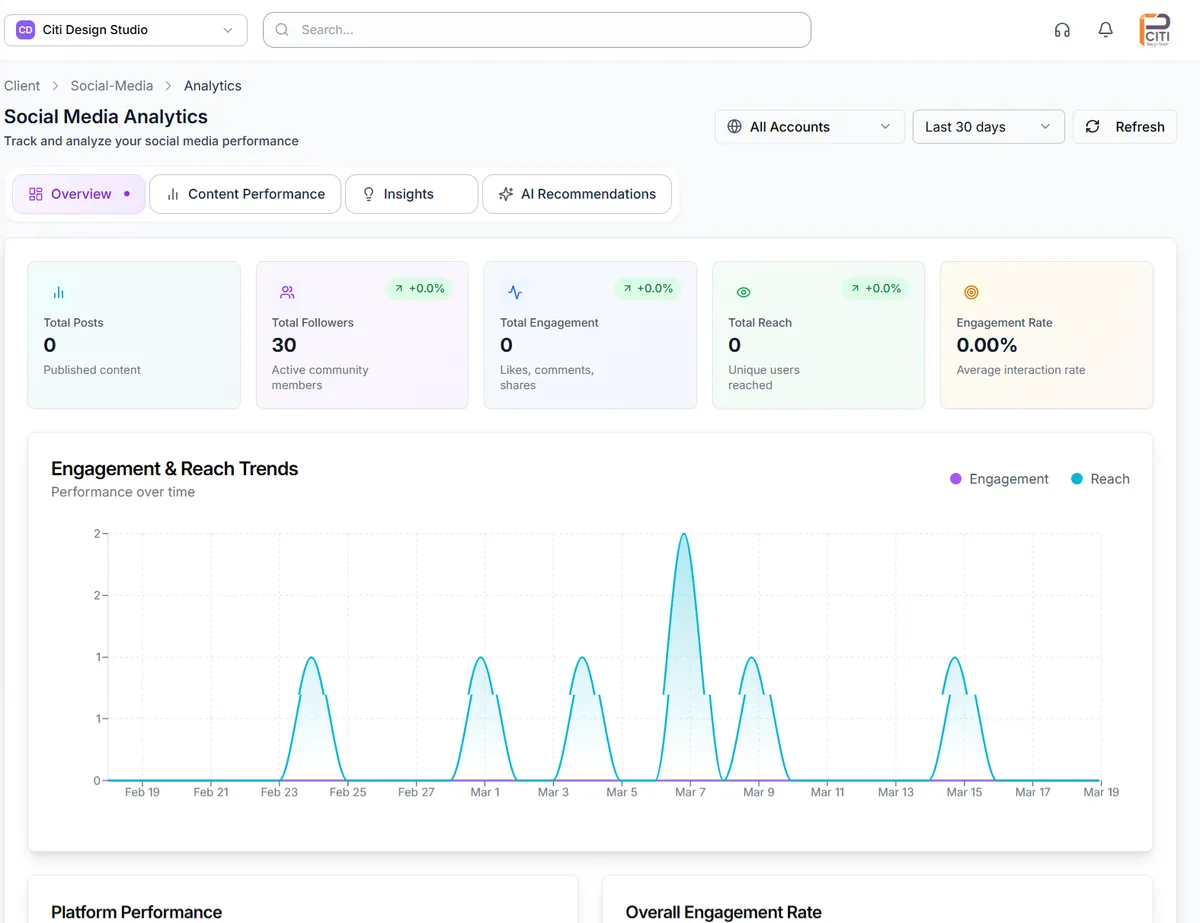
See which approved posts drove engagement. Compare across clients, platforms, and campaigns. Generate reports your clients actually read.
What your client sees
Clean, simple, no login required. They click the link and they are in.
One link. Three actions.
Approve. Request changes. Reject. Plus a comment field. That is it. No accounts. No apps. No friction.
- Mobile-friendly — clients review on their phone between meetings
- No login required — token-based access via email link
- See the content exactly as it will look published
- Comment with specific feedback
- Agency gets notified instantly when client takes action
Build the workflow your agency actually uses
Every agency has different review needs. Configure approvals to match yours.
Brand Content Review
- Content creator drafts post
- Brand strategist reviews
- Account manager approves
- Sent to client for final approval
Social Media Post Approval
- Content scheduled by team
- Account manager checks copy & visuals
- Sent to client via approval link
- Auto-publishes on approved date
Campaign Launch Review
- Campaign content drafted
- Compliance review (if needed)
- Creative director sign-off
- Multi-stakeholder client approval
Add as many review steps as you need. Assign specific reviewers per step. Lock content from publishing until every step is complete. Each client workspace has its own approval flow — changes to one client's workflow never affect another.
From approval chaos to one clean workflow
Before CampaignSwift
- WhatsApp voice notes from clients
- Email threads with reply-all chaos
- "Which version is this?" confusion
- Spreadsheets tracking who approved what
- Missed deadlines from approval delays
- Lost feedback in five different inboxes
- Three weeks of work, one email thread
With CampaignSwift
- One dashboard for every approval
- Token-based client links — no login
- Full revision history on every post
- Status badges on every calendar card
- Auto-publish the moment approval lands
- Comments tied to specific content
- Six weeks of work, six confident approvals
Approval features compared
How CampaignSwift's approval workflow stacks up against the major scheduling tools.
| Feature | CampaignSwift | Hootsuite | Buffer | Sprout Social |
|---|---|---|---|---|
| Internal team review | ✓ Multi-step | Basic | ✗ | Basic |
| Client approval (no login) | ✓ Token link | ✗ | ✗ | ✗ |
| Custom approval workflows | ✓ Unlimited | ✗ | ✗ | Limited |
| Auto-publish on approval | ✓ | ✗ | ✗ | ✗ |
| Full revision history | ✓ | Limited | ✗ | ✓ |
| Comment threads on content | ✓ | ✓ | ✗ | ✓ |
Comparison reflects publicly listed features at the time of writing. Verify on each provider's site.
The Social Media Approval Process, Step by Step
How agencies set up and run a reliable social media approval process using CampaignSwift.
A structured social media approval process keeps your team aligned and your clients confident. Here is how it works in practice.
1. Define your review stages. Decide who needs to sign off and in what order. A typical flow: content creator drafts the post, an account manager reviews copy and visuals, then the client gives final approval. Some agencies add compliance or brand review between internal and client stages.
2. Create content and submit for review. Your team builds posts in the editor with live previews for each social platform. When a post is ready, they submit it into the approval workflow. The right reviewer gets notified automatically.
3. Internal team collaboration and review. Reviewers leave comments directly on the content — not in a separate email thread. Multiple team members can collaborate on feedback, suggest edits, and mark items as ready for the next stage. Everything stays in context, in one place.
4. Client approval via link. When internal review is complete, the client receives a shareable link. They review the social media post exactly as it will appear, then approve, request changes, or reject. No login required. No app to install.
5. Auto-publish on approval. Once the client approves, the social media post publishes automatically at the scheduled time. No manual intervention needed. Your calendar updates in real time so the whole team sees what is live and what is still pending.
This social media post approval software eliminates the back-and-forth that buries feedback in email threads and WhatsApp messages. Every action is timestamped, every version is saved, and every approval is documented.
Whether you manage 5 clients or 50, a consistent approval process protects your team from publishing mistakes and gives your clients the transparency they expect.
Team Collaboration and Approval Workflows in One Tool
Stop splitting collaboration and approvals across separate apps. CampaignSwift handles both.
Most agencies run team collaboration in one tool and approvals in another — Slack for discussion, email for sign-off, spreadsheets for tracking. That fragmentation creates gaps where feedback gets lost and deadlines slip.
CampaignSwift combines team collaboration and approval workflows in a single platform. Your team discusses, reviews, and approves content in the same place where it was created. Comments are attached to specific posts. Approval status is visible on every calendar card. Nothing lives in a silo.
For agencies looking for the best social media tools for team collaboration and approval workflows, this integration is what makes the difference. You do not need a project management tool, a messaging app, and an approval platform. You need one tool that connects the conversation to the content to the calendar.
See pricing or book a demo to see how collaboration and approvals work together.
Client Feedback and Approvals in One Place
Collect feedback, manage revisions, and build a library of approved social media materials — without email.
The best social media approval tool does two things well: it makes it effortless for clients to respond, and it keeps every response organized for your team. Most agencies discover this only after a year of trying to run reviews through email and Slack — by then, missed approvals and version control gaps have already cost them at least one client relationship.
CampaignSwift's client-facing approval dashboard shows clients exactly what needs their attention. They see content previews, leave specific feedback with annotations, and approve or request changes — all from a clean interface that requires no login. Your team sees every response in real time, attached to the content it belongs to. The full audit trail records who reviewed what and when, which matters when a client asks to see history six months later.
As content gets approved, it automatically moves into your approved content library. Every approved social media post, image, and caption is stored with its full approval history — who approved it, when, and any revision notes. This gives your team a searchable library of approved social media materials they can reference for future campaigns. Combined with proper version control, your team always works from the latest approved version, never accidentally publishes an outdated draft.
For agencies that need the fastest content approval process, CampaignSwift eliminates the delays that come from email-based reviews. Automated reminders nudge clients who have not responded. Status dashboards show your team which approvals are pending across all clients. The average approval turnaround drops from days to hours. This is the difference between a generic project management tool and a purpose-built social media approval tool — the workflow understands that approving a social media post is fundamentally different from approving a quarterly report.
Questions about approval workflow
Common questions agencies ask before switching their approval process.
Can clients approve content without logging in?
Yes. Clients get a token-based review link via email. They click once, review the content, and approve, reject, or request changes. No account, no password, no app to install. Every action is tracked with timestamps and full revision history.
How does the multi-level approval workflow work?
Content flows through defined review steps: creator drafts → internal team reviews → client approves via link → approved content auto-publishes on the calendar. You configure who reviews at each step and whether approval is required to move forward. Nothing publishes until every step is complete.
Can I customize the approval steps for different clients?
Yes. Create named workflows like "Brand Content Review," "Social Media Post Approval," or "Campaign Launch Review." Each workflow has its own review chain and rules. Assign different workflows to different clients or content types based on what each relationship needs.
What happens after content is approved?
Approved content schedules and publishes automatically at the planned date and time. The calendar updates its status from "pending" to "approved" to "live." You do not need to re-check anything — once the client clicks approve, the rest happens on its own.
How do I track approval status across multiple clients?
The approval dashboard shows every piece of content across every client with its current status — draft, pending team review, pending client approval, approved, or live. Filter by client, workflow, or status. No spreadsheets, no WhatsApp threads, no "did the client see it yet?" questions.
Explore More Approval Solutions
Social Media Approval Workflow
Multi-stage content review with one-click client sign-off, automated reminders, and version history.
Creative Approval Software
Visual review and annotations for images, videos, and designs. Built for creative teams and agencies.
Client Portal
White-label portals where clients review content, approve posts, and access reports.
Agency Approval Workflows Guide
How structured agency approval workflows cut revision cycles from 5 to 2. Step-by-step playbook.
Ready to close those 12 browser tabs?
Set up your agency in 48 hours. Import your clients, connect your social accounts, and run your first campaign the same day.
Questions? Book a 15-min demo call
Schedule Demo"Approvals used to take three days. Now they take three minutes."