Social Media Report Examples Real Dashboards & Insights
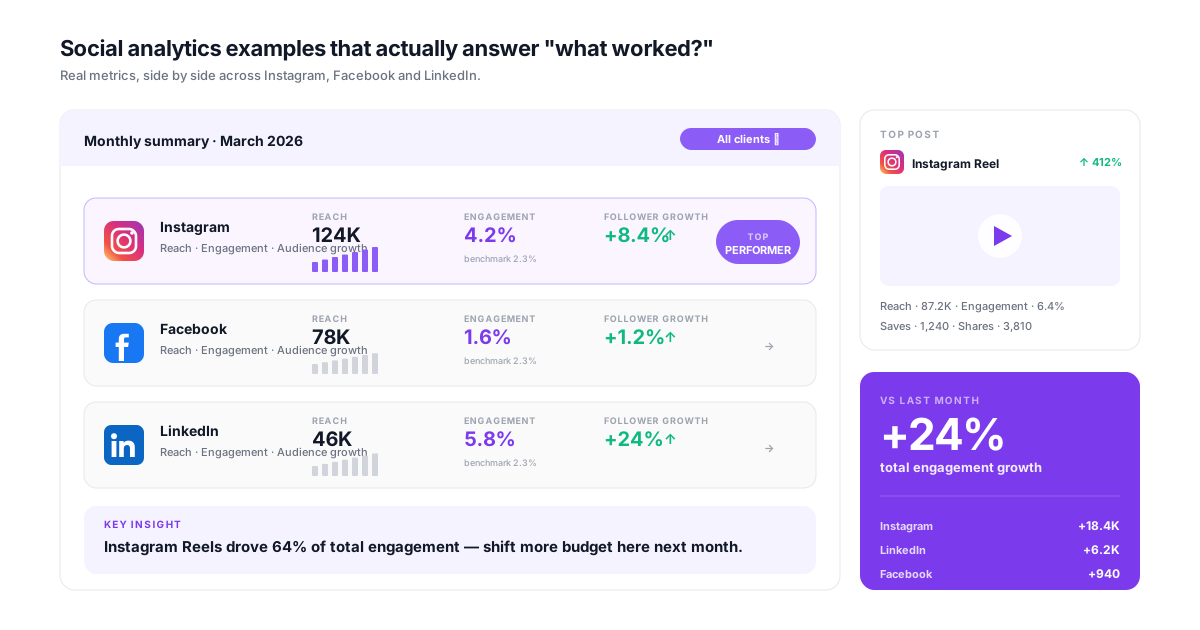
Reporting is easier to learn from the finished article than from a list of metrics. This guide collects real social media report examples, the dashboards and commentary that went with them, and the frameworks behind each one, so you can see what a good report looks like before building your own.

Why Social Media Analytics Examples Matter
Learning from real-world applications
Theory vs. Reality Gap
01Most analytics guides explain what metrics mean but not how to use them. Real examples bridge the gap between understanding engagement rate in theory and knowing what a good engagement report actually looks like.
Report Structure Confusion
02Without seeing actual reports, teams reinvent the wheel every time. Examples provide templates and structures that can be adapted to your specific needs, saving hours of trial and error.
Insight Extraction Difficulty
03Data is easy to collect; insights are hard to extract. Seeing how others turn raw numbers into actionable recommendations helps develop your own analytical thinking skills.
Stakeholder Communication
04Knowing what to analyze is different from knowing how to present it. Examples show how to structure reports for executives, clients, or team members who need different levels of detail.
Social Media Analytics Examples by Type
Real reports and insights you can learn from
Monthly Performance Reports
See how top marketers structure monthly social media reports. Examples include executive summaries, KPI dashboards, platform breakdowns, content performance analysis, and strategic recommendations. Learn what to include and what to leave out.
- Executive summary
- KPI dashboard
- Platform breakdown
- Recommendations
Campaign Analytics Examples
Real examples of campaign performance reports, from launch metrics through completion analysis. See how to set campaign KPIs, track progress, measure success, and document learnings for future campaigns. For sentiment specifically, see our playbook on how to track social media sentiment for campaigns.
- Campaign setup
- Progress tracking
- Success measurement
- Post-campaign analysis
Competitive Analysis Reports
Examples of competitor benchmarking reports. See how to structure share of voice analysis, content strategy comparisons, engagement benchmarks, and competitive positioning insights.
- Share of voice
- Content comparison
- Engagement benchmarks
- Positioning insights
Content Performance Analysis
Deep-dive examples analyzing what content works and why. See how to categorize content types, identify top performers, analyze patterns, and build data-driven content strategies.
- Content categorization
- Pattern identification
- Performance ranking
- Strategy insights
ROI and Attribution Reports
Examples showing how to connect social media to business results. See revenue attribution models, lead tracking reports, and ROI calculations that justify social media investment.
- Revenue attribution
- Lead tracking
- ROI calculation
- Investment justification
Client Reporting Examples
Agency-specific examples of client-facing reports. See how to balance detail with clarity, present wins honestly, address underperformance constructively, and maintain client confidence.
- Client-friendly format
- Win presentation
- Issue addressing
- Confidence building
Framework: How to Analyze Like These Examples
Apply these principles to your own analytics
Start With the Question
Every good analysis answers a specific question. Not 'how did we perform?' but 'did our Instagram strategy increase website traffic?' or 'which content types drive the most engagement?' The question shapes everything else.
Gather Relevant Data
Pull only data that helps answer your question. Don't dump every metric into a report. If you're analyzing content performance, you need post-level data. If you're reporting ROI, you need conversion data. Match data to purpose.
Identify Patterns and Outliers
Look for trends (consistent patterns over time), anomalies (unexpected spikes or drops), and correlations (relationships between metrics). The interesting insights are usually in the patterns, not the raw numbers.
Translate to Action
Every insight should suggest an action. 'Video performs 2x better than images' becomes 'Increase video content from 20% to 50% of posts.' Without actionable recommendations, analysis is just documentation.
Social media report examples in action
Illustrative scenarios showing how analytics insights drive decisions
E-commerce Brand: Content Pivot
Using analytics to shift content strategyE-commerce brand posting product photos daily. Decent engagement but flat sales from social. No clear data on what content actually drove purchases.
Analyzed 6 months of post data against website conversions. Discovered user-generated content and behind-the-scenes posts drove 4x more traffic than product photos. Educational content had highest conversion rate.
B2B Company: Platform Reallocation
Using cross-platform analytics for resource decisionsB2B company spreading effort equally across Twitter, LinkedIn, Instagram, and Facebook. Team stretched thin. No data-driven prioritization.
Built cross-platform comparison report. LinkedIn drove 70% of quality leads despite getting only 25% of effort. Instagram engagement was high but led nowhere. Facebook was dead for their audience.
Agency Client Reporting
Using examples to improve client communicationAgency sending clients data dumps with every metric. Clients confused. Constant questions. Difficulty demonstrating value.
Restructured reports using the examples here: executive summary first, KPIs tied to client goals, clear wins highlighted, honest assessment of challenges, specific recommendations.
Example: Monthly Report Structure
Executive Summary Format
Start every report with a 3-4 sentence summary. Example: "Social media engagement increased 23% this month, driven by our new video content strategy. Instagram reached 50K followers (milestone achieved). Website traffic from social grew 15%. Recommend increasing video budget and expanding to TikTok."
Sample Monthly Report Sections
| Section | Purpose | Typical Length |
|---|---|---|
| Executive Summary | Key findings at a glance | 3-4 sentences |
| KPI Dashboard | Progress toward goals | 1 page visual |
| Platform Breakdown | Performance by channel | 1/2 page per platform |
| Top Content | Best performing posts | 5-10 posts with metrics |
| Insights | What the data means | 3-5 key findings |
| Recommendations | What to do next | 3-5 action items |
Example Insight: Content Analysis
Finding:
"Carousel posts averaged 4.2% engagement vs. 1.8% for single images. Educational carousels outperformed promotional carousels 2:1."
Recommendation:
"Increase carousel content from 20% to 40% of posts. Focus carousels on educational content. Test educational angles for product content."
Key Patterns From Our Examples
- Lead with insight, not data: "Engagement doubled" not "Engagement went from 2% to 4%"
- Always include context: Compare to last month, last year, or industry benchmarks
- Explain the 'why': Don't just report what happened. Hypothesize why
- Make it visual: Charts > tables > walls of text
- End with next steps: Every report should drive action
Get These Reports Automatically
CampaignSwift generates reports like these automatically through agency reporting with full white-label customization. Connect your accounts, customize your templates, and get professional analytics reports delivered on schedule, with no manual data gathering required. We also break down what to look for in our roundup of the best social media analytics tools for agencies, and our piece on Instagram vs Facebook analytics covers cross-platform reporting in depth. For multi-client work, pair this with multi-client analytics built for portfolio thinking.
Social Media Analytics Examples: FAQs
Common questions about analytics examples
That it shows the reasoning, not just the numbers. Plenty of templates look impressive and say nothing: twelve charts, no argument. A social media report example worth copying makes it obvious what changed, why it changed, and what the next month does differently as a result. If you can delete every chart and the summary still tells the client something useful, the structure is sound.
Essential sections: Executive summary (key findings, 2-3 sentences), KPI overview (progress toward goals), platform performance (breakdown by channel), content analysis (top/bottom performers), insights (what the data means), recommendations (what to do next). Length depends on audience: executives want brevity, teams want detail.
Lead with business outcomes, not vanity metrics. Instead of 'we got 10,000 impressions,' say 'social media drove 500 website visits and 50 leads.' Use visuals over tables. Keep it brief (1-2 pages max). Focus on ROI, trends, and strategic recommendations. Save the detailed data for appendices.
Depends on goals. Awareness: reach, impressions, follower growth, share of voice. Engagement: engagement rate, comments, shares, saves. Traffic: click-through rate, website sessions. Conversion: leads generated, conversions, revenue attributed. Pick 3-5 KPIs max that directly measure goal progress.
Categorize posts by type (video, image, carousel, text), topic, or campaign. Calculate average performance metrics for each category. Identify outliers (highest and lowest performers). Look for patterns: What do top performers have in common? What distinguishes failures? Use findings to guide future content.
Varies significantly by platform and industry. General benchmarks: Instagram 1-3% is typical, 3-6% is good, 6%+ is excellent. Twitter 0.5-1% is typical. LinkedIn 2-4% is good for company pages. Facebook 0.5-1% is typical. But comparing to your own historical performance matters more than industry benchmarks.
Track costs (ad spend, tool subscriptions, time invested) and returns (revenue from social traffic, lead value, conversion value). Use UTM parameters to attribute website conversions to social. Calculate: ROI = (Returns - Costs) / Costs x 100%. For non-revenue goals, measure cost per result (cost per lead, cost per signup). If you're trying to keep tool costs low while still tracking the basics, our list of free analytics tools covers options that don't add to the cost side of the equation.
Common cadences: Weekly quick reports for active campaigns or high-volume accounts (key metrics only). Monthly comprehensive reports for ongoing performance tracking. Quarterly deep-dives for strategy assessment and planning. Campaign-specific reports at campaign end. Match frequency to decision-making needs.
For every data point, ask 'so what?' If engagement is up 20%, why? What content caused it? Should you do more of that? Every insight should suggest an action: 'Video outperforms images 2:1' becomes 'Double video content in Q2.' Data without action recommendations is just documentation.
Still have questions?
Our team is here to help. Book a 15-minute call to get all your questions answered.
Ready to put the busywork on agents?
Start with one client. Connect accounts, send your first approval link, and let the agents take the follow-ups. Plans start at $29/mo.
30-day free trial · No credit card · Cancel anytime
Questions? Book a 15-min demo call
Schedule Demo